
• Skip to main content
  • Skip to primary sidebar
  • Deals
  • Features
  • Guides
  • Chromebooks
  • Videos
  • Podcast
  • More +
    • Reviews
    • Unboxing
    • Upcoming Devices
    • Chromebook Plus
    • Chrome
    • ChromeOS
    • Chrome OS Flex
  • Search
  • Sign Up
  • Log In
Chrome Unboxed – The Latest Chrome OS News

Chrome Unboxed - The Latest Chrome OS News

A Space for All Things Chrome, Google, and More!

  • Deals
  • Features
  • Guides
  • Chromebooks
  • Videos
  • Podcast
  • More +
    • Reviews
    • Unboxing
    • Upcoming Devices
    • Chromebook Plus
    • Chrome
    • ChromeOS
    • Chrome OS Flex
  • Search
  • Sign Up
  • Log In

Chrome 95 lets you save tab groups, improves security payments, and more

October 21, 2021 By Michael Perrigo View Comments

Support our independent tech coverage. Chrome Unboxed is written by real people, for real people—not search algorithms. Join Chrome Unboxed Plus for just $2 a month to get an ad-free experience, access to our private Discord, and more. Learn more about membership here.
START FREE TRIAL (MONTHLY)START FREE TRIAL (ANNUAL)

Chrome 94 introduced the official Sharing Hub, HTTPS-First Mode, a “What’s New” page so you can see new features and details the moment they’re available, a Settings page redesign, and more. Now, we’re seeing Chrome 95 begin its rollout, and with it, the ability to save tab groups for later, improvements to security payments, some other developer feature changes. Let’s take a look at what you’ll see that’s different after you update!

Improved Security Payments

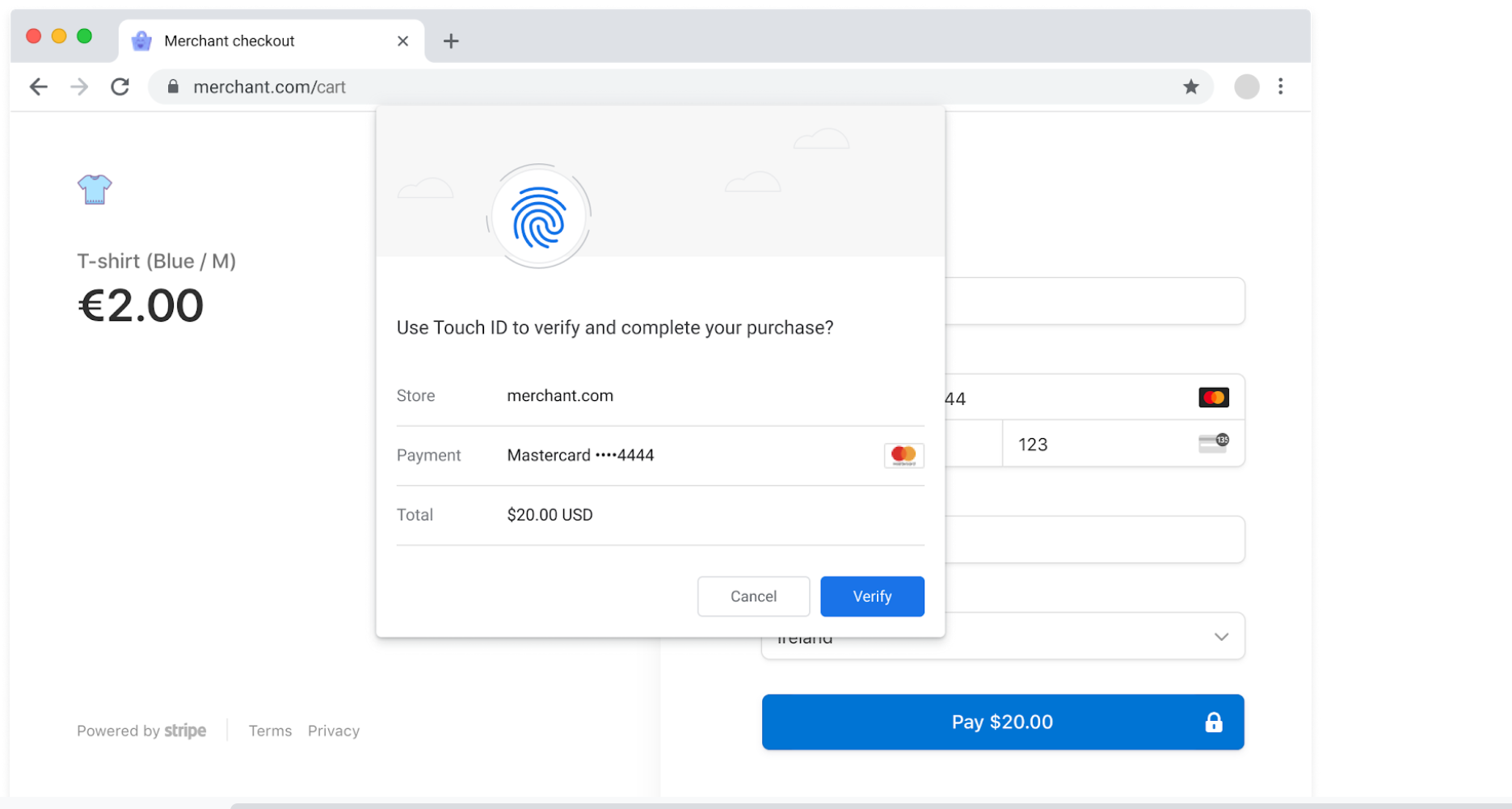
In an effort to streamline web payments and to make them more secure by default, the developers have introduced a new WebAuthn extension that will let banks and other payment authorizers to approve or deny requests made as you checkout via online merchants. By placing more power in the hands of the source where your money is being taken from in order to complete the transactions – the banks – greater security can eventually become the foundation for future eCommerce efforts in Chrome.
Xremove ads
Github

Set Web Apps as Defaults

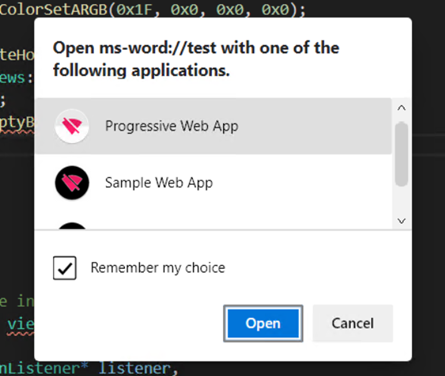
Chrome will now allow web applications to be used as URL handlers, which means that any PWA can be set as the default for specific types of links or files! Now that this is baked directly into Chrome, it will require no extra work on behalf of third-party developers like it used to. Below, you can see an example of this. It looks just like when you must select an app on your Android phone or Windows computer to open a file or link with, only now, it’s built right into the web!
Microsoft via Google Docs

Save tab groups

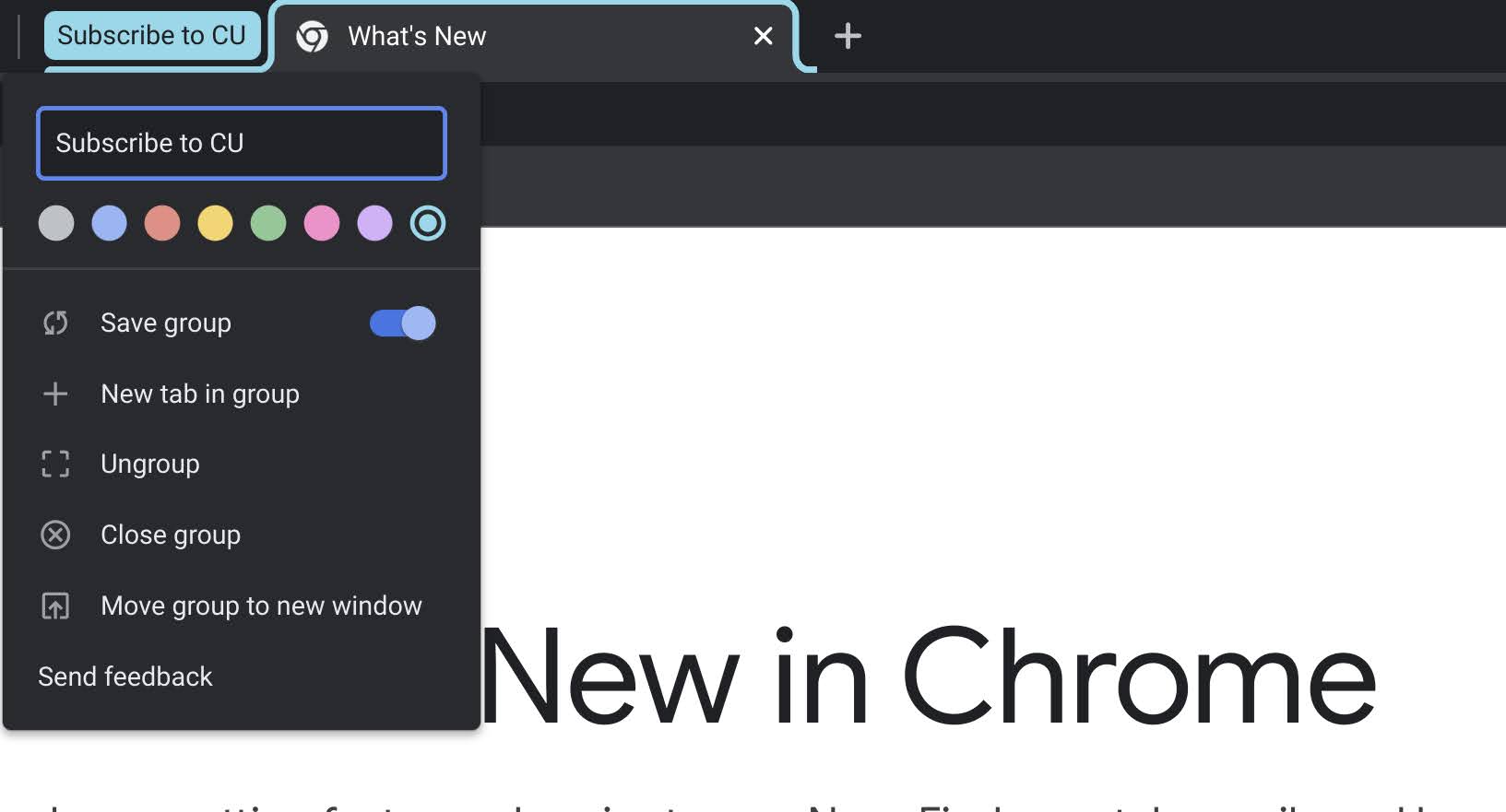
My favorite update with Chrome 95 is the ability to save tab groups for later. Right-clicking an existing tab group will now present you with a “Save group” toggle. Once saved, your tab group can be closed entirely, and then re-opened from the Tab Search section at the top-right of the browser just near your minimize button. These tab groups will eventually get swallowed up though by other history items like individual site visits. Adding to that, tab groups still don’t appear in History, even though Google is implementing Journeys there, but that feature is coming and already appears on Chrome Canary.
Featured Videos

Xremove ads
You can now save tab groups – Hooray!

Other Improvements

There are many other improvements that come with Chrome 95 like scrolling screenshots (if you activate the #scroll-capture flag), but the ones we highlighted were among the most exciting for those who aren’t developers. If you are, however, you can look forward to a color eyedropper tool for web apps, the File System Access API being replaced with the Storage Foundation API, and unfortunately, FTP URLs being removed from the browser entirely. In the past, Google removed FTP capabilities, and now it’s just cleaning up loose ends with the URLs. Check out the video below to learn more about URLPattern, origin trials, and more.

SUBSCRIBE TO UPSTREAM

Get Chrome Unboxed delivered straight to your inbox

Upstream is our flagship, curated newsletter with the top stories, most click-worthy deals, giveaways, and trending articles from Chrome Unboxed sent directly to your inbox a few times a week. Join 31,000+ subscribers.

SUBSCRIBE HERE!

Filed Under: Chrome, New & Upcoming Features, News, Updates Tagged With: videos

About Michael Perrigo

Known as "Google Mike" to his customers, Michael worked at Best Buy as a Chromebook Expert who dedicated his time to understanding the user experience from a regular Chromebook owner's perspective. Having spent nearly 20 years meeting you face-to-face, he strives to help you understand your technology through carefully crafted guides and coverage, relentlessly seeking out the spark in what's new and exciting about ChromeOS.

Primary Sidebar

Xremove ads

Deals

Save $300 as Acer’s Chromebook Plus Spin 714 returns to its all-time low price

By Robby Payne
May 21, 2026

The best Chromebook deals today

By Robby Payne
May 18, 2026

Save $40 on the Google Pixel Watch 4 before the Spring Sale ends

By Joseph Humphrey
April 24, 2026

Deal Alert: the excellent Lenovo Chromebook Plus 2-in-1 returns to $429

By Robby Payne
April 20, 2026

Lenovo Legion Tab Gen 3 drops to $399, ahead of the much pricier Gen 5 release

By Joseph Humphrey
April 18, 2026

More Deals

Xremove ads

Reviews

Lenovo Chromebook Plus 2-in-1 Review: pretty great in a vacuum

By Robby Payne
April 23, 2026

Acer Chromebook Plus Spin 514 Review: Kompanio Ultra power in a convertible

By Robby Payne
December 24, 2025

My review after 6 weeks with the Lenovo Chromebook Plus 14 [VIDEO]

By Robby Payne
August 11, 2025

One week with the best small Android tablet you can buy, and I’m sold

By Robby Payne
May 9, 2025

Best Chromebooks of 2024 [VIDEO]

By Robby Payne
November 28, 2024

More Reviews

Xremove ads

Guides

This Chromebook trackpad shortcut is definitely not new, but is blowing my mind

By Robby Payne
March 11, 2024

How to reduce broadcast delay on YouTube TV to stop live spoilers

By Robby Payne
December 8, 2023

Windows PC keyboard and Chromebook

How to use a Windows keyboard with a Chromebook

By Joseph Humphrey
December 8, 2023

How reset and revert your Chromebook to the previous version of Chrome OS

By Robby Payne
November 29, 2023

My Chromebook Plus features disappeared: here’s how I fixed it

By Robby Payne
November 24, 2023

More Guides

TWITTER · FACEBOOK · INSTAGRAM · YOUTUBE · EMAIL · ABOUT

Copyright © 2026 · Chrome Unboxed · Chrome is a registered trademark of Google Inc.
We are participants in various affiliate advertising programs designed to provide a means for us to earn fees by linking to affiliated sites.

PRIVACY POLICY