

Support our independent tech coverage. Chrome Unboxed is written by real people, for real people—not search algorithms. Join Chrome Unboxed Plus for just $2 a month to get an ad-free experience, access to our private Discord, and more. Learn more about membership here.
START FREE TRIAL (MONTHLY)START FREE TRIAL (ANNUAL)
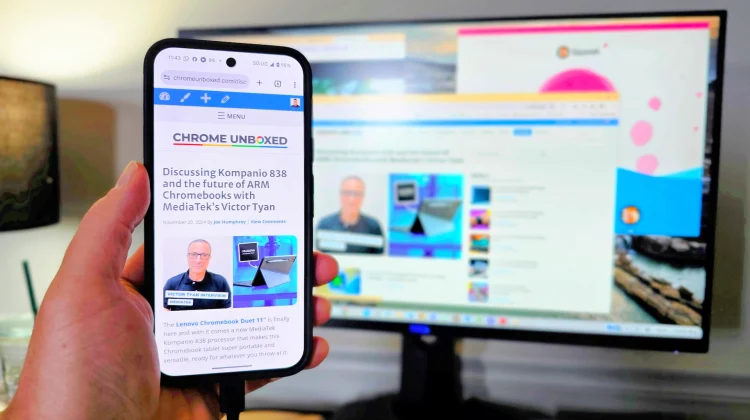
We’ve known for a bit that Google is working on a desktop mode for Android and a special version of Chrome to run on it, too. The latest glimpse of this effort comes courtesy of Android expert Mishaal Rahman, reporting for Android Authority. By delving into the developer options on a Google Pixel 8 Pro running an early Android 16 beta build, Rahman was able to manually enable this still-in-development desktop mode. Connecting the phone to a USB-C compatible monitor instantly launched a PC-like interface on the larger screen, showcasing significant progress from earlier iterations.
With this latest look, things appear to be coalescing into a more cohesive experience. Rahman’s brief video demonstration reveals a desktop environment featuring a taskbar along the bottom, complete with pinned apps, recent apps, an app launcher reminiscent of the Windows Start Menu, and the standard Android navigation buttons on the right. At the top, a familiar Android status bar displays the time, Wi-Fi, cellular signal, and other system icons. Dragging down from the top even reveals the dual-column Quick Settings and notification panel, similar to the interface on Android tablets and foldables today.
Apps launch in freeform windows that can be resized, moved around, and snapped side-by-side, controlled via a connected keyboard and mouse. Impressively, the phone remains fully functional independently while the desktop mode is active on the external display.
While this is an exciting development, don’t expect it to arrive any time soon. Rahman cautions that this desktop mode might not be fully baked in time for the official Android 16 launch later this year. It’s plausible it could debut in a subsequent quarterly platform release (QPR) or potentially even be held back for Android 17 in 2026.
The lingering ChromeOS/Android question
The bigger question surrounding this feature is its strategic fit within Google’s broader computing landscape. Google is actively working to leverage more of the Android framework underneath ChromeOS, blurring the lines between the two platforms. Simultaneously, adding robust desktop capabilities directly to Android opens intriguing possibilities. Could this pave the way for Android-powered laptops or convertibles? Or is this foundational work primarily intended to standardize the experience for partners like Samsung, who already invest heavily in features like DeX?
Some users (myself included) clearly love the idea of the phone-as-a-PC concept. You can’t deny that the simplicity of plugging a single device into docking stations at work and home holds appeal. Whether Google is building all of this for users to routinely dock their Pixels or is simply creating the underlying architecture for other manufacturers remains unclear. It’s an interesting development that suggests Android’s capabilities continue to expand, potentially pushing the boundaries of what we expect from our mobile devices.
SUBSCRIBE TO UPSTREAM
Get Chrome Unboxed delivered straight to your inbox
Upstream is our flagship, curated newsletter with the top stories, most click-worthy deals, giveaways, and trending articles from Chrome Unboxed sent directly to your inbox a few times a week. Join 31,000+ subscribers.

