

Support our independent tech coverage. Chrome Unboxed is written by real people, for real people—not search algorithms. Join Chrome Unboxed Plus for just $2 a month to get an ad-free experience, access to our private Discord, and more. Learn more about membership here.
START FREE TRIAL (MONTHLY)START FREE TRIAL (ANNUAL)
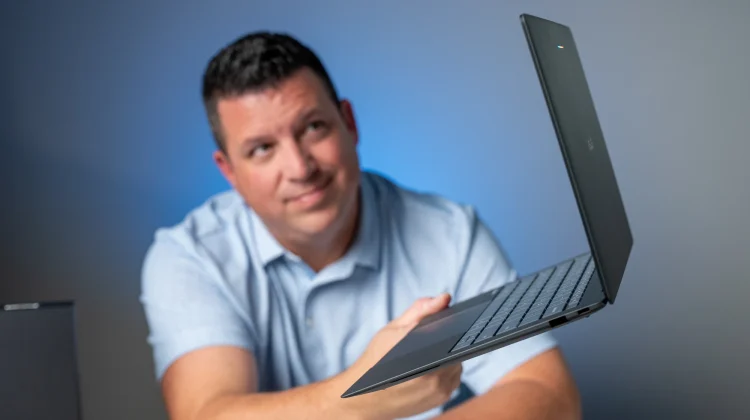
While we spent a bit of hands-on time with the ASUS Googlebook 14 back in New York City, actually getting it out of its massive retail box and onto the desk is a different experience entirely. Weighing in right around two pounds, it is easily the lightest device in the entire launch fleet: and one of the more striking pieces of laptop hardware I’ve ever held.
We are taking our time putting Googlebook OS through a proper, real-world testing gauntlet before dropping full software reviews, because a brand-new operating system deserves more than a quick knee-jerk reaction. For now, we’re focusing simply on the hardware that is delivering the new Googlebook OS experience, and it is pretty incredible.
Impossibly light hardware that doesn’t compromise
The first thing that hits you when pulling the ASUS Googlebook 14 out of the box is the texture. ASUS used a unique alloy material that feels almost like ultra-fine-grit sandpaper. While that slightly gritty finish tends to pick up dry skin rather than the usual fingerprints, it gives the chassis a completely rigid feel that seems almost impossible on a sub-two-pound laptop.
Even with a chassis that is this thin, ASUS didn’t force any port compromises. Along the edges, you get two USB Type-C ports, two full-sized USB-A ports, a full HDMI port, and a headphone/microphone jack. Even the hinge engineering is dialed in: not only does it pass the one-finger lift test effortlessly, but it also features a reverse hinge mechanism that gently pulls the lid shut once you bring it down near the base.
Inside, you’re looking at a gorgeous 14-inch 16:10 Quad HD+ (2880 x 1800) OLED touchscreen with 500 nits of standard brightness and a 1,000-nit peak outdoor boost. The anti-glare finish on this panel is impressive, too. Even with our studio lights pointed directly at it from an extreme off-angle, glare is substantially reduced.
Pair that with a great backlit keyboard, a edge-to-edge haptic trackpad that feels crazy solid, a serviceable 1080p webcam with a privacy shutter, and upward-firing speakers that are wildly full and get borderline too loud, and it’s clear why this machine commands a $1,299 price tag.
Specs, Glowbar tricks, and Better Together in action
Under the hood, our review unit is running the Intel Core Ultra 5 325 processor (an Ultra 7 355 configuration is also available) paired with 16GB of DDR5 RAM and a 512GB NVMe SSD. Everything flies during initial testing, and while Googlebook OS doesn’t currently show a traditional “hours remaining” battery estimate in the notification panel like ChromeOS, we fully expect all-day stamina here.
Though the deeper dives into Googlebook OS and the full reviews are in the works, we did take time to show off several signature features that set Googlebook apart from other laptops:
- Continue On & App Streaming: Whether pulling up an active Chrome tab from my phone straight onto the desktop shelf or streaming mobile apps like Instagram or Chick-fil-A directly in a window without installing them locally, the handoff is seamless.
- Direct Phone File Access: Right inside the native Files app, your phone’s storage shows up like a local drive over Wi-Fi. Being able to snap a featured photo on my phone and immediately drag-and-drop files up to 200MB straight into an editor has already been huge in early testing.
- The Glowbar: Since there is no “Googlebook” branding printed on the chassis, the top LED Glowbar serves as the visual signature. It shifts to a blue-purple gradient when talking to Gemini, flashes the four-color Google band on shutdown, displays a green battery meter when plugged into the included two-piece 65W charger, and even has a hidden “Glowbar Disco” app tucked away in the system for playing with custom audio-reactive gradients.
There are plenty of software quirks and deep-dive features I still need to work through as I live with Googlebook OS day in and day out. We’ll have a dedicated reviews coming soon very soon, I promise. Stay tuned.
SUBSCRIBE TO UPSTREAM
Get Chrome Unboxed delivered straight to your inbox
Upstream is our flagship, curated newsletter with the top stories, most click-worthy deals, giveaways, and trending articles from Chrome Unboxed sent directly to your inbox a few times a week. Join 31,000+ subscribers.

