


Support our independent tech coverage. Chrome Unboxed is written by real people, for real people—not search algorithms. Join Chrome Unboxed Plus for just $2 a month to get an ad-free experience, access to our private Discord, and more. Learn more about membership here.
START FREE TRIAL (MONTHLY)START FREE TRIAL (ANNUAL)
Google is working on yet another feature that might allow you to use your Android phone as a desktop workstation with its latest development: “Desktop View.” This new feature, currently being tested in Android 16 Beta 3, could elevate the Android desktop experience, potentially bringing it closer to the functionality users expect from ChromeOS.
While Android’s current desktop mode falls short of replacing your Chromebook, Google is without a doubt actively working to bridge this gap. Recent beta releases showcase substantial improvements, particularly in external display management. The discovery of a new developer option buried in the code hints at a more refined and versatile desktop experience. While we continue to believe that Google isn’t trying to fully replace ChromeOS with Android, these new features on Android will hopefully create a more cohesive and efficient ecosystem.
Spotted by Mishaal Rahman of Android Authority, this new “Enable desktop experience” setting appears to allow users to toggle desktop mode functionality on both the device itself and connected external displays. However, due to a current technical issue, the feature remains non-functional. If resolved and implemented as an official developer option in the final Android 16 release, this could significantly enhance the usability of Android phones with external monitors, offering a more seamless desktop-like experience.
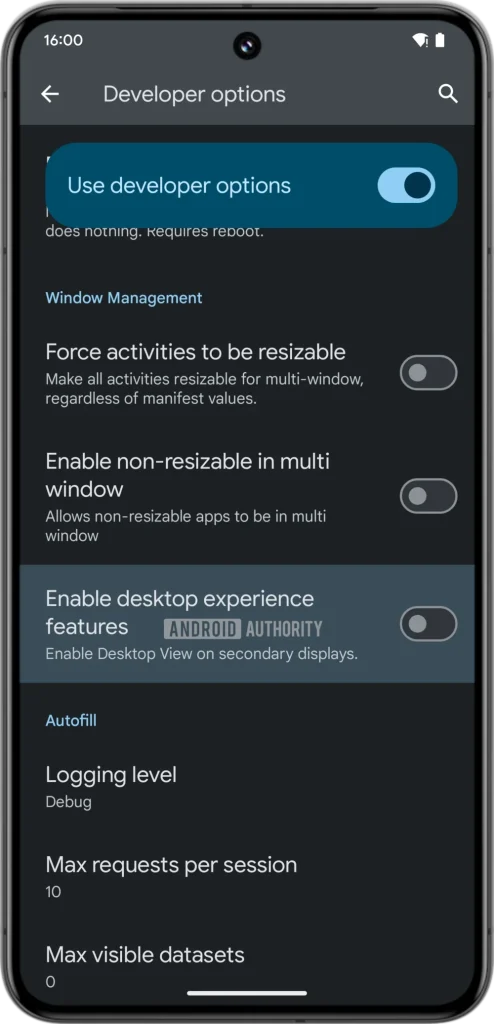
Android 15 laid the groundwork with basic windowing features, but Android 16 is taking it a step further. Current external display capabilities in Android 15 are rudimentary, lacking the fluidity and versatility of desktop operating systems. For instance, Pixel phones currently restrict cursor movement to a single screen at a time. But recent findings indicate that Google is addressing these limitations, implementing features like mouse cursor transitions across connected displays and the ability to rearrange them.
It’s also worth noting that “Desktop View” might be a temporary name, as the feature is still under development. Google may opt for a different moniker before the final release, whenever that might be.
Overall, it certainly looks like Google is working to provide a more intuitive and user-friendly desktop environment on Android. For now, though, we’ll have to wait and see how all of this new Android functionality will be positioned and how Google will promote it alongside their own desktop operating system, ChromeOS. What are your thoughts on Android’s new Desktop View? Let me know in the comments below.
SUBSCRIBE TO UPSTREAM
Get Chrome Unboxed delivered straight to your inbox
Upstream is our flagship, curated newsletter with the top stories, most click-worthy deals, giveaways, and trending articles from Chrome Unboxed sent directly to your inbox a few times a week. Join 31,000+ subscribers.

