

• Skip to main content
  • Skip to primary sidebar
  • Deals
  • Features
  • Guides
  • Chromebooks
  • Videos
  • Podcast
  • More +
    • Reviews
    • Unboxing
    • Upcoming Devices
    • Chromebook Plus
    • Chrome
    • ChromeOS
    • Chrome OS Flex
  • Search
  • Sign Up
  • Log In
Chrome Unboxed – The Latest Chrome OS News

Chrome Unboxed - The Latest Chrome OS News

A Space for All Things Chrome, Google, and More!

  • Deals
  • Features
  • Guides
  • Chromebooks
  • Videos
  • Podcast
  • More +
    • Reviews
    • Unboxing
    • Upcoming Devices
    • Chromebook Plus
    • Chrome
    • ChromeOS
    • Chrome OS Flex
  • Search
  • Sign Up
  • Log In

Android Auto redesign “Coolwalk” official, made for multitasking and adapts to your display size

May 15, 2022 By Michael Perrigo View Comments

Support our independent tech coverage. Chrome Unboxed is written by real people, for real people—not search algorithms. Join Chrome Unboxed Plus for just $2 a month to get an ad-free experience, access to our private Discord, and more. Learn more about membership here.
START FREE TRIAL (MONTHLY)START FREE TRIAL (ANNUAL)

In just a few months, Google will be rolling out a brand new interface design for Android Auto that’s made to adapt to any screen size. Remember the codename “Coolwalk” from a while back? Well, this is it, and it’s finally coming! The goal of the redesign is to help you get directions faster, control your media more easily, and have more functionality at your fingertips without having to switch apps or navigate away from your map screen.
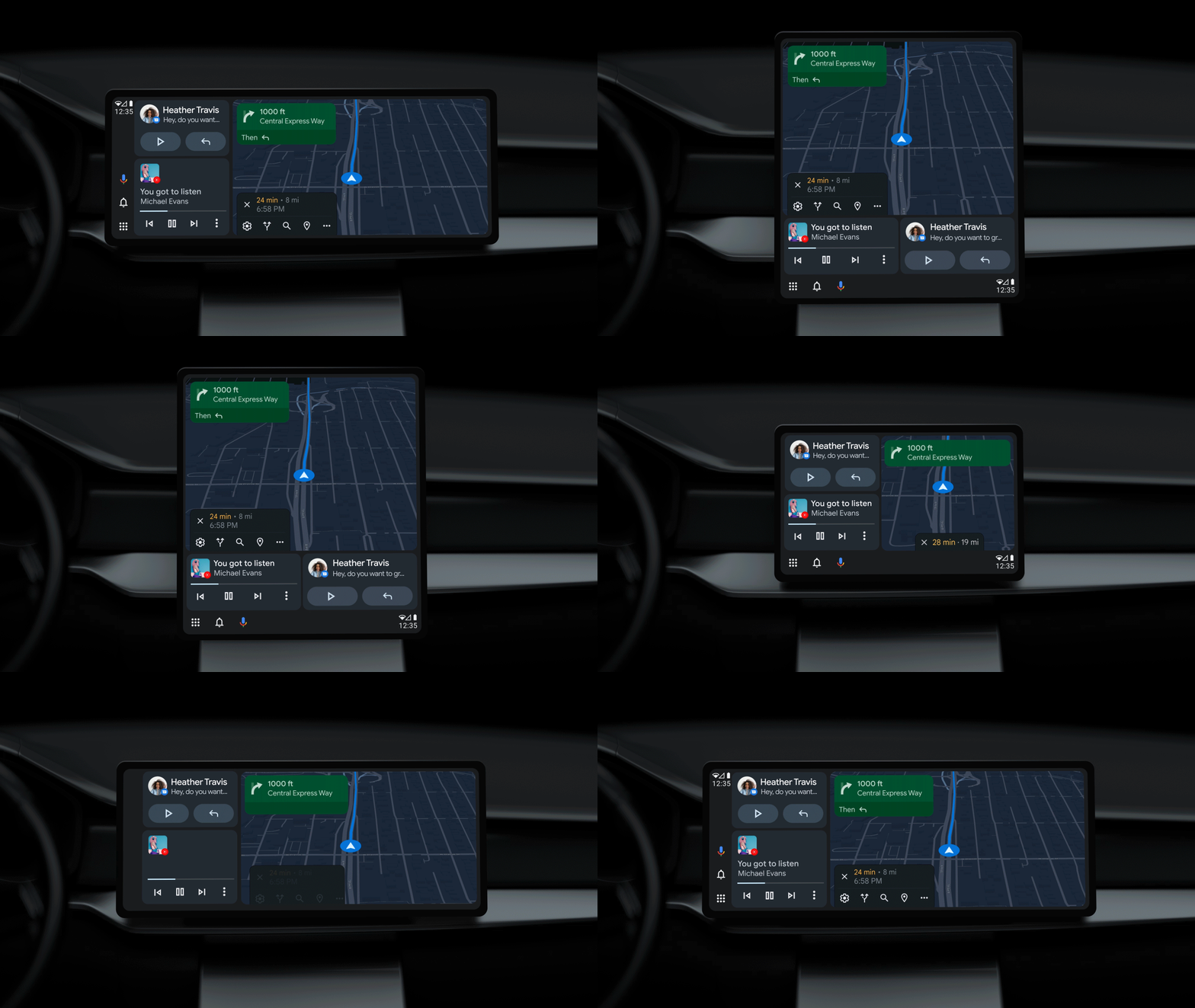
To do this, it’s adopting a new split screen mode, which will let you keep all of the features you use the most often on the display at once. Want to reply to a text message from a friend or family member? Want to change the song that’s playing? Interested in seeing the time, or having more space for your arrival time and other navigation information? The new Android Auto will make this all seamless by utilizing these new widget spots.

Xremove ads

In the video below, you may notice that Google is portraying a liquid UI, and that’s because the visual update will allow for the widgets to be positioned to the left or below the main navigation depending on the shape of the display.

And with the new design able to adapt to different screen sizes, it looks great across widescreen, portrait and more.

The Keyword

The ability to cast your own content from your phone to the car display is also coming soon, building on the plans the company has already revealed for allowing you to use more video streaming apps like Tubi TV, YouTube, and Epix Now while your car is parked. At the end of the day, Android Auto is meant to be more scalable, adaptable, and multi-tasking oriented all while preventing unsafe driving conditions or making you take your eyes off of the road. It’s a terribly difficult balance to strike, but an important one for in-dash functionality!

Featured Videos

Xremove ads

SUBSCRIBE TO UPSTREAM

Get Chrome Unboxed delivered straight to your inbox

Upstream is our flagship, curated newsletter with the top stories, most click-worthy deals, giveaways, and trending articles from Chrome Unboxed sent directly to your inbox a few times a week. Join 31,000+ subscribers.

SUBSCRIBE HERE!

Filed Under: Android Auto, Google Assistant, New & Upcoming Features, News, Updates Tagged With: videos

About Michael Perrigo

Known as "Google Mike" to his customers, Michael worked at Best Buy as a Chromebook Expert who dedicated his time to understanding the user experience from a regular Chromebook owner's perspective. Having spent nearly 20 years meeting you face-to-face, he strives to help you understand your technology through carefully crafted guides and coverage, relentlessly seeking out the spark in what's new and exciting about ChromeOS.

Primary Sidebar

Googlebook

If your Googlebook ‘Better Together’ features stopped working, you need to check this

By Robby Payne
October 16, 2026

One of the best Pixel-exclusive apps is quietly available on your new Googlebook

By Robby Payne
October 16, 2026

One of the biggest missing features in Googlebook’s Chrome browser is getting fixed

By Robby Payne
October 15, 2026

A new affordable wave of Snapdragon-powered Googlebooks is in the works

By Robby Payne
October 15, 2026

Googlebooks just solved one of the most annoying parts of using a laptop for work

By Robby Payne
October 14, 2026

More Googlebook

Xremove ads

Deals

My favorite convertible Chromebook is $150 off right now and primed for Googlebook OS

By Robby Payne
September 29, 2026

Google Pixel Buds 2a in Hazel bundled with a new Googlebook laptop at Best Buy

Score a free $129 pair of Pixel Buds 2a with any Googlebook pre-order at Best Buy

By Robby Payne
September 28, 2026

The best Chromebook deals today

By Robby Payne
September 2, 2026

The best Chromebook ever made is $350 off at Best Buy right now

By Robby Payne
August 21, 2026

The excellent, powerful Acer Chromebook Plus Spin 514 is $150 off right now

By Robby Payne
August 12, 2026

More Deals

Xremove ads

Reviews

Acer Chromebook Plus Spin 514 Review: the best convertible you can buy [VIDEO]

By Robby Payne
July 1, 2026

Lenovo Chromebook Plus 2-in-1 Review: pretty great in a vacuum

By Robby Payne
April 23, 2026

My review after 6 weeks with the Lenovo Chromebook Plus 14 [VIDEO]

By Robby Payne
August 11, 2025

One week with the best small Android tablet you can buy, and I’m sold

By Robby Payne
May 9, 2025

Best Chromebooks of 2024 [VIDEO]

By Robby Payne
November 28, 2024

More Reviews

Xremove ads

TWITTER · FACEBOOK · INSTAGRAM · YOUTUBE · EMAIL · ABOUT

Copyright © 2026 · Chrome Unboxed · Chrome is a registered trademark of Google Inc.
We are participants in various affiliate advertising programs designed to provide a means for us to earn fees by linking to affiliated sites.

PRIVACY POLICY