• Skip to main content
  • Skip to primary sidebar
  • Deals
  • Features
  • Guides
  • Chromebooks
  • Videos
  • Podcast
  • More +
    • Reviews
    • Unboxing
    • Upcoming Devices
    • Chromebook Plus
    • Chrome
    • ChromeOS
    • Chrome OS Flex
  • Search
  • Sign Up
  • Log In
Chrome Unboxed – The Latest Chrome OS News

Chrome Unboxed - The Latest Chrome OS News

A Space for All Things Chrome, Google, and More!

  • Deals
  • Features
  • Guides
  • Chromebooks
  • Videos
  • Podcast
  • More +
    • Reviews
    • Unboxing
    • Upcoming Devices
    • Chromebook Plus
    • Chrome
    • ChromeOS
    • Chrome OS Flex
  • Search
  • Sign Up
  • Log In

Android Auto is getting a completely revamped visual interface with “Coolwalk” update

February 2, 2022 By Michael Perrigo View Comments

Support our independent tech coverage. Chrome Unboxed is written by real people, for real people—not search algorithms. Join Chrome Unboxed Plus for just $2 a month to get an ad-free experience, access to our private Discord, and more. Learn more about membership here.
START FREE TRIAL (MONTHLY)START FREE TRIAL (ANNUAL)

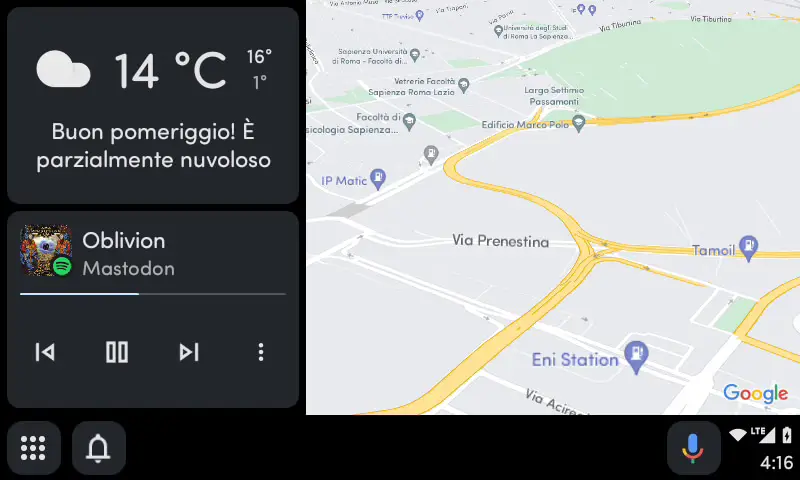
A completely new visual design for Android Auto has been discovered by AndroidWorld during one of its APK teardowns of the app. Codenamed “Coolwalk”, the UI refresh is a big leap for the in-dash operating system, but as of right now, there’s no telling when it’s coming to users. In fact, the folks at AndroidWorld had to alter the Google Play Services database to activate the new elements and reveal the work-in-progress for themselves.

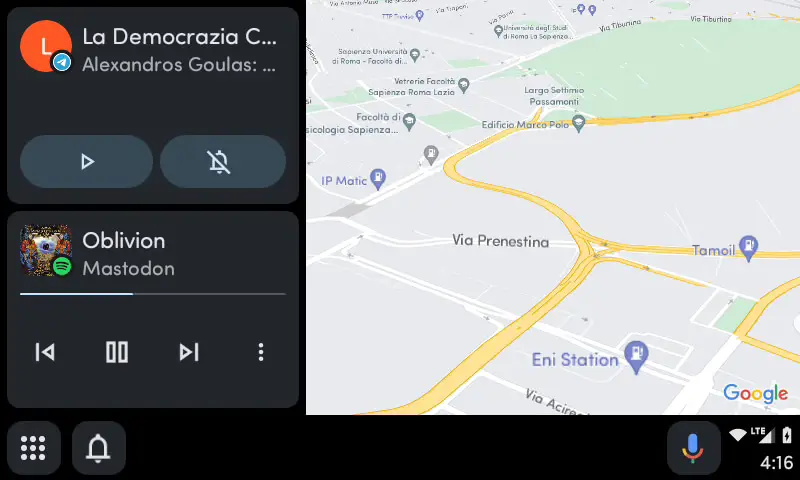
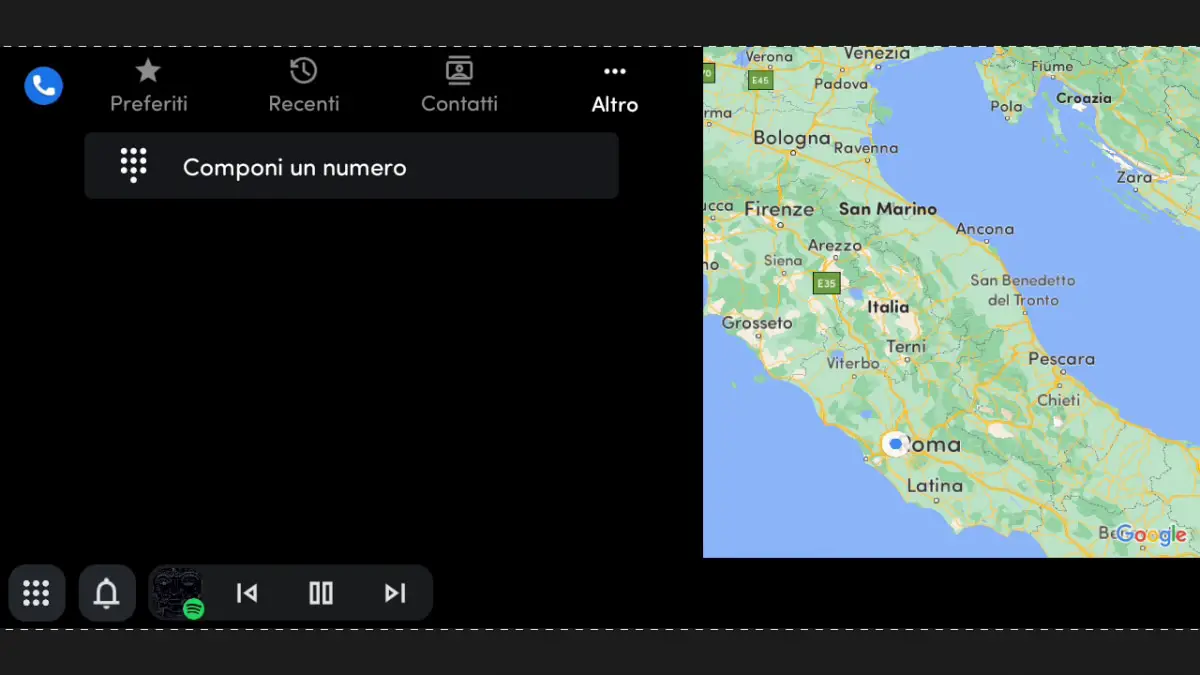
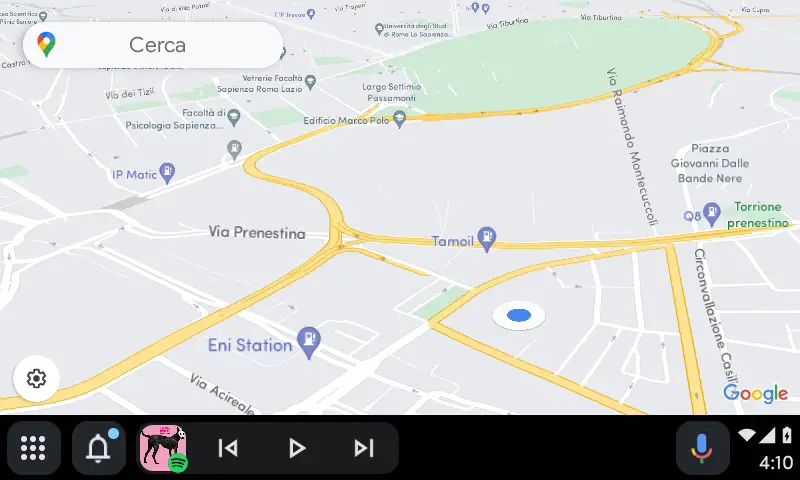
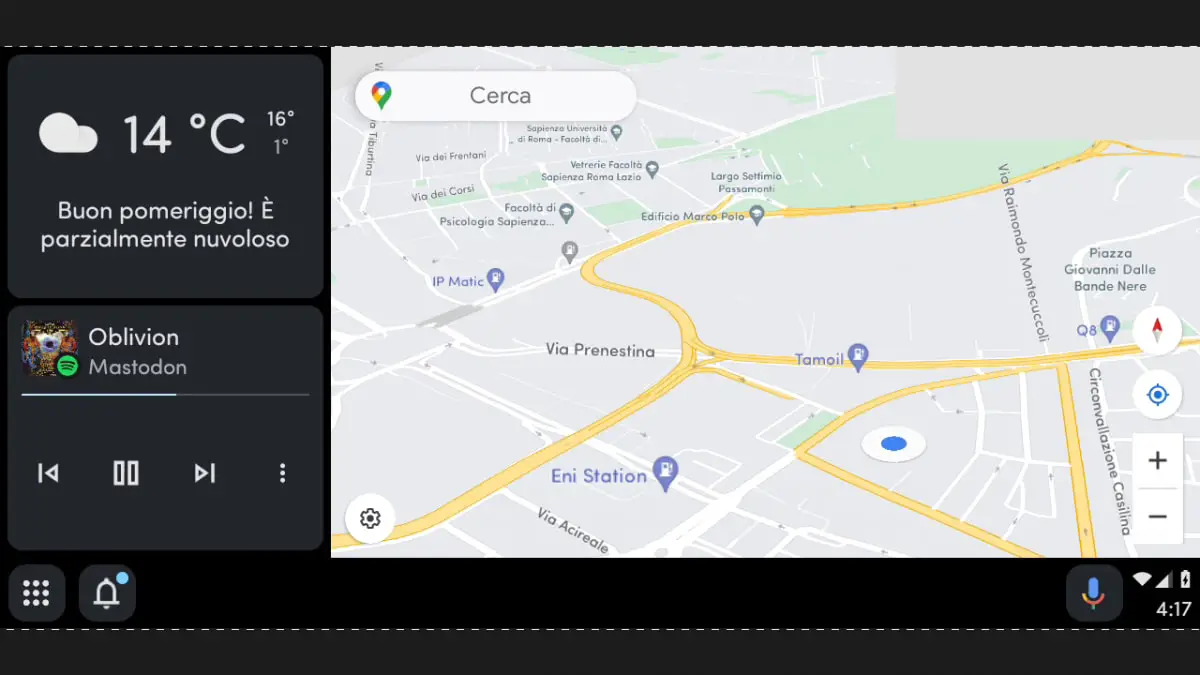
Let’s take a look at what’s changed so that we can at least get excited for what’s to come while we await a release date for the update, shall we? First, the status bar at the top has been removed, and all of the icons that used to occupy it are now at the bottom-right of the screen. Additionally, the bottom navigation bar has increased in height (much to several people’s disappointment).
Xremove ads
Source: Android World

The home button has now been swapped out for an app drawer logo, and a new notifications icon appears next to it on the left instead of at the far right where it used to sit. In place of the old notification bell on the right is a new Assistant microphone for easy access to manually toggling voice commands in your vehicle.

Currently, any time you have music playing or a call active, they appear on the bottom bar, but with “Coolwalk”, you’ll get familiar music or call cards that Google’s been using lately across Chrome and Chrome OS via the global media control panel. In fact, anyone familiar with Chrome OS and Android 12 will realize that this update will bring virtually everything closer to the design of these other two operating systems, potentially in anticipation of the future merger of all of Google’s operating systems.

Featured Videos

Xremove ads

One thing I want to note here is that the media or call controls do appear at the bottom of the screen in several of the images, so it may be possible to decide where it’s docked going forward.

At this stage of development, there are still many bugs and glitches in the new “Coolwalk” update, so I don’t anticipate it will come out immediately or even any time soon, but who knows. Regardless, I love the new design, and I’m excited for it.

There’s also a mysterious new Cast app in AndroidWorld’s build called “MirroringApp”. It could be a new tool to allow Android Auto users to cast their phone screens directly to their head units, but at this time, it crashes upon launch, so we’ll have to wait to get more information about that ass well as it gets closer to release.

Xremove ads

SUBSCRIBE TO UPSTREAM

Get Chrome Unboxed delivered straight to your inbox

Upstream is our flagship, curated newsletter with the top stories, most click-worthy deals, giveaways, and trending articles from Chrome Unboxed sent directly to your inbox a few times a week. Join 31,000+ subscribers.

SUBSCRIBE HERE!

Filed Under: Android Auto, New & Upcoming Features, News, Updates

About Michael Perrigo

Known as "Google Mike" to his customers, Michael worked at Best Buy as a Chromebook Expert who dedicated his time to understanding the user experience from a regular Chromebook owner's perspective. Having spent nearly 20 years meeting you face-to-face, he strives to help you understand your technology through carefully crafted guides and coverage, relentlessly seeking out the spark in what's new and exciting about ChromeOS.

Primary Sidebar

Xremove ads

Deals

The best Chromebook deals today

By Robby Payne
April 20, 2026

Deal Alert: the excellent Lenovo Chromebook Plus 2-in-1 returns to $429

By Robby Payne
April 20, 2026

Lenovo Legion Tab Gen 3 drops to $399, ahead of the much pricier Gen 5 release

By Joseph Humphrey
April 18, 2026

How to get 50% off YouTube Premium for a full year with Google One

By Robby Payne
April 16, 2026

The Pixel 10a just dropped to $449, but here’s why you should buy the Pixel 10 instead

By Joseph Humphrey
April 13, 2026

More Deals

Xremove ads

Reviews

Acer Chromebook Plus Spin 514 Review: Kompanio Ultra power in a convertible

By Robby Payne
December 24, 2025

My review after 6 weeks with the Lenovo Chromebook Plus 14 [VIDEO]

By Robby Payne
August 11, 2025

One week with the best small Android tablet you can buy, and I’m sold

By Robby Payne
May 9, 2025

Best Chromebooks of 2024 [VIDEO]

By Robby Payne
November 28, 2024

Samsung Galaxy Chromebook Plus Review: Samsung is back! [VIDEO]

By Robby Payne
October 28, 2024

More Reviews

Xremove ads

Guides

This Chromebook trackpad shortcut is definitely not new, but is blowing my mind

By Robby Payne
March 11, 2024

How to reduce broadcast delay on YouTube TV to stop live spoilers

By Robby Payne
December 8, 2023

Windows PC keyboard and Chromebook

How to use a Windows keyboard with a Chromebook

By Joseph Humphrey
December 8, 2023

How reset and revert your Chromebook to the previous version of Chrome OS

By Robby Payne
November 29, 2023

My Chromebook Plus features disappeared: here’s how I fixed it

By Robby Payne
November 24, 2023

More Guides

TWITTER · FACEBOOK · INSTAGRAM · YOUTUBE · EMAIL · ABOUT

Copyright © 2026 · Chrome Unboxed · Chrome is a registered trademark of Google Inc.
We are participants in various affiliate advertising programs designed to provide a means for us to earn fees by linking to affiliated sites.

PRIVACY POLICY