

Support our independent tech coverage. Chrome Unboxed is written by real people, for real people—not search algorithms. Join Chrome Unboxed Plus for just $2 a month to get an ad-free experience, access to our private Discord, and more. Learn more about membership here.
START FREE TRIAL (MONTHLY)START FREE TRIAL (ANNUAL)
If you’ve ever seen a trailer for a movie, got super-excited about that movie, went to go see the movie, and left the theater a bit let down, you know exactly how I feel about the Acer Chromebook 514. When this Chromebook was announced back in August of 2018, we had our expectations set quite high and the spec sheet that came with that announcement was partially to blame.
Aluminum build, 14-inch touch screen, backlit keyboard, Gorilla Glass trackpad, up to 8GB of RAM: this thing ticked a bunch of boxes. Oh, and it looked nice, too! Add to this the fact that we’ve been eagerly awaiting a followup to the easy-to-recommend Acer Chromebook 14 from 2016 and you have a recipe for high hopes and large expectations.
Sure, we knew that this thing would come in between $400 and $500, but with that spec sheet and the press images they released, I was OK with that. After all, great build, solid materials, and a premium feeling device don’t come cheap. Assuming the overall fit and finish was good, I was prepared to still love the Acer 514 even at a price I thought was a bit steep for a Chromebook rocking an entry-level processor.
Now that I’ve been using this device for a bit of time, I’m sad to say the expectations fell flat and the spec sheet simply did not deliver. Let’s talk about why.
Build
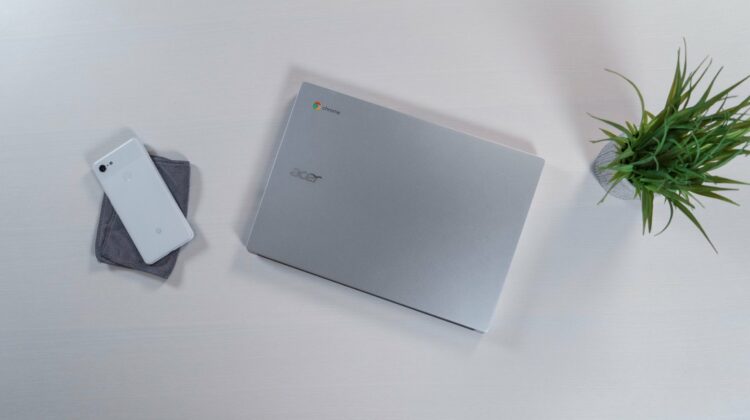
I would describe the overall build quality of the Acer Chromebook 514 as middling. It isn’t ugly, it isn’t the best looking device ever made; it is just OK. When we think of all-aluminum builds, devices like the Lenovo Yoga Chromebook C630, Dell Inspiron Chromebook 14 or the Google Pixelbook come to mind. What you actually get here, on the other hand, is just not up to those standards.
Sure, it is all aluminum, but it doesn’t feel high quality. The seams don’t quite come together as you’d expect and the edges literally feel sharp enough to cut vegetables with. When you hold it, you don’t feel confidence in the build quality. Instead, it just feels affordable. Add to this the plastic surround around the screen and you take what could have been a great build and turn it into an odd, almost-cheap feeling one.
On the plus side, it isn’t creaky or flimsy. It is just over 3 pounds and right around 3/4-inch thick, so the size is definitely workable and portable. It just doesn’t inspire anything out of me at all. There’s nothing about the form of this Chromebook that makes me feel good about it on a table or in my hand, and I’m really sad about that.
Screen
The screen on the Acer 514 is FHD 1920×1080 with wide viewing angles, touch capability, decent colors, and average brightness. The anti-glare coating on the display helps to knock down reflections and makes the average brightness a bit more usable in various environments, but also adds just a bit of graininess to the overall look of an otherwise decent panel. Put up next to the HP x360 or Dell Inspiron, this panel literally pales in comparison.
Keyboard & Trackpad
With a backlit keyboard and Gorilla Glass trackpad, I was expecting a great working experience from the 514. For me, if a so-so build and mediocre screen are paired with a great keyboard and trackpad, I can overlook some deficiencies to a certain extent.
Sadly, this isn’t even close to the case here.
The keyboard has backlighting, but the keys are soft, mushy and lack any real and discernible click response. Many times I was left unsure on whether or not I’d actually hit the key I was going for and that is just an inexcusable deficiency. While I love backlit keyboards, I’d gladly take one I can confidently type on with no backlighting over one I can see in the dark and still not know whether or not I’ve hit the key I’m trying for.
The trackpad was equally frustrating and poorly built. With the glass surface, all my gestures and pointer tracking were perfect, but the minute I went to actually depress the glass I was met with the budget device defect of the trackpad hovering just above the actual click mechanism. With this defect, you can push the trackpad down just a bit and feel a slight click as the surface actually meets the button beneath it. This gives you a tangible and audible click. Then there is the click of the actual mechanism, resulting in almost a double-click every time you depress the trackpad.
We see it all the time on cheap Chromebooks, so it isn’t odd. What is odd is seeing this defect show up on a device advertising a Gorilla Glass trackpad. Add to this the click mechanism being overly firm and you have an input experience that feels like work, and I just don’t expect that in a $500 Chromebook.
Ports & Speakers
I know I’ve been rough on Acer so far, but on the port for this Chromebook, I’m very happy with the overall layout. The 514 has 2 USB-C and 2 USB-A ports with one of each on both sides of the device for maximum versatility. If you are looking to avoid the dongle life, this is a fantastic setup. Along with those is a microSD card slot, headphone/mic jack, and a Kensington lock.
The speakers get us back into the disappointing side of things, however, delivering what sound like only mid-tones with nearly no bass response and no crispy highs. They are loud, though. They do get really loud.
Internals
Now we have to talk about the processor. This was the one part of this device I wasn’t sure about when they announced it. I really thought the hardware was going to be quite good and my one hangup would be the processor. Strangely enough, the processor wasn’t my biggest gripe. Sure, there is a $399 version of this device with 4GB of RAM and an N3450 Apollo Lake Celeron processor that I wouldn’t recommend anyone buy, but I also thought the Pentium N4200 in our review unit would struggle mightily to keep up with my daily workflow.
That wasn’t exactly the case, though. There were spans of 30 minutes here and there where I honestly forgot I was working on a lower-end processor. Paired up with the 8GB of RAM and 64GB of eMMC storage, the internals were enough to get by on. Sure, there were times of lag if I was editing a graphic file or larger photos, but most tasks were handled quite well even with my QHD+ monitor attached.
Battery life was also as expected, giving my an easy 8-10 hours if I kept my screen brightness under control. With the average brightness on this one, however, I tended to leave my screen up around 80-90%, so it did knock my battery down an hour or so when I chose to use it this way. Keeping your brightness around 75% should keep you in the 8+ hours of battery life with not too much effort.
Wrap Up
This was a tough review. I really, really wanted to like this device. I was pre-disposed to cheering on this Chromebook. But after using it for a bit, I am so underwhelmed across the board that it has become a pretty tough sell for me to recommend this device to anyone at these prices. $499 can get you a great Chrome OS experience right now. There are simply too many great devices on offer in this price range to even remotely consider purchasing the Acer 514.
If you, like me, were excited about the prospect of getting one, I hope I’m saving you a bit of heartache or a bit of money. If you are dead-set on this Chromebook, my advise would be to wait it out a bit and see if the prices come down. If that time comes, all of this could be a very different discussion. If the 514 was priced around $299, my tone would be infinitely more forgiving. As it stands right now at $499, however, I simply cannot recommend anyone buy the Acer Chromebook 514.

