

Support our independent tech coverage. Chrome Unboxed is written by real people, for real people—not search algorithms. Join Chrome Unboxed Plus for just $2 a month to get an ad-free experience, access to our private Discord, and more. Learn more about membership here.
START FREE TRIAL (MONTHLY)START FREE TRIAL (ANNUAL)
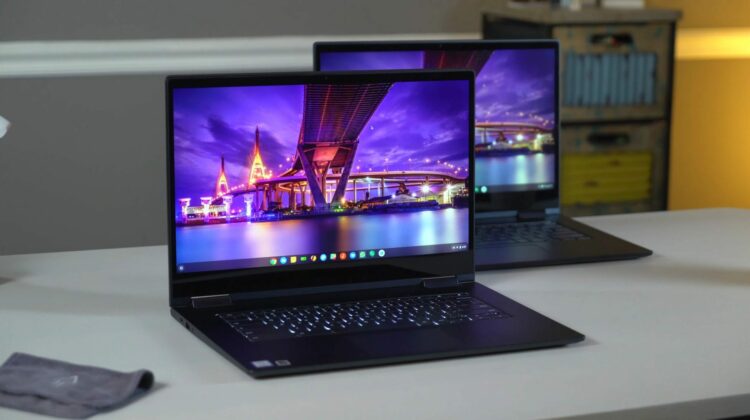
It is not standard for us to review a device the second time, but with Lenovo’s Yoga C630, we are making an exception. Up front, we need to point out a few things, though. First, we’re not going to regurgitate everything we discussed in our original review. This device is exactly the same hardware for the most part, save two additions: a backlit keyboard and a 4K display.
So, with that out of the way, let’s talk about those two significant differences and see if this upgraded version of the Yoga C630 is worth your dollars.
Keyboard
As a part of an already-fantastic pair, the keyboard on the standard Best Buy issued C630 was great to use, I loved typing on it, and along with the trackpad made for one of the best input combos on a Chromebook I’ve ever used.
The missing backlighting just felt like a silly omission, though. Everything about this device feels well-made and premium, so it was such a head-scratcher that a bit of illumination behind the dark keys was not present.
Thankfully, C630 units shipped from Lenovo (not just the 4K version) all come equipped with backlit keys and that makes a big difference in making the overall package feel premium. The keys on this 4K unit were just as satisfying to type on, and within a day I was in a position to actually leverage the backlighting on the keys, too.
That Display
Now, on to the bigger difference from our original review: that display. This is the first 4K panel on any Chromebook and it is a fantastic panel. Bright, colorful, and pin-sharp, this display was simply a joy to look at. Seeing a Chromebook with such a large screen still have the sharpness of a Pixelbook is just pleasing. The original FHD model had a really warm tint to the screen and we’re glad to report that is not the case at all with the 4K panel. While not as cool as the Pixelbook, this panel feels very balanced and realistic in its color production.
Watching 4K content on an actual 4K screen is fun, too! There’s quite a bit of it on Netflix and YouTube at this point, so I took full advantage.
The higher-res panel did cause some of the overview mode hiccups we see on the Pixel Slate, Pixelbook and other high-res Chromebooks, though. While disappointing to see after the smoothness offered by the FHD version of this device, I’m confident the Chrome team has found a way around the jank and lag with overview mode and we’ll see it cleaned up in short order.
Performance in normal tasks didn’t suffer at all, however, and the 8th-get Core i5, 8GB of RAM, and 128GB of internal storage hummed along just as quickly as the FHD version.
I have to admit, I was a bit negative about 4K panels on Chromebooks and still am to a certain point. This device did win me over a bit, though. While I don’t think 4K on anything smaller than 15.6-inch panels is necessary (the 2400×1600 on the Pixelbook is razor sharp without having to push all those additional pixels around for instance), I do think this device justifies the 4K addition.
Another fun thing with having all these extra pixels on screen is the ability to scale the display down a few notches to get more space to work with. The display is scaled to nearly FHD out of the box, but you can bump it to an 80% scale and get quite a bit more space to move windows around on. Sure, your UI elements and text will get a bit small, but if you just need some space for a couple tasks and don’t have an additional monitor handy, this can come in handy. With all that resolution, everything stays nice and sharp regardless of how much you scale things down.
Shop the Lenovo Yoga Chromebook C630
Wrap Up
Again, if you haven’t, check out our original review of the Yoga C630. This is a device that everyone really enjoyed and it only gets better with the additions backlit keys and the 4K panel. At $900, it is a hard sale, but we’ve already seen it on sale for as low as $629, so if you can wait around for a good sale from Lenovo, this is an absolute “buy it now” device.

