

Support our independent tech coverage. Chrome Unboxed is written by real people, for real people—not search algorithms. Join Chrome Unboxed Plus for just $2 a month to get an ad-free experience, access to our private Discord, and more. Learn more about membership here.
START FREE TRIAL (MONTHLY)START FREE TRIAL (ANNUAL)
Since their inception, Chromebooks have long been thought of as cheap computers, cheap laptops, “just a browser”, or just a cheap way to get online. Sure, there are still a ton of affordable Chromebook on the market and, because of the education sector, there likely always will be. However, there is a growing trend that really started with the Pixelbook that is seeing more and more Chromebooks built in the mid to upper range with more premium builds, better internals, and just a better overall user experience.
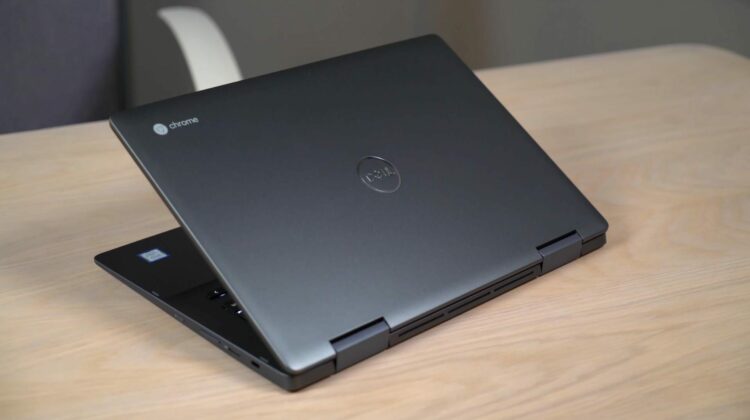
One such device is the Dell Inspiron 14 that launched late in 2018. This Chromebook brings a lot to the tablet for the $599 asking price and, if you keep a sharp eye out, you may just find a deal on it for as low as $450 from time to time. At any price sub-$600, Dell has put quite a bit on offer and we want to lay out why this could be one of the best Chromebook experiences on offer for the next year.
Screen
Starting out with the screen, Dell has done a great job with this 14-inch, FHD (1920×1080) panel. The bezels on the top and sides are nice and small, viewing angles are great, brightness is good, colors are vibrant, and the size is great for overall productivity.
With Chrome OS’ scaling ability, 1080p displays can be scaled up and down to make the UI a bit bigger or smaller while maintaining a nice, crisp look to everything on the screen. The benefit, here, is that a FHD screen is much less resource-intensive when compared to the 3000×2000 display on something like the Pixel Slate or the 2400×1600 layout of the Pixelbook. Sure, those screens are fantastic, but they also take a toll on the battery and processor, and that’s not always the best trade-off.
I routinely use Chromebooks with a secondary monitor that, if sat next to a device with a mediocre screen, can make Chromebooks displays look bad by comparison. No such problem with the Dell, though, as it stood toe-to-toe with my LG Ultrawide monitor both in brightness and colors.
14-inches is also a great size for productivity. When not at my desk, I often miss the extra screen real estate I have with a second monitor and 14-inch Chromebooks give me just enough room to remain comfortable on the go.
Keyboard/Trackpad/Pen
As with most Chromebooks, input methods are pretty solid. That’s not to say they are great, however, and at this price point I have a few nits to pick.
First is the keyboard. While backlighting is a welcome addition, key travel and click aren’t my favorite. I don’t get to bent out of shape over keyboards, but the mushiness of this particular device bothered me a bit. I can get by without too much travel, but I do like a good click when I hit a key so I know I hit it. Many times with the Dell I found myself wondering if I missed a keystroke and that was a bit annoying.
The trackpad, while not glass, is pretty smooth and plenty spacious. I didn’t have too much issue with it in general other than a bit of oil build up over the course of a normal day. Glass trackpads do much better in this area, and at this price I would like to see a glass pad. But, the click is good and overall usability was just fine.
The pen is exactly what you’d expect at this point with a Chromebook. It works will, is stowed away inside the device and is available when needed. With apps slowly getting better at utilizing pen input on Chromebooks, I really like seeing more and more devices have the garaged stylus. Whether you use it often or every once and a while like I do, I love that it is simply there when you need it. As always, multiple levels of pressure sensitivity and tilt support are here for the ride as Dell has opted for the artist-approved EMR stylus.
Ports
Port selection is a win. Quite a few devices shipped with this layout in 2018 and I hope it continues. In a world lurching towards USB-C adoption, there is still great value in an additional USB-A port and headphone/mic jack. Sure, USB-C can supplant both with the right dongle, but it is really nice to have a port setup that allows you to forget the dongles and just take care of business.
Also along for the ride are the usual suspects: a micro SD card reader and two USB-C ports situated one on each side.
Speakers were also a surprise on the Inspiron. While bottom-firing, the sound was full and rich and didn’t feel like all the sound was being pushed through the bottom of the chassis.
Build
This thing is built like a tank. There’s no way around that. At over 4 pounds, the Inspiron is not light or dainty in the least. If you are in the market for a super-thin, super-light Chromebook, you need to look elsewhere. if you are planning on snagging this device to use it as a tablet often, you need to look elsewhere.
While it isn’t overly clunky or ridiculous, this thing is substantial. It is well-built and you feel quality when you pick it up. Forget creaks, plastic, or cheap materials. This thing is aluminum all the way and built to take a beating. I actually dropped our review device from a chair a few feet off the ground right onto a wood floor and there wasn’t even a slight scratch on the unit.
This shouldn’t come as a surprise as Dell has been making the Inspiron line of laptops for many years and they’ve brought that same experience, know-how and quality to this Chromebook. It is an important step for Dell, too, as they’ve not extended their existing PC branding to any Chromebooks until this one. Now that you can buy a Dell Inspiron with Windows or Chrome OS, it feels like a legitimizing move that sends a message to general consumers that Chromebooks are a legitimate choice in the PC buying process. My hope is Dell extends this same treatment to the XPS line at some point down the road.
Internals
Dell only offers up one configuration of this Chromebook. That setup is an 8th-gen Core i3 (8130U), 4GB RAM, and 128GB eMMC storage. Benchmarks show this device to be just as fast synthentically as it feels in real life, scoring near 100 on Speedometer and 34000 on Octane. Simply put: this thing is FAST.
With these U-series i3 processors, there’s no real need for an i5 or i7. Paired up with only 1920×1080 pixels to push around, there’s literally nothing I could do to slow this thing down.
Surely, some of you are reading this and are immediately spurned by the 4GB of RAM. I really, REALLY wish they would have opted for 8GB here, but I have to be honest and say it never reared it’s head and never caused any issue for me.
The spacious 128GB of storage was fantastic to have and, though eMMC, I never get bothered by the slower read/write speeds. At some point, faster SSDs will become necessary on Chromebooks as video/photo editing becomes a realistic thing, but for now there’s no real need.
Overall, I’d say Dell has simply knocked performance out of the park. As always with Chromebooks, you get all this performance paired with 8-10 hours of use, so no worries about battery life with this one.
Bottom Line
So, should you get this one? At full price, I’d say maybe. There are other players at this price like the Lenovo C630, the seemingly-always-on-sale Pixelbook, the fantastic HP x360, HP x2 and likely a few others as we get into 2019. To this point, no Chromebook gets everything right, but Dell has checked a ton of the boxes with the Inspiron.
It won’t be odd to see this device on sale and if you can get it for closer to $500, it becomes a no-brainer. But even at the full $599, I think you’d be hard-pressed to find a computing experience this good across the board.
Buy The Dell Inspiron Chromebook 14 From Dell Buy The Dell Inspiron Chromebook 14 From Best Buy
