
• Skip to main content
  • Skip to primary sidebar
  • Deals
  • Features
  • Guides
  • Chromebooks
  • Videos
  • Podcast
  • More +
    • Reviews
    • Unboxing
    • Upcoming Devices
    • Chromebook Plus
    • Chrome
    • ChromeOS
    • Chrome OS Flex
  • Search
  • Sign Up
  • Log In
Chrome Unboxed – The Latest Chrome OS News

Chrome Unboxed - The Latest Chrome OS News

A Space for All Things Chrome, Google, and More!

  • Deals
  • Features
  • Guides
  • Chromebooks
  • Videos
  • Podcast
  • More +
    • Reviews
    • Unboxing
    • Upcoming Devices
    • Chromebook Plus
    • Chrome
    • ChromeOS
    • Chrome OS Flex
  • Search
  • Sign Up
  • Log In

Acer Chromebook 14 For $229: Why Costco’s Black Friday Deal Is Tough To Beat

November 13, 2016 By Gabriel Brangers View Comments

Support our independent tech coverage. Chrome Unboxed is written by real people, for real people—not search algorithms. Join Chrome Unboxed Plus for just $2 a month to get an ad-free experience, access to our private Discord, and more. Learn more about membership here.
START FREE TRIAL (MONTHLY)START FREE TRIAL (ANNUAL)
picsart_11-13-02-16-59

We’ve come across some really good deals on Chrome devices to take advantage of this holiday shopping season. You can check out all the goodies here.

Xremove ads

One device in particular may be the best bargain you can find and here’s why we think so.


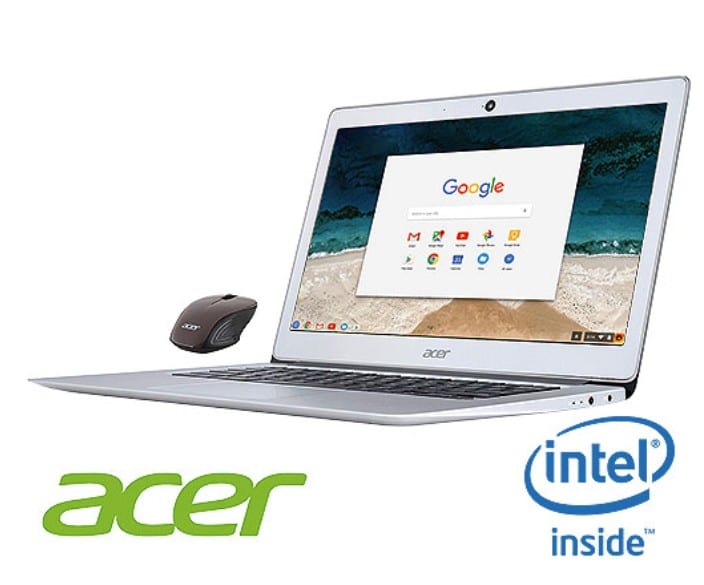
The Acer Chromebook 14 made its debut rather quietly earlier this year and has held its head under the radar for the most part. But, with a price of $299, the all-aluminum Chromebook still offers a solid Chrome OS experience with a premium feel.

Featured Videos

Xremove ads

We get asked a lot, “what’s the best Chromebooks for the money under $300?”

Arguably, there are a number of devices that could fill in that blank. The Acer 14 definitely makes the list. Take a look at the specs and it won’t be hard to see why.

Acer Chromebook 14

Display
  • 14″ LCD display
  • 16:9 aspect ratio
  • Full HD (1920 x 1080)
  • Screen type: LED backlit with IPS (Full HD)
Processor
  • Intel® Celeron® Quad-Core Processor N3160 (2M Cache, 1.6 GHz)
  • Intel® HD Graphics 400
Memory
  • 4 GB of DDR3 RAM
Storage
  • 32 GB SSD Storage¹
Dimensions
  • 341 x 236.6 x 16.95 mm
Weight
  • 3.39 lbs/1.54 kg
Color
  • Sparkly Silver
Material
  • Aluminum
Power
  • Battery life: Up to 12 hours of battery life²
  • 45W AC adapter
Camera
  • HD Webcam (1280 x 720) with 88 degree wide angle lens supporting High Dynamic Range (HDR)
Audio
  • Two stereo speakers
  • Built-in microphone
Keyboard & Trackpad
  • Full-size keyboard
  • Fully clickable trackpad
Ports
  • Two USB 3.0 ports
  • HDMI port
  • Combo headphone/speaker jack
  • DC-in jack for AC adapter
Wireless
  • 802.11ac Wi-Fi with support for a/b/g/n/ac, 2.4 and 5 GHz
  • Bluetooth 4.0 Smart Ready

Now, there’s not one particular thing on that list that stands out as a “wow” feature. But, the culmination of so many “good” options on the Acer make it a Chromebook that most users can enjoy.

Xremove ads

The Intel N3160 has proven itself as a workhorse for moderate to heavy users. A full HD, IPS display looks good and bright at any angle. 4 GB of RAM is perfect for a device in this bracket. As we have seen time and again, 4 GB seems to be the sweet spot for Chrome OS.

All-aluminum build

This is a big one, for me at least. I’ve recently spent some time using the Asus C301SA and for all intents and purposes these machines are twins. The internals are identical and I would expect performance to be the same.

But, (and this is a big but) the Asus just feels cheap. The look is great but the all plastic body is flimsy and it feels as if it should never leave my desk for fear of damage.

Xremove ads


An all-aluminum build is a huge selling point for many consumers. Especially those looking to transition from higher end devices like a MacBook.

Play Store

The Acer Chromebook 14 is on the list of devices that will, eventually, get access to Google Play Store. The Acer R11 we have floating around the office is having no problem chewing through Android apps with the Braswell N3060. The N3160 in the Acer 14 will surely handle them equally as well.

Support

End of Life Policy has been a bit of a sore spot for users. With that being said, $229 will get you a sharp device that is guaranteed to receive updates and support until at least March of 2021. At that price, most users will have no issue replacing or upgrading 5 years down the road.

Xremove ads

Costco Advantage

This is where the value becomes paramount. Not only can you get a great Chromebook at a crazy low price, Costco does business a little differently. The 1 year manufacturer warranty gets doubled with their exclusive concierge service.

Not only do you get an additional year of warranty coverage, Costco offers technical support 7 days a week on products purchased through their site.

All this plus they throw in an Acer mouse as part of the bundle. Also, if for any reason you need to return your device, Costco offers a liberal, 90 day return policy on computers.

All-in-all this makes the Acer Chromebook 14 a great device at $299, but a complete steal when you consider the sale price and all the perks from Costco.

Xremove ads

Kudos.

Filed Under: All Stories, Chromebooks, Featured, News

About Gabriel Brangers

Lover of all things coffee. Foodie for life. Passionate drummer, hobby guitar player, Web designer and proud Army Veteran. I have come to drink coffee and tell the world of all things Chrome. "Whatever you do, Carpe the heck out of that Diem" - Roman poet, Horace. Slightly paraphrased.

Primary Sidebar

Xremove ads

Deals

Save $40 on the Google Pixel Watch 4 before the Spring Sale ends

By Joseph Humphrey
April 24, 2026

The best Chromebook deals today

By Robby Payne
April 20, 2026

Deal Alert: the excellent Lenovo Chromebook Plus 2-in-1 returns to $429

By Robby Payne
April 20, 2026

Lenovo Legion Tab Gen 3 drops to $399, ahead of the much pricier Gen 5 release

By Joseph Humphrey
April 18, 2026

How to get 50% off YouTube Premium for a full year with Google One

By Robby Payne
April 16, 2026

More Deals

Xremove ads

Reviews

Lenovo Chromebook Plus 2-in-1 Review: pretty great in a vacuum

By Robby Payne
April 23, 2026

Acer Chromebook Plus Spin 514 Review: Kompanio Ultra power in a convertible

By Robby Payne
December 24, 2025

My review after 6 weeks with the Lenovo Chromebook Plus 14 [VIDEO]

By Robby Payne
August 11, 2025

One week with the best small Android tablet you can buy, and I’m sold

By Robby Payne
May 9, 2025

Best Chromebooks of 2024 [VIDEO]

By Robby Payne
November 28, 2024

More Reviews

Xremove ads

Guides

This Chromebook trackpad shortcut is definitely not new, but is blowing my mind

By Robby Payne
March 11, 2024

How to reduce broadcast delay on YouTube TV to stop live spoilers

By Robby Payne
December 8, 2023

Windows PC keyboard and Chromebook

How to use a Windows keyboard with a Chromebook

By Joseph Humphrey
December 8, 2023

How reset and revert your Chromebook to the previous version of Chrome OS

By Robby Payne
November 29, 2023

My Chromebook Plus features disappeared: here’s how I fixed it

By Robby Payne
November 24, 2023

More Guides

TWITTER · FACEBOOK · INSTAGRAM · YOUTUBE · EMAIL · ABOUT

Copyright © 2026 · Chrome Unboxed · Chrome is a registered trademark of Google Inc.
We are participants in various affiliate advertising programs designed to provide a means for us to earn fees by linking to affiliated sites.

PRIVACY POLICY