

• Skip to main content
  • Skip to primary sidebar
  • Deals
  • Features
  • Guides
  • Chromebooks
  • Videos
  • Podcast
  • More +
    • Reviews
    • Unboxing
    • Upcoming Devices
    • Chromebook Plus
    • Chrome
    • ChromeOS
    • Chrome OS Flex
  • Search
  • Sign Up
  • Log In
Chrome Unboxed – The Latest Chrome OS News

Chrome Unboxed - The Latest Chrome OS News

A Space for All Things Chrome, Google, and More!

  • Deals
  • Features
  • Guides
  • Chromebooks
  • Videos
  • Podcast
  • More +
    • Reviews
    • Unboxing
    • Upcoming Devices
    • Chromebook Plus
    • Chrome
    • ChromeOS
    • Chrome OS Flex
  • Search
  • Sign Up
  • Log In

Zoom PWA gets proper blurred and virtual backgrounds, Sharing audio from a Chrome tab

April 25, 2022 By Johanna Romero View Comments

Support our independent tech coverage. Chrome Unboxed is written by real people, for real people—not search algorithms. Join Chrome Unboxed Plus for just $2 a month to get an ad-free experience, access to our private Discord, and more. Learn more about membership here.
START FREE TRIAL (MONTHLY)START FREE TRIAL (ANNUAL)

Zoom announced last year that it would be releasing a new Progressive Web App (PWA) specifically designed for ChromeOS in place of their soon-to-be deprecated app on the Chrome Web Store. In that announcement, Zoom promised that this PWA would bring new features like a customizable gallery view, self-select breakout rooms, live transcription & translation, a new background masking feature, and hand-raising & reactions.

The PWA was released without much fanfare, as users kept using the Web Store app that they were already used to. In fact, a banner started appearing on the old app reminding users to use the Zoom for Chrome PWA app from the Google Play Store as the web app would lose support in June 2022.

Xremove ads

Now it looks like Zoom is delivering on at least one of its promises for its PWA. We were clued into this by Twitter user @jdeslip, who sent us the tweet below, letting us know that virtual backgrounds were now working on the PWA. Additionally, About Chromebooks also reported this new development and the new capability of background blurring – both of which were previously unavailable.

https://twitter.com/jdeslip/status/1514044259506159618?s=20&t=bf46hRBDjJxbsMHuSMFLAg

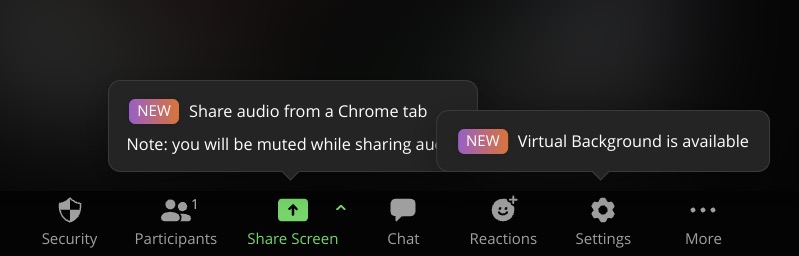
Since I had not used Zoom in a while, I hopped on the app to try this out for myself. Immediately after starting a meeting, I was greeted with two new feature notifications: Sharing audio from a Chrome tab and virtual backgrounds. Sharing audio from a Chrome tab works similar to how it works on Google Meet, where you can share a chrome tab of your screen, except that it mutes you while you are sharing audio. I do not think Meet can do that at the moment.
Featured Videos

Xremove ads

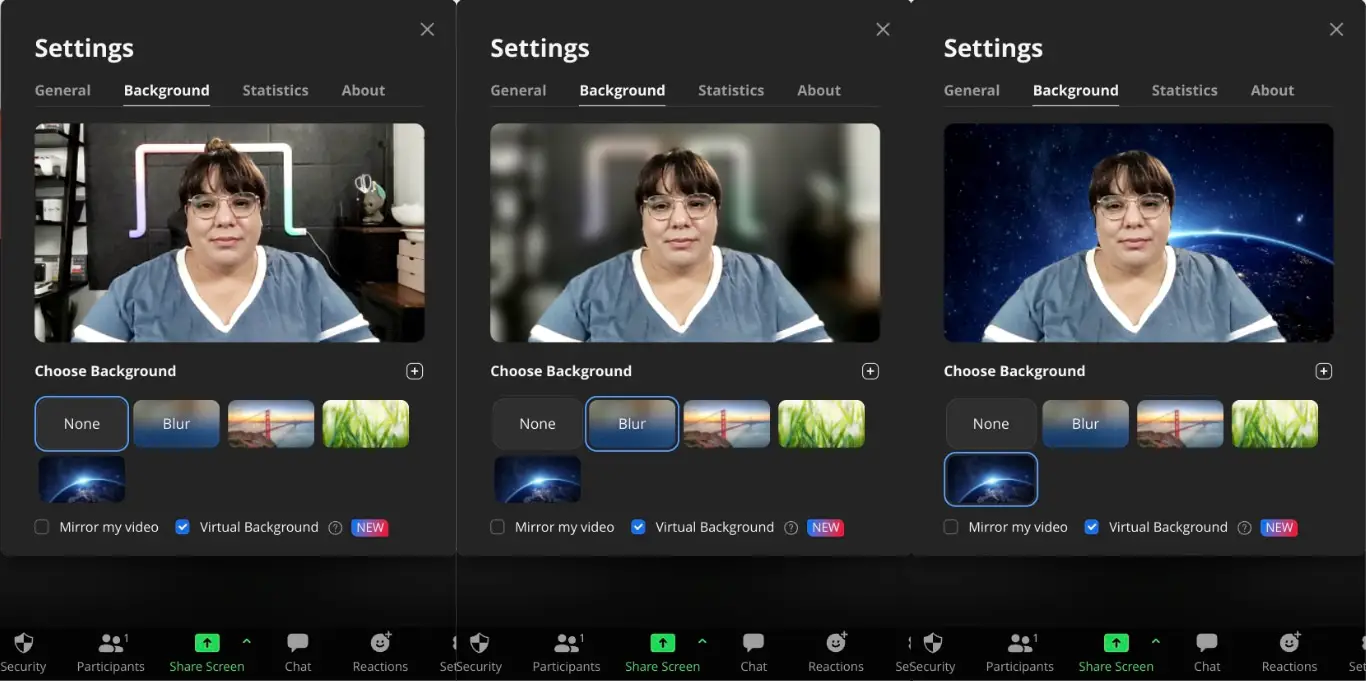
As far as the virtual backgrounds, I was able to set up a background blur and change my background to either an image from their gallery or an image on my Chromebook. Both looked great and didn’t cause any crashes, but your mileage may vary depending on your Chromebook specs.
I am very excited about the improvements made on the Zoom PWA so far. In fact, I may start using it more often when connecting with family overseas instead of trying to coach them on using another solution that they’re not already familiar with. The Zoom for Chrome PWA can be found on the Google Play Store and has a help page available on the Zoom website.

SUBSCRIBE TO UPSTREAM

Get Chrome Unboxed delivered straight to your inbox

Upstream is our flagship, curated newsletter with the top stories, most click-worthy deals, giveaways, and trending articles from Chrome Unboxed sent directly to your inbox a few times a week. Join 31,000+ subscribers.

Xremove ads
SUBSCRIBE HERE!

Filed Under: Apps, New & Upcoming Features, Updates Tagged With: chromeos, pwa, zoom, zoom pwa

Primary Sidebar

Googlebook

Your Android phone might soon double as a wireless mouse for Googlebook

By Robby Payne
September 5, 2026

Google’s John Solomon explains why Googlebook is Google’s next Chromebook moment

By Robby Payne
September 4, 2026

Googlebook is designed for AI, but that’s not why I’m excited for it

By Robby Payne
September 3, 2026

Leaked Googlebook ‘Look up’ app appears on the Play Store ahead of launch

By Robby Payne
September 2, 2026

Acer teases its first Googlebook at IFA ahead of Google’s press event

By Robby Payne
September 2, 2026

More Googlebook

Xremove ads

Deals

The best Chromebook deals today

By Robby Payne
September 2, 2026

The best Chromebook ever made is $350 off at Best Buy right now

By Robby Payne
August 21, 2026

The excellent, powerful Acer Chromebook Plus Spin 514 is $150 off right now

By Robby Payne
August 12, 2026

Acer’s new Chromebook 315 is wildly affordable and points to the real future of Chromebooks

By Robby Payne
August 11, 2026

You can score the massively upgraded ASUS CX54 Chromebook Plus for just $599 right now

By Joseph Humphrey
July 28, 2026

More Deals

Xremove ads

Reviews

Acer Chromebook Plus Spin 514 Review: the best convertible you can buy [VIDEO]

By Robby Payne
July 1, 2026

Lenovo Chromebook Plus 2-in-1 Review: pretty great in a vacuum

By Robby Payne
April 23, 2026

My review after 6 weeks with the Lenovo Chromebook Plus 14 [VIDEO]

By Robby Payne
August 11, 2025

One week with the best small Android tablet you can buy, and I’m sold

By Robby Payne
May 9, 2025

Best Chromebooks of 2024 [VIDEO]

By Robby Payne
November 28, 2024

More Reviews

Xremove ads

TWITTER · FACEBOOK · INSTAGRAM · YOUTUBE · EMAIL · ABOUT

Copyright © 2026 · Chrome Unboxed · Chrome is a registered trademark of Google Inc.
We are participants in various affiliate advertising programs designed to provide a means for us to earn fees by linking to affiliated sites.

PRIVACY POLICY