


Support our independent tech coverage. Chrome Unboxed is written by real people, for real people—not search algorithms. Join Chrome Unboxed Plus for just $2 a month to get an ad-free experience, access to our private Discord, and more. Learn more about membership here.
START FREE TRIAL (MONTHLY)START FREE TRIAL (ANNUAL)
Whether you’re a student working on class assignments, studying a foreign language, or exploring new career opportunities, YouTube has content for you. Unfortunately, that content isn’t always perfectly tailored or appropriate for all audiences, and when it comes to young learners, YouTube’s autoplay feature often tosses something entirely unexpected onto the screen at a moment’s notice.
Add to that the fact that advertisements will play before and during videos you select if you’re not paying for Premium (and you probably wouldn’t be if you’re accessing the platform through your school), as well as the incessant external link recommendations to products, and you have a recipe for disaster.
Google is looking to fix this with its latest announcement – a special “Player for Education”. When a YouTube video is embedded into an educational app, it will refrain from showing ads, links, or recommendations. At first, the company is partnering with Edtech companies in the United States like Edpuzzle, Purdue University, and Purdue Global.
Additionally, the embedded YouTube video player that can be found in Google Classrooms will take on the form of this new educational player. As a parent, any opportunity to remove my son’s ability to see things he shouldn’t at his age is a gift, and most often the place he gets information I didn’t find appropriate for his age was at school. Google has come a long way with its YouTube for Tweens feature as well as its family-oriented updates and resources.
Everyday, teachers and students across the globe are using YouTube to learn, and YouTube Player for Education will help further learning in educational settings by allowing students to engage with new subjects distraction-free. We’re excited to be an early partner with YouTube to offer Player for Education and further EDpuzzle’s mission is to help students learn through video.”
– Quim Sabrià , CEO and Co-founder, EDpuzzle, Inc.
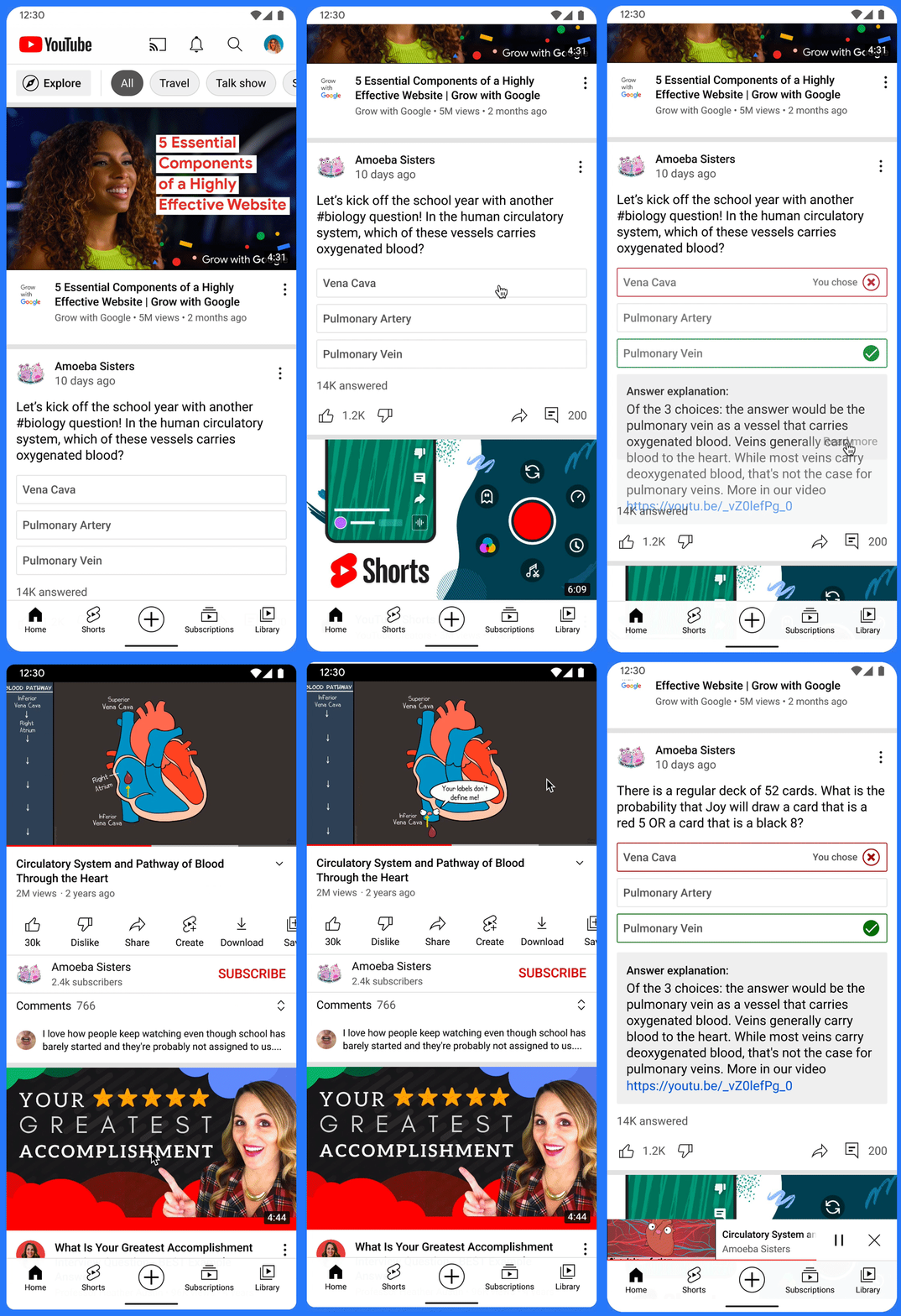
Two last updates that YouTube announced today were courses and quizzes. To help students retain and apply what they’ve learned while watching educational videos, creators can create quick quizzes to test their knowledge. These will show up in the Community tab. Those familiar with YouTube content creation will know that polls have been a thing for quite some time, so it’s great to see teachers gaining the ability to leverage this technology for student growth!
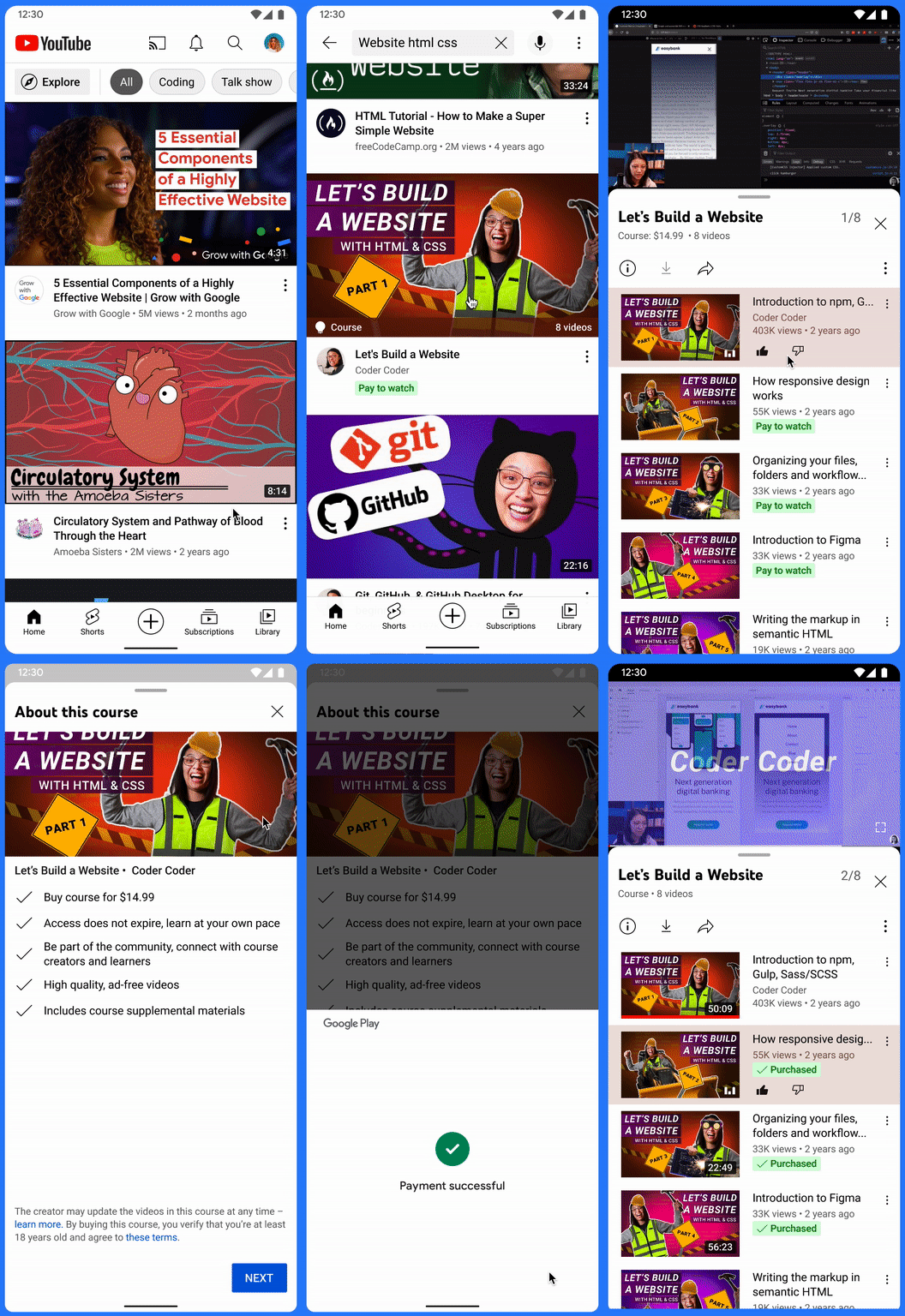
Courses can be tied to videos too as seen above, and this seems to put YouTube on par to become the next Lynda.com or Skillshare. I’m not opposed to this, and I believe that content creators should be compensated with more than just AdSense for all of the hard work they put into their videos. For now, this is strictly for educational content, but I imagine this will become widely available to all YouTubers before long.
Tapping a “Pay to watch” video and choosing a video chapter will bring you to a Google Play Store payment where you can process your card and unlock that content. Once it’s unlocked, you’ll have access to it from then on, but just keep in mind that teachers can change the video content at any time! Let me know in the comments if you think these new resources for educators and learners alike are worthwhile and useful or if you even use YouTube in school as a tool at all.
SUBSCRIBE TO UPSTREAM
Get Chrome Unboxed delivered straight to your inbox
Upstream is our flagship, curated newsletter with the top stories, most click-worthy deals, giveaways, and trending articles from Chrome Unboxed sent directly to your inbox a few times a week. Join 31,000+ subscribers.

