
• Skip to main content
  • Skip to primary sidebar
  • Deals
  • Features
  • Guides
  • Chromebooks
  • Videos
  • Podcast
  • More +
    • Reviews
    • Unboxing
    • Upcoming Devices
    • Chromebook Plus
    • Chrome
    • ChromeOS
    • Chrome OS Flex
  • Search
  • Sign Up
  • Log In
Chrome Unboxed – The Latest Chrome OS News

Chrome Unboxed - The Latest Chrome OS News

A Space for All Things Chrome, Google, and More!

  • Deals
  • Features
  • Guides
  • Chromebooks
  • Videos
  • Podcast
  • More +
    • Reviews
    • Unboxing
    • Upcoming Devices
    • Chromebook Plus
    • Chrome
    • ChromeOS
    • Chrome OS Flex
  • Search
  • Sign Up
  • Log In

Multi-instance app support rolls out for Workspace on tablets, dual-pane view for Keep

September 11, 2022 By Johanna Romero View Comments

Featured image for the official launch of Android 12L for large screen devices

This week, Google announced a roundup of new features that are in the process of rolling out to Android tablets, including a redesign of the widgets for Google Drive and Keep. Additionally, other Workspace app features had also been teased back in July that would improve the experience on tablet devices running Android 12L. One of these is the ability to run multiple instances of Docs, Sheets, or Slides, which is just now rolling out. However, a new feature has also just been announced that supercharges the usefulness of Google Keep.

Dual pane view on Google Keep

As a follow up to drag and drop functionality while split screen is active, Google is now introducing Dual pane view on Keep. Unlike a regular split screen, this new feature allows you to browse one instance of Keep notes on the left side of your screen, while editing content on the right side of your screen.

Xremove ads

Dual pane view for Keep began rolling out to Rapid and Scheduled Release domains on September 8, 2022 and will continue at a gradual pace that will last up to two weeks.

Multi-instance support on Docs, Sheets & Slides

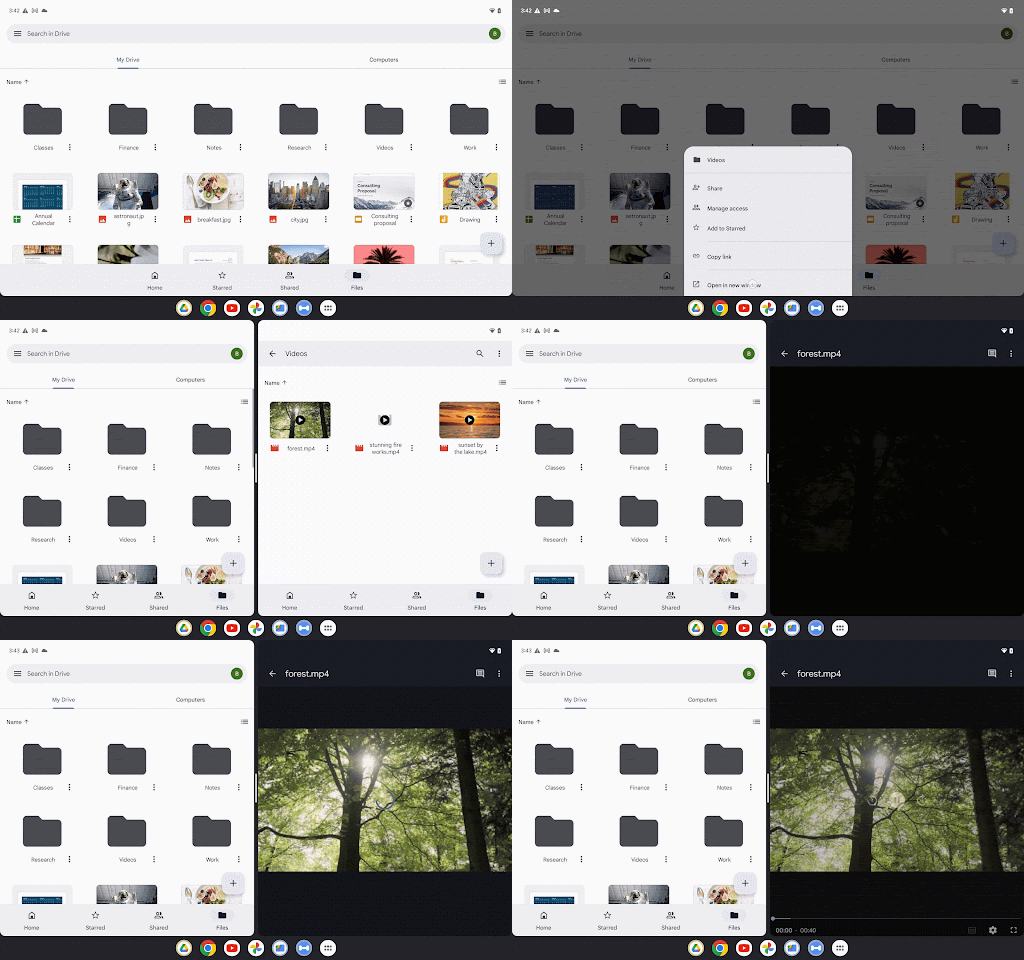
Multi-instance support on Docs, Sheets & Slides was announced in July, however, the roll out scheduled specified that feature wouldn’t be ready until September. According to the latest Workspace release notes, this began rolling out to Rapid and Scheduled Release domains on September 7th, 2022 and will continue its gradual roll out for another two weeks.
Featured Videos

Xremove ads

Multi-instance effectively allows you to have two windows side-by-side of the same app. This can be done in Drive by tapping the three-dot menu on any file, choosing “Open in new window”, and then navigating through each Drive window independently.

Join Chrome Unboxed Plus

Introducing Chrome Unboxed Plus – our revamped membership community. Join today at just $2 / month to get access to our private Discord, exclusive giveaways, AMAs, an ad-free website, ad-free podcast experience and more.

Plus Monthly

$2/mo. after 7-day free trial

Xremove ads

Pay monthly to support our independent coverage and get access to exclusive benefits.

Start free trial

Plus Annual

$20/yr. after 7-day free trial

Pay yearly to support our independent coverage and get access to exclusive benefits.

Xremove ads
Start free trial

Our newsletters are also a great way to get connected. Subscribe here!

Click here to learn more and for membership FAQ

Filed Under: Workspace Tagged With: dual pane view, google workspace, keep, multi-instance view, workspace

Primary Sidebar

Xremove ads

Deals

The best Chromebook deals today

By Robby Payne
December 15, 2025

Save $220 on the powerful, versatile Acer Chromebook Plus Spin 714

By Robby Payne
December 10, 2025

The Google Pixel 9a just hit its lowest price ever at $150 off

By Joseph Humphrey
December 8, 2025

At $349, this Lenovo Chromebook Plus is one of the best value laptops you can buy

By Joseph Humphrey
December 3, 2025

The elusive 8GB Lenovo Chromebook Duet 11 is finally back in stock and down to $279

By Robby Payne
December 2, 2025

More Deals

Xremove ads

Reviews

My review after 6 weeks with the Lenovo Chromebook Plus 14 [VIDEO]

By Robby Payne
August 11, 2025

One week with the best small Android tablet you can buy, and I’m sold

By Robby Payne
May 9, 2025

Best Chromebooks of 2024 [VIDEO]

By Robby Payne
November 28, 2024

Samsung Galaxy Chromebook Plus Review: Samsung is back! [VIDEO]

By Robby Payne
October 28, 2024

Lenovo Chromebook Duet 11″ Review [VIDEO]

By Robby Payne
October 19, 2024

More Reviews

Xremove ads

Guides

This Chromebook trackpad shortcut is definitely not new, but is blowing my mind

By Robby Payne
March 11, 2024

How to reduce broadcast delay on YouTube TV to stop live spoilers

By Robby Payne
December 8, 2023

Windows PC keyboard and Chromebook

How to use a Windows keyboard with a Chromebook

By Joseph Humphrey
December 8, 2023

How reset and revert your Chromebook to the previous version of Chrome OS

By Robby Payne
November 29, 2023

My Chromebook Plus features disappeared: here’s how I fixed it

By Robby Payne
November 24, 2023

More Guides

TWITTER · FACEBOOK · INSTAGRAM · YOUTUBE · EMAIL · ABOUT

Copyright © 2025 · Chrome Unboxed · Chrome is a registered trademark of Google Inc.
We are participants in various affiliate advertising programs designed to provide a means for us to earn fees by linking to affiliated sites.

PRIVACY POLICY