

Support our independent tech coverage. Chrome Unboxed is written by real people, for real people—not search algorithms. Join Chrome Unboxed Plus for just $2 a month to get an ad-free experience, access to our private Discord, and more. Learn more about membership here.
START FREE TRIAL (MONTHLY)START FREE TRIAL (ANNUAL)
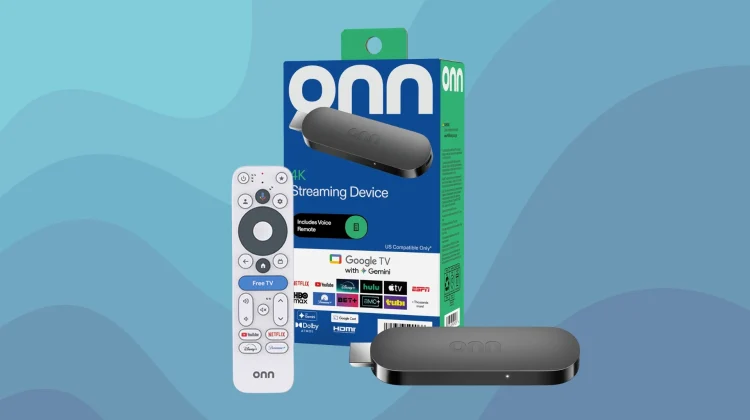
Following right in the footsteps of the Onn 4K Pro 2 we covered recently, Walmart’s new Onn 4K streaming stick is starting to become more widely available. The new Google TV dongle is hitting more store shelves and online listings this week, carrying a retail price of $39.99.
While I was honestly hoping to see this stick land closer to the $30 mark—especially since the older full HD version used to float around $19—paying $40 to get 4K streaming, Dolby Atmos, and Gemini built right in still feels like a pretty solid deal.
A solid spec bump under the hood
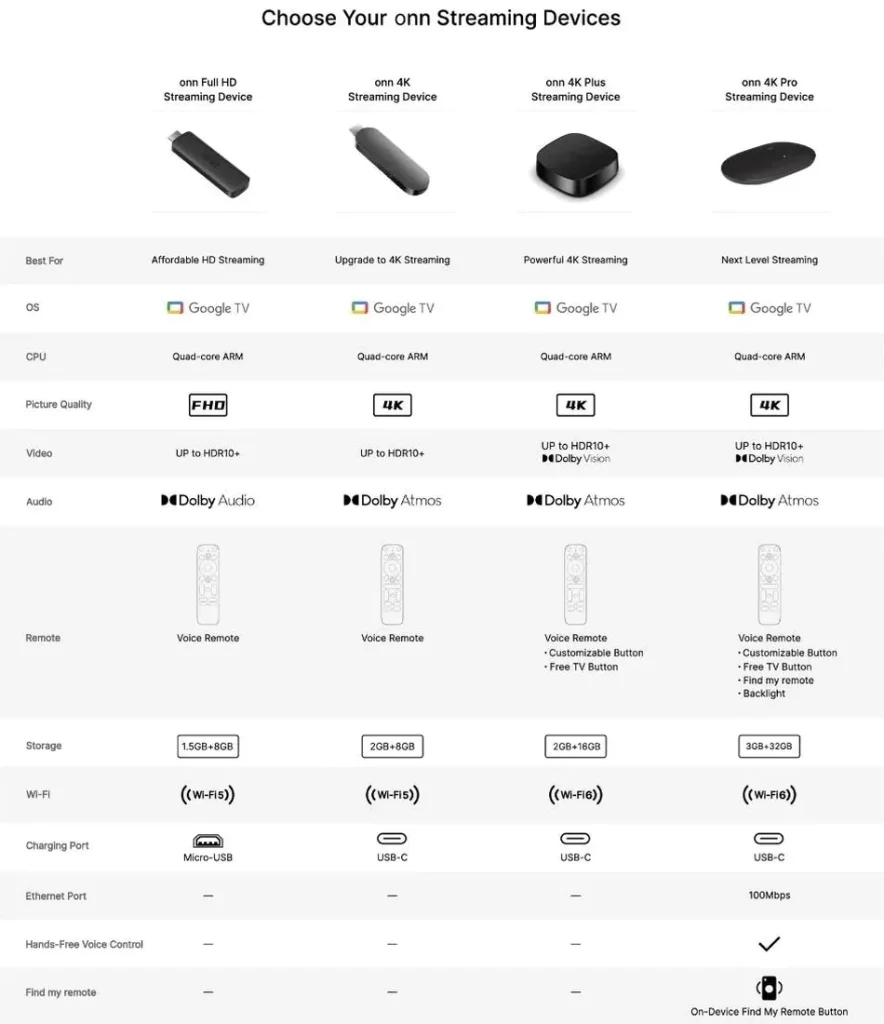
Under the hood, this new stick is powered by a quad-core ARM Cortex-A55 CPU running at 1.7GHz, paired with a Mali-G57 GPU. More importantly, Walmart packed in 2GB of RAM and 8GB of storage. That is a nice step up from the older 1080p stick and should hopefully provide a fairly snappy experience when navigating the UI and loading up apps.
It officially supports 4K Ultra HD resolution, HDR10+, and Dolby Atmos. The box also explicitly highlights “Google TV with Gemini,” bringing voice control and the full freedom of an Android-based OS right to your living room. In the box, Walmart includes the voice remote (with batteries), a 4.88-foot wall AC adapter, and an HDMI extender to help wedge it behind tight, wall-mounted TVs. It’s also worth noting that this device does not have an on-device Find My Remote button.
How it stacks up to the competition
On paper, the Onn 4K stick has a lot to like, but it does have some stiff competition—namely from Amazon. Compared to devices like the Fire TV Stick 4K Plus or the 4K Max, the Onn dongle does have a few notable shortcomings. Most notably, it only supports Wi-Fi 5 and lacks Dolby Vision. Amazon’s sticks frequently go on sale for around $30 or $40, bringing features like Wi-Fi 6, Dolby Vision, and occasionally more storage (in the case of the Max) down to this exact price point.
However, the Onn stick has one massive advantage: the operating system. With Amazon heavily pivoting toward its own platforms like Vega OS, the Onn device gives you the pure, unrestricted Google TV experience. If you’ve become disillusioned with the Fire OS ecosystem and just want the freedom of Android without any blacklisted apps or heavy-handed custom launchers, that alone gives Walmart a major edge.
Overall, I think Walmart’s new Onn 4K Streaming Device is a step in the right direction. If you really want Dolby Vision or Wi-Fi 6, you can always spend an extra $20 and grab the Onn 4K Pro set-top box instead. But if you just want a capable, budget-friendly 4K stick to easily turn your TV into a Google TV streamer, this one likely won’t disappoint. I’d expect to see these formally available everywhere very soon.
SUBSCRIBE TO UPSTREAM
Get Chrome Unboxed delivered straight to your inbox
Upstream is our flagship, curated newsletter with the top stories, most click-worthy deals, giveaways, and trending articles from Chrome Unboxed sent directly to your inbox a few times a week. Join 31,000+ subscribers.

