Support our independent tech coverage. Chrome Unboxed is written by real people, for real people—not search algorithms. Join Chrome Unboxed Plus for just $2 a month to get an ad-free experience, access to our private Discord, and more. Learn more about membership here.
START FREE TRIAL (MONTHLY)START FREE TRIAL (ANNUAL)
Last week, we discussed Google’s new and exciting Productivity launcher which is being tested internally. It no longer takes up the full screen, and while it looks to be inspired by the current, modern design of the peeking launcher, it’s as compact as the original launcher that Chrome OS shipped with years ago. Check out the GIF below to see it in action. It’s certainly not finished – not by a longshot, and apps and folders don’t yet launch or open when clicked.
During my time creating mock-ups for what Google’s Material You design could look like on a Chromebook, I took the liberty of including the Productivity launcher into my vision for what Chrome OS could end up looking and feeling like with all of these design changes applied. My hope is that Google leans in this direction, and based on our current understanding of the company’s plans with the new launcher and its slick, new design language that heralds from Android 12 beta, we have little doubt that what I’ve created will be fairly accurate to the final product.
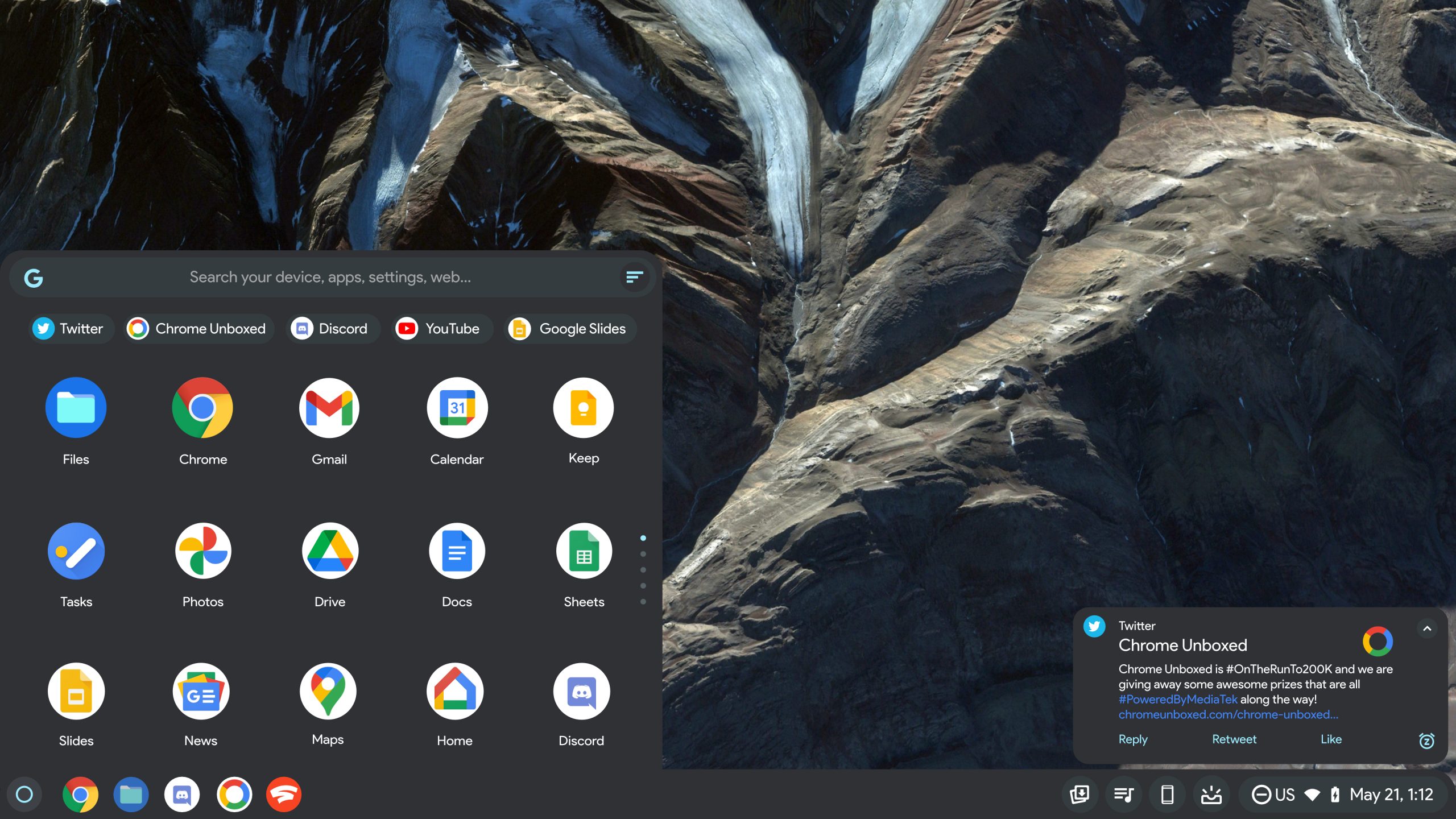
Now, it’s important that I stress that what you’re seeing above is not a leak or a sneak-peek into Google’s actual designs. This is simply a mock-up that I’ve created to represent what I think the Productivity launcher will look like when finished, along with a few tweaks to the operating system’s core components should Material You be applied. On top of that, I’ve included a few things that have come of wishful thinking.
For example, you’ll notice that I’ve left-aligned the shelf icons so that the right-side shelf tools have room to breathe. Additionally, I’ve included my top feature request for the Chromebook launcher – a sorting button. At the top-right of the search bar, you’ll see a sort icon. My greatest hope is that Google implements something like this so that users can alphabetize their apps and folders intelligently with a single click. An option to reset these apps to the user’s custom organization would be important as well.
We’ve had many of our readers cry out for such an option, and I’m inclined to agree that it’s a necessity at this point – especially if Chrome OS considers itself to be maturing. Don’t forget, Google recently added a launcher categorization flag to the Canary channel, and we’re already seeing some launcher labels appear which indicate that there may soon be tags to identify the source of a piece of content via search.
In Google’s Productivity launcher experiment, the styling and recently opened item bubbles are not yet present, but I’ve gone ahead and imagined them in the mock-up so that you can get a fuller understanding of what the final product is probably going to be. The major difference here is that in step with the other Material You companion mocks which you can see in the video below, I’ve added a custom color palette to a few of the design elements in the launcher – namely the Google ‘G’, the launcher sort button and the pagination dots on the right side.
I would love to hear your thoughts on what I’ve thought up for the final look of the Productivity launcher. Would you be happier with this over the current full screen launcher that slides up from the bottom of the screen? While it more closely resembles the Windows 10 non full screen Start button for PCs to a few, I think that most will be excited to get some of their screen space back.
SUBSCRIBE TO UPSTREAM
Get Chrome Unboxed delivered straight to your inbox
Upstream is our flagship, curated newsletter with the top stories, most click-worthy deals, giveaways, and trending articles from Chrome Unboxed sent directly to your inbox a few times a week. Join 31,000+ subscribers.