

Support our independent tech coverage. Chrome Unboxed is written by real people, for real people—not search algorithms. Join Chrome Unboxed Plus for just $2 a month to get an ad-free experience, access to our private Discord, and more. Learn more about membership here.
START FREE TRIAL (MONTHLY)START FREE TRIAL (ANNUAL)
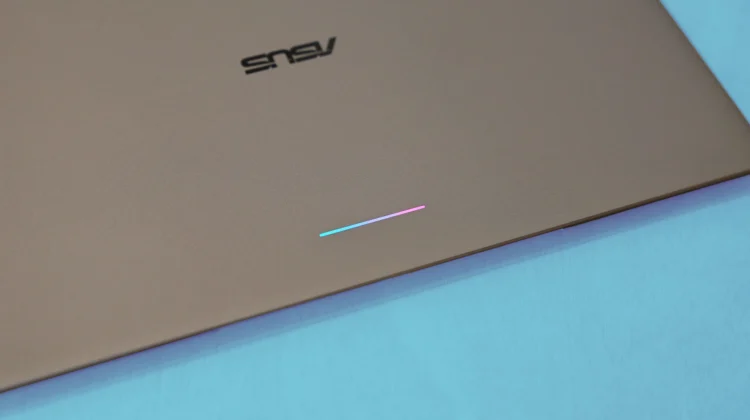
One of the most interesting hardware touches on the newly announced Googlebook lineup is the return of the iconic Glow Bar. First made famous on the original Chromebook Pixel and Pixel C, the multicolor light bar is back as a signature hardware requirement across every launch device from Acer, ASUS, Dell, HP, and Lenovo.
Officially, Google designed the Glow Bar for clean, functional utility: it sweeps to show battery and charging status, animates during boot-up, and pulses gently whenever you interact with Gemini on-device.
However, during hands-on time in New York City, many noticed a playful “disco mode” that flashes the LED bar in rhythmic sync with whatever audio or music is playing through the speakers.
While it wasn’t clear during initial demos whether this was an internal developer flag or an easter egg, Google Senior Director Alexander Kuscher confirmed the feature’s existence on the Android Faithful podcast, noting that a standalone app called “Glow Bar Disco” is tucked away inside the OS.
We actually chatted directly with Alexander about this very feature at the launch event, so as not to leave you guessing, we can tell you exactly where the app is hiding and how to launch it on day one.
How to find and open the hidden ‘Glow Bar Disco’ app on your Googlebook
Google didn’t pin Glow Bar Disco to the main app launcher, but it isn’t buried behind developer mode or Linux terminal commands. It lives directly within your system settings as a pre-installed system package:
- Open Settings on your Googlebook.
- Navigate to Apps > App Manager.
- Click to View all apps (make sure system apps are visible).
- Use the search bar at the top and type “Glow Bar Disco”.
- Click on the app entry and hit Open.
Once opened, the app hooks into the active audio output stream, turning the lid’s light bar into an audio visualizer that syncs color pulses and rhythmic animations to your Spotify playlists, YouTube Music tracks, or local video files. There are also some additional options in there for things like a Knight Rider-like mode and more. It’s a really fun add-on.
An iconic hardware anchor (and future APIs)
Beyond easter eggs and party tricks, the Glow Bar represents something much bigger for the platform. Even as hardware partners introduce their own industrial designs, the Glow Bar serves as an instant, unmistakable visual anchor that identifies the device as a Googlebook.
More importantly, Google confirmed that this is just the beginning for the light bar. The team plans to open up Glow Bar APIs to third-party Android and web developers in the future. That will allow communication apps to create bespoke notification flashes, games to trigger reactive lighting effects, and productivity tools to communicate visual status alerts without cluttering your screen.
For now, when review units and retail pre-orders land on doorsteps next week, you’ll know exactly where to dig to show off Googlebook’s coolest party trick.
SUBSCRIBE TO UPSTREAM
Get Chrome Unboxed delivered straight to your inbox
Upstream is our flagship, curated newsletter with the top stories, most click-worthy deals, giveaways, and trending articles from Chrome Unboxed sent directly to your inbox a few times a week. Join 31,000+ subscribers.

