


Support our independent tech coverage. Chrome Unboxed is written by real people, for real people—not search algorithms. Join Chrome Unboxed Plus for just $2 a month to get an ad-free experience, access to our private Discord, and more. Learn more about membership here.
START FREE TRIAL (MONTHLY)START FREE TRIAL (ANNUAL)
Back in 2017, Google showed off a pretty incredible “Object Removal” feature where a boy playing baseball could be seen behind a fence. Using artificial intelligence and machine learning, Google Photos was able to remove the fence and make it seem as if it were never there to begin with!
Unfortunately, this feature never saw the light of day, and only a year later, the company gave some information on why it was never spoken about or shown off again. According to XDA Developers who heard directly from Google, the feature was deprioritized in favor of other, more useful ones like Magic Eraser.
We were told that the object removal feature teased during the 2017 keynote was a demonstration of Google’s machine learning capabilities. While the technology is certainly available and can be deployed, the team approaches building their product by prioritizing what’s most important for people. Hence, the Photos team prioritized other applications of machine learning above this feature.
XDA Developers
To date, there’s no telling whether or not Google will release Smart Object Removal to the public, and while I certainly hope it does, there is a way for you to try it out right this very instant. A company called Adva Soft has an app called Touch Retouch on the Google Play Store, and with it, you can perform the same machine learning magic trick!
Deemed “Smart Mesh Removal”, the feature highlights a gate or fence in the foreground and applies logic to it to determine what should be behind it. Recreating or constructing the missing elements, it removes the fence entirely and makes it seem as though it never existed – just like Google.
Now, there’s no doubt that when you try this feature, you’ll notice some janky lines, and I’m almost certain that Google’s tech will be more accurate in how it stitches images back together, but there is a way to correct split lines in the doctored image using Touch Retouch.
In the editing view, just tap the “Lines” option on the bottom navigation and then tap “Line Remover”. From there, all you’ll need to do is draw over the messed-up alignment in the image and it corrects the stitching pretty well. You can see an example of this below. Use the slider to see the before and after image!
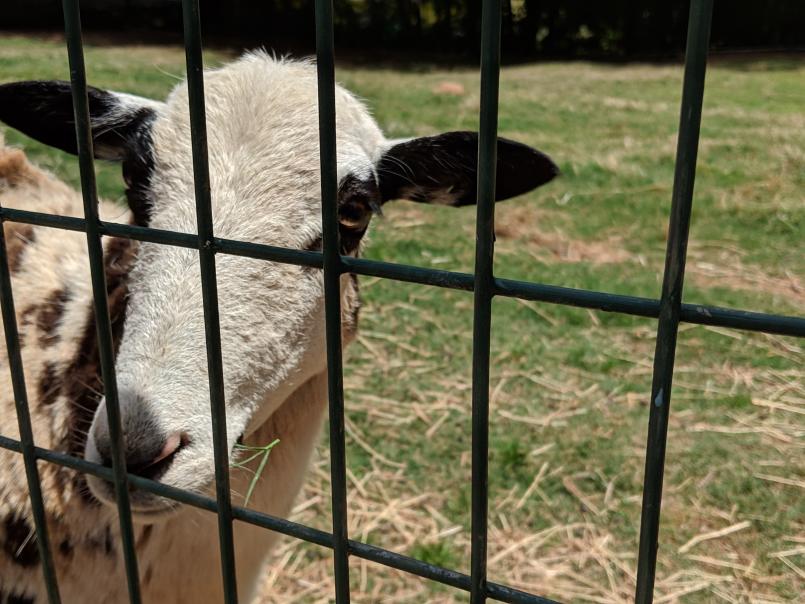

While it’s still not perfect even after applying the fixes, you will notice that the image quality does improve. It’s super impressive to see a developer like ADVA Soft pull this off and place it on the market for users when Google decided to pull back from releasing its own version of the tech.
I imagine this is using the same logic as Google’s Magic Eraser, so it’s not like we haven’t seen smart object removal before from the tech giant, but when it comes to a fence in the foreground, it just feels like a whole other level of mind blowing. You can install Touch Retouch below – enjoy!
Credit: GoldenCheezie
SUBSCRIBE TO UPSTREAM
Get Chrome Unboxed delivered straight to your inbox
Upstream is our flagship, curated newsletter with the top stories, most click-worthy deals, giveaways, and trending articles from Chrome Unboxed sent directly to your inbox a few times a week. Join 31,000+ subscribers.

