

• Skip to main content
  • Skip to primary sidebar
  • Deals
  • Features
  • Guides
  • Chromebooks
  • Videos
  • Podcast
  • More +
    • Reviews
    • Unboxing
    • Upcoming Devices
    • Chromebook Plus
    • Chrome
    • ChromeOS
    • Chrome OS Flex
  • Search
  • Sign Up
  • Log In
Chrome Unboxed – The Latest Chrome OS News

Chrome Unboxed - The Latest Chrome OS News

A Space for All Things Chrome, Google, and More!

  • Deals
  • Features
  • Guides
  • Chromebooks
  • Videos
  • Podcast
  • More +
    • Reviews
    • Unboxing
    • Upcoming Devices
    • Chromebook Plus
    • Chrome
    • ChromeOS
    • Chrome OS Flex
  • Search
  • Sign Up
  • Log In

These are not the photos you’re looking for: Nest Hub adding hand wave gesture for browsing

October 9, 2021 By Michael Perrigo View Comments

Support our independent tech coverage. Chrome Unboxed is written by real people, for real people—not search algorithms. Join Chrome Unboxed Plus for just $2 a month to get an ad-free experience, access to our private Discord, and more. Learn more about membership here.
START FREE TRIAL (MONTHLY)START FREE TRIAL (ANNUAL)

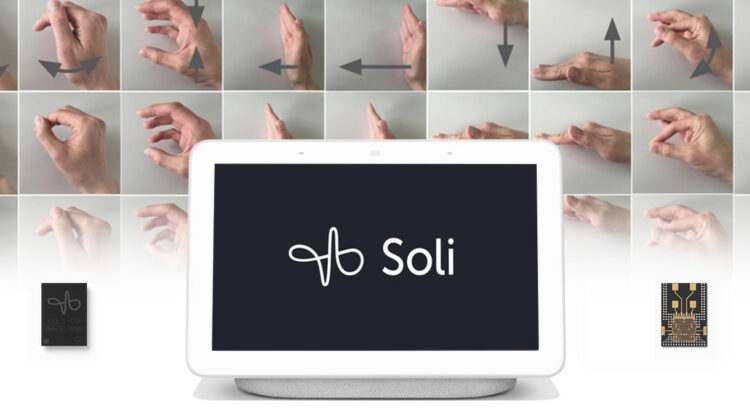
The Soli chip that’s built into the second-generation Nest Hub lets you use Jedi Mind Tricks to control the experience using ‘Motion Sense’. Well, not literally, but holding your hand up to play or pause music and waving to dismiss timers sure feels like using the Force to bend reality to your will, doesn’t it?

Well, apparently, that’s just not enough for Google as it’s adding yet another – the ability to swipe through Google Photos just by waving your hand from left to right or vice versa in front o the display. Discovered by 9to5Google, this “browse photos” trick was recently encountered in the Home app a bit early, and showed an animated tutorial of the process. You’ll notice in the photos below that the hand wave gesture already existed for the aforementioned two use cases, but now the small and almost easy-to-miss inclusion of photo navigation on your Hub’s screensaver has been added.
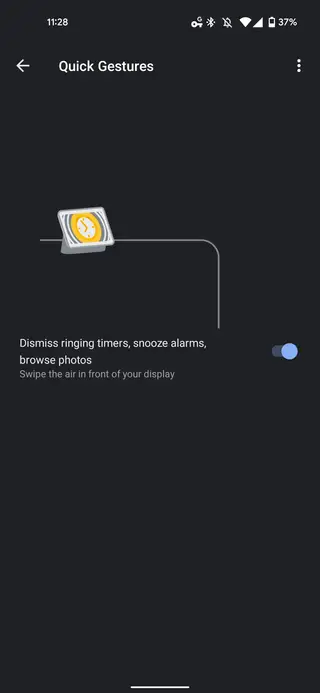
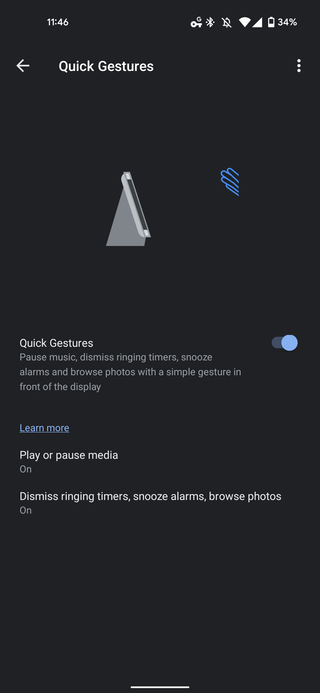
Xremove ads
Source: 9to5Google

According to 9to5Google, the new feature isn’t yet working on 2nd-gen Nest Hubs with Cast firmware v1.56, but enrolling your device into the Preview program could help ensure you get it as soon as it’s ready for early consumer testing. Of course, this can be disabled using the quick toggle found in the app’s settings, but I can’t see many situations where you would accidentally trigger it and therefore be averse to it.

I also find it interesting how the very same feature that was rejected by Pixel phone owners to control their music ended up being a pretty awesome and futuristic way to interact with our smart homes. Sometimes, new technology and innovations have to go through that ‘awkward haircut’ stage before it finds its place in society. Let me know below if this is something you’re already using for timers and such or if you’ve disabled it entirely.

Featured Videos

Xremove ads

SUBSCRIBE TO UPSTREAM

Get Chrome Unboxed delivered straight to your inbox

Upstream is our flagship, curated newsletter with the top stories, most click-worthy deals, giveaways, and trending articles from Chrome Unboxed sent directly to your inbox a few times a week. Join 31,000+ subscribers.

SUBSCRIBE HERE!

Filed Under: Nest, New & Upcoming Features, News, Smart Home, Updates

About Michael Perrigo

Known as "Google Mike" to his customers, Michael worked at Best Buy as a Chromebook Expert who dedicated his time to understanding the user experience from a regular Chromebook owner's perspective. Having spent nearly 20 years meeting you face-to-face, he strives to help you understand your technology through carefully crafted guides and coverage, relentlessly seeking out the spark in what's new and exciting about ChromeOS.

Primary Sidebar

Googlebook

Google confirms Googlebook pre-orders start on September 21

By Robby Payne
September 14, 2026

I completely overlooked a massive Googlebook feature from the latest Lenovo leak

By Robby Payne
September 14, 2026

What we know about Lenovo’s mysterious third Googlebook ahead of tomorrow’s NYC media event

By Robby Payne
September 14, 2026

Lenovo Googlebook leak reveals the name of Google’s new laptop operating system

By Robby Payne
September 11, 2026

Googlebook will automatically organize your files using on-device AI ‘Collections’

By Robby Payne
September 11, 2026

More Googlebook

Xremove ads

Deals

The best Chromebook deals today

By Robby Payne
September 2, 2026

The best Chromebook ever made is $350 off at Best Buy right now

By Robby Payne
August 21, 2026

The excellent, powerful Acer Chromebook Plus Spin 514 is $150 off right now

By Robby Payne
August 12, 2026

Acer’s new Chromebook 315 is wildly affordable and points to the real future of Chromebooks

By Robby Payne
August 11, 2026

You can score the massively upgraded ASUS CX54 Chromebook Plus for just $599 right now

By Joseph Humphrey
July 28, 2026

More Deals

Xremove ads

Reviews

Acer Chromebook Plus Spin 514 Review: the best convertible you can buy [VIDEO]

By Robby Payne
July 1, 2026

Lenovo Chromebook Plus 2-in-1 Review: pretty great in a vacuum

By Robby Payne
April 23, 2026

My review after 6 weeks with the Lenovo Chromebook Plus 14 [VIDEO]

By Robby Payne
August 11, 2025

One week with the best small Android tablet you can buy, and I’m sold

By Robby Payne
May 9, 2025

Best Chromebooks of 2024 [VIDEO]

By Robby Payne
November 28, 2024

More Reviews

Xremove ads

TWITTER · FACEBOOK · INSTAGRAM · YOUTUBE · EMAIL · ABOUT

Copyright © 2026 · Chrome Unboxed · Chrome is a registered trademark of Google Inc.
We are participants in various affiliate advertising programs designed to provide a means for us to earn fees by linking to affiliated sites.

PRIVACY POLICY