

Support our independent tech coverage. Chrome Unboxed is written by real people, for real people—not search algorithms. Join Chrome Unboxed Plus for just $2 a month to get an ad-free experience, access to our private Discord, and more. Learn more about membership here.
START FREE TRIAL (MONTHLY)START FREE TRIAL (ANNUAL)
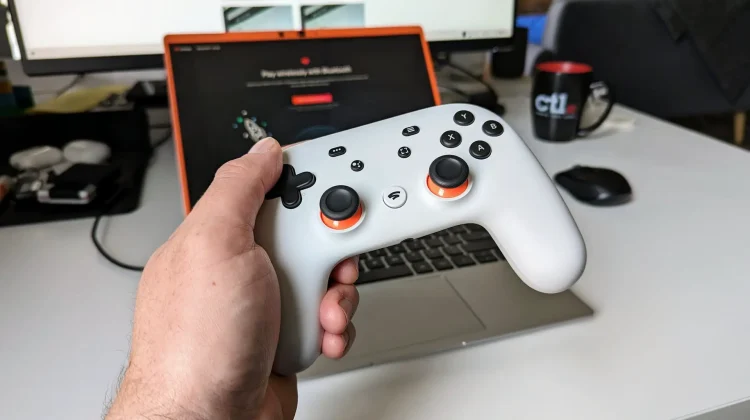
As we approach the third anniversary of Stadia’s shutdown, the final “active” remnant of Google’s cloud gaming experiment is about to go dark. For years, the official Stadia Controller Bluetooth conversion tool has lived on borrowed time, receiving multiple last-minute extensions from Google.
However, with no new extension in sight, the web-based tool is officially scheduled to go offline on December 31, 2025. If you have a Stadia Controller sitting in a drawer, this is your absolute last window to unlock its wireless potential before it becomes a wired-only relic forever.
Why the Stadia Controller is still worth saving
You might wonder why there is so much fuss over hardware for a dead platform, but the reality is that the Stadia Controller is an excellent piece of gear. It features top-tier ergonomics, a solid build quality that rivals the best from PlayStation and Xbox, and a unique personality that stands out in a sea of generic gamepads. By converting it to Bluetooth mode, you aren’t just saving a piece of gaming history from a landfill; you’re gaining a high-quality wireless controller for your PC, Mac, or Android phone for free.
Furthermore, support for the controller has quietly improved over the last few weeks. Steam recently upgraded its input support to better recognize the Stadia Controller natively. The Stadia button now functions like an Xbox or Steam key to open Big Picture mode, the screenshot button is fully functional on SteamOS, and the Google Assistant key can even be programmed with custom macros. While some limitations remain (like the lack of rumble over Bluetooth and the disabled 3.5mm headphone jack) the controller is more useful today than it has been since the day Stadia died.
How to beat the December 31 deadline
The conversion process is straightforward and only takes a few minutes, but it requires the official web tool while it’s still live. Here is the quick breakdown of how to get it done:
- Head to the official site: Use a Chrome-based browser on your PC to visit stadia.google.com/controller.
- Connect via USB: Plug your controller into your computer using a USB-C data cable.
- Unlock and Update: Follow the on-screen instructions, which will involve a specific button combination (usually holding the Options and Google Assistant buttons along with A and Y) to allow the browser to flash the new Bluetooth firmware.
- Pair and Play: Once updated, you can enter pairing mode by holding the Y + Stadia buttons for two seconds until the status light pulses orange.
The final door closes on Stadia
Seeing this tool go offline feels like the final door closing on the Stadia experiment. Google did right by its customers by offering full hardware refunds and providing this “rescue” tool to prevent massive amounts of e-waste, but the era of official support is over. If you want to keep using your controller wirelessly for years to come, don’t wait for a last-minute miracle; get it updated before the clock strikes midnight on the 31st.
SUBSCRIBE TO UPSTREAM
Get Chrome Unboxed delivered straight to your inbox
Upstream is our flagship, curated newsletter with the top stories, most click-worthy deals, giveaways, and trending articles from Chrome Unboxed sent directly to your inbox a few times a week. Join 31,000+ subscribers.

