

Support our independent tech coverage. Chrome Unboxed is written by real people, for real people—not search algorithms. Join Chrome Unboxed Plus for just $2 a month to get an ad-free experience, access to our private Discord, and more. Learn more about membership here.
START FREE TRIAL (MONTHLY)START FREE TRIAL (ANNUAL)
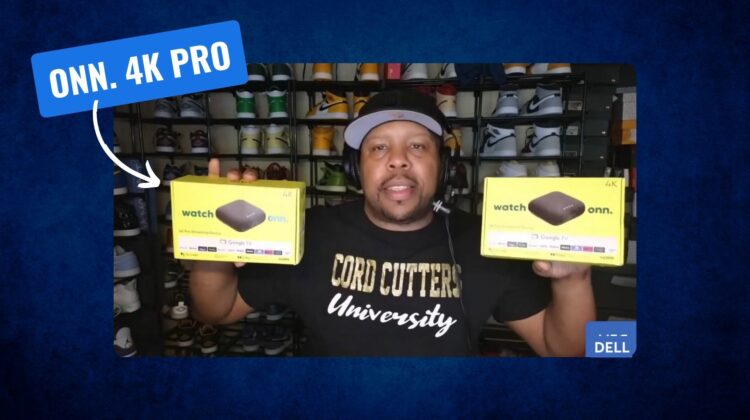
Just a few weeks ago, a Bluetooth SIG listing showed up for what we now know for certain is the Onn. 4K Pro Google TV. How do we know for sure? Well, because a YouTuber by the name of SUPERDELL-TV wandered into a local Walmart store and happened to find a couple of them just sitting on the shelf.
Stay with me, though. I don’t think there’s any reason to run out to your local store just yet, as this seems to have been mistakenly plopped on a shelf ahead of schedule. What it does mean, though, is that we’ll likely see this new 4K Pro Google TV box very soon.
What to expect from this new streamer
First, I’m sure most of you are likely wondering about the price on this one, and these upgraded internals do come at a premium. While Walmart’s previous streaming boxes always came in around $20-$30, this new Pro model will retail at $50 and from what I’m seeing in this video, that’s a fair shake. There are a lot of upgrades here over the standard Onn. 4K Google TV, so a $50 price tag isn’t shocking.
First up, the build quality of this device looks far better than what we’ve seen in the past. The cloth-like upper portion houses four circular LEDs that should look familiar to anyone who’s ever used a Nest Mini or any other Google Home speaker. And those are there precisely for what you’d expect: a bit of “Hey Google” action.
With a mic on the device itself, the Onn. 4K Pro can take hands-free requests to start shows, launch apps or show the weather if you don’t want to mess with a remote. How good those commands will be is anyone’s guess with the current state of the Google Assistant, but being able to get a few things done on your TV without touching the remote is a nice touch.
And those requests look to be handled with a lot more speed than most of us have become accustomed to in the past few years. Let’s face it: Google TV devices are laggy and slow. But that doesn’t seem to be the case for this new one. Powered by a quad-core Cortex-A55 processor, 3GB of RAM and 32GB of storage, the demos from the video look fast and smooth from moving around the UI to installing apps. And that’s the sort of upgrade I’m after for sure.
On the outside, the Onn. 4K Pro also has an Ethernet, USB 3.0 Type-A, and HDMI port to get things connected. I can already tell you that I’ll be using that Ethernet port to patch directly into the router for our main TV and the USB Type-A port means you’ll be able to drop in a Logitech dongle for some easy keyboard/mouse navigation if you so choose. Or, maybe even some GeForce NOW action.
All in all, this looks like a solid upgrade that will be totally worth the asking price. With it accidentally being put on shelves, I can’t imagine it will be long before we see this one becoming available. We’ll get our hands on one as soon as possible (you know I’m going to be checking our local Walmart stores for sure) and once we have one in-hand, we’ll let you know more. Now, it’s Google’s turn to respond.
SUBSCRIBE TO UPSTREAM
Get Chrome Unboxed delivered straight to your inbox
Upstream is our flagship, curated newsletter with the top stories, most click-worthy deals, giveaways, and trending articles from Chrome Unboxed sent directly to your inbox a few times a week. Join 31,000+ subscribers.

