


Support our independent tech coverage. Chrome Unboxed is written by real people, for real people—not search algorithms. Join Chrome Unboxed Plus for just $2 a month to get an ad-free experience, access to our private Discord, and more. Learn more about membership here.
START FREE TRIAL (MONTHLY)START FREE TRIAL (ANNUAL)
My first attempt at a standing desk is a metal shelving unit that still sits in our studio to this day. Inspired by another co-worker I’d watched work from a standing position all day, I thought my overall health would benefit from standing at my desk throughout the day instead of sitting. After all, for a short period about 5 years ago, sitting was the new smoking, right? It was the issue that was killing all of us desk workers and the only fix was to stand up and undo it. So I did.
I bought a shelving unit, made it work as a standing desk, and hated nearly every minute of it. In my excitement to try a whole new way to work, I didn’t really consider how fatiguing it actually is to stand in one spot for 7-8 hours a day. I’d worked many jobs in the past where I was on my feet all day, but I also moved about the workspace as well. Standing in one place all day is honestly pretty terrible. It didn’t take long before I was back to a standard desk and back to feeling like my sedentary work life was hurting my health.
Fast forward a bit and we all realized that sitting all day is bad, standing all day is not great either, and just getting up and moving around during the day is the best thing overall for your health. With that in mind, I still knew that standing from time to time at my desk was beneficial and for limited times during my workday, I did really enjoy it. Aside from having two desks (not practical at all), the only solution I saw to my working needs was a sit/stand desk. At the time, there weren’t too many options and as I began searching, I came across Autonomous. Their SmartDesk 2 was reasonably priced, attractive, and just the right fit for what I was looking for. Oddly enough, it wasn’t long after my purchase that they hit me up about doing a review on YouTube, and my sit/stand desk journey began.
Since that time, I’ve used a wide variety of this sort of desk. We actually now have 6 sit/stand desks in our office and my former employer has their entire team outfitted with variable height desks. Everywhere I look, there are sit/stand desks to be found and they are made by all sorts of manufacturers, too. However, my favorite of the bunch is still the dual-motor SmartDesk 2 from Autonomous because there’s something just a touch nicer about their hardware versus the other desks I’ve had and used.
The L-Shaped SmartDesk Corner
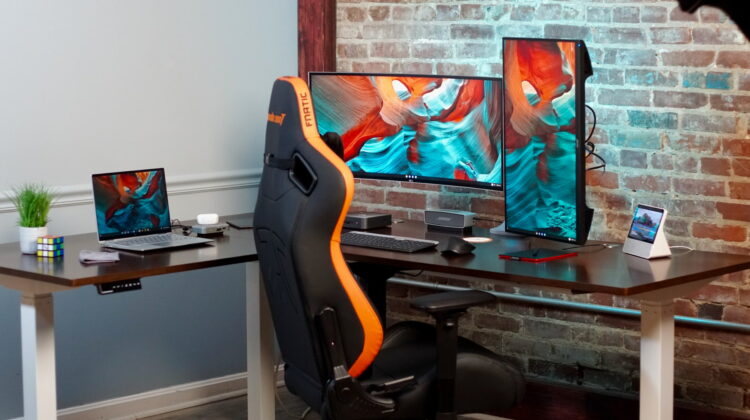
The latest addition to our desk collection is the SmartDesk Corner and it was given to us by Autonomous to take a look at, use in a video, and finally use in our podcast studio. You may have seen our Ultimate Chrome OS Desk Setup video and, if you did, you’ll note the vast options on offer by a desk of this size. The layouts are numerous, the size of the workspace beckons productivity, and the whole thing goes together with relative ease.
After that video, the SmartDesk Corner made the trip into our Podcast studio where we’ll be showing it off on a weekly basis as we transition our podcast from audio-only to video production as well. For this task, the SmartDesk Corner is absolutely perfect. With the massive space of the desktop, cable storage trays built-in, the beauty of the wood top, and the customized height adjustment at the push of a button, this desk is the perfect foundation for our latest effort to bring another dimension to the podcast.
However, many of you aren’t going to be sitting three people around this desk with any regularity, and I’d argue that I’m a bit envious of you. Sitting at our Ultimate Chrome OS Desk Setup, I was green from head to toe. While not practical in our current office space, I can see a day where I would love to leverage a desk like this for my personal workspace. Having the ability to set up my current desk and basically have a second desk surrounding me is tantalizing for sure. While I’m not 100% sure what exactly I’d do with the extra real estate, I feel confident I’d find quite a few things to take up that space.
With this desk’s triple motors and sleek looks, moving to a standing position for a few minutes here and there is even less of a hassle as the desktop rises to meet your posture very, very quickly. I know it’s just a desk and as long as it looks good, feels good, and is well constructed, it is doing the job. But there was something tactile and visceral about sitting at this desk for me and I think for many of you, it could be an incredible fit for a home office setup. There’s literally nothing else I could ask of this desk and I think Autonomous has done a great job putting together a bit of tech and a clean aesthetic to build a desk that does everything you need and then gets the job done while getting out of the way.

SUBSCRIBE TO UPSTREAM
Get Chrome Unboxed delivered straight to your inbox
Upstream is our flagship, curated newsletter with the top stories, most click-worthy deals, giveaways, and trending articles from Chrome Unboxed sent directly to your inbox a few times a week. Join 31,000+ subscribers.

