
• Skip to main content
  • Skip to primary sidebar
  • Deals
  • Features
  • Guides
  • Chromebooks
  • Videos
  • Podcast
  • More +
    • Reviews
    • Unboxing
    • Upcoming Devices
    • Chromebook Plus
    • Chrome
    • ChromeOS
    • Chrome OS Flex
  • Search
  • Sign Up
  • Log In
Chrome Unboxed – The Latest Chrome OS News

Chrome Unboxed - The Latest Chrome OS News

A Space for All Things Chrome, Google, and More!

  • Deals
  • Features
  • Guides
  • Chromebooks
  • Videos
  • Podcast
  • More +
    • Reviews
    • Unboxing
    • Upcoming Devices
    • Chromebook Plus
    • Chrome
    • ChromeOS
    • Chrome OS Flex
  • Search
  • Sign Up
  • Log In

Switching from iCloud Photos to Google Photos may become easier

March 18, 2022 By Johanna Romero View Comments

Support our independent tech coverage. Chrome Unboxed is written by real people, for real people—not search algorithms. Join Chrome Unboxed Plus for just $2 a month to get an ad-free experience, access to our private Discord, and more. Learn more about membership here.
START FREE TRIAL (MONTHLY)START FREE TRIAL (ANNUAL)

When I switched from iOS to Android a few years ago to try the Pixel 2, I faced a problem. While I was able to transfer my data from the iPhone I had at the time to my new Pixel using a lightning cable and the included Quick Switch Adapter, I could not transfer all the photos I had saved in my iCloud Photos account. That’s thousands of cute baby and dog pictures stuck in the cloud.

You see, the built-in utility that the Pixel phones (and I’m assuming all Android phones) have only transfers the documents and photos that are saved locally on your device. This can be a big issue if you have a phone without a lot of storage space as you cannot be expected to download all your photos to then transfer them. Fear not, however: all is not lost as a solution is available. It does need to be noted that this solution won’t scratch your itch for instant gratification and instead will force you to wait 3-7 days.

Xremove ads

Fortunately, it’s looking like that may be about to change. 9to5Google found some evidence via an APK teardown that Google’s upcoming “Switch to Android” app for iOS may be able to import data from iCloud directly into Google Photos. We also noticed this last month when we reported on what looked like a test build of Google Photos that had that exact functionality advertised, among other features. However, the “Switch to Android” iOS app would allow starting the process from the iPhone itself instead of the Android device.
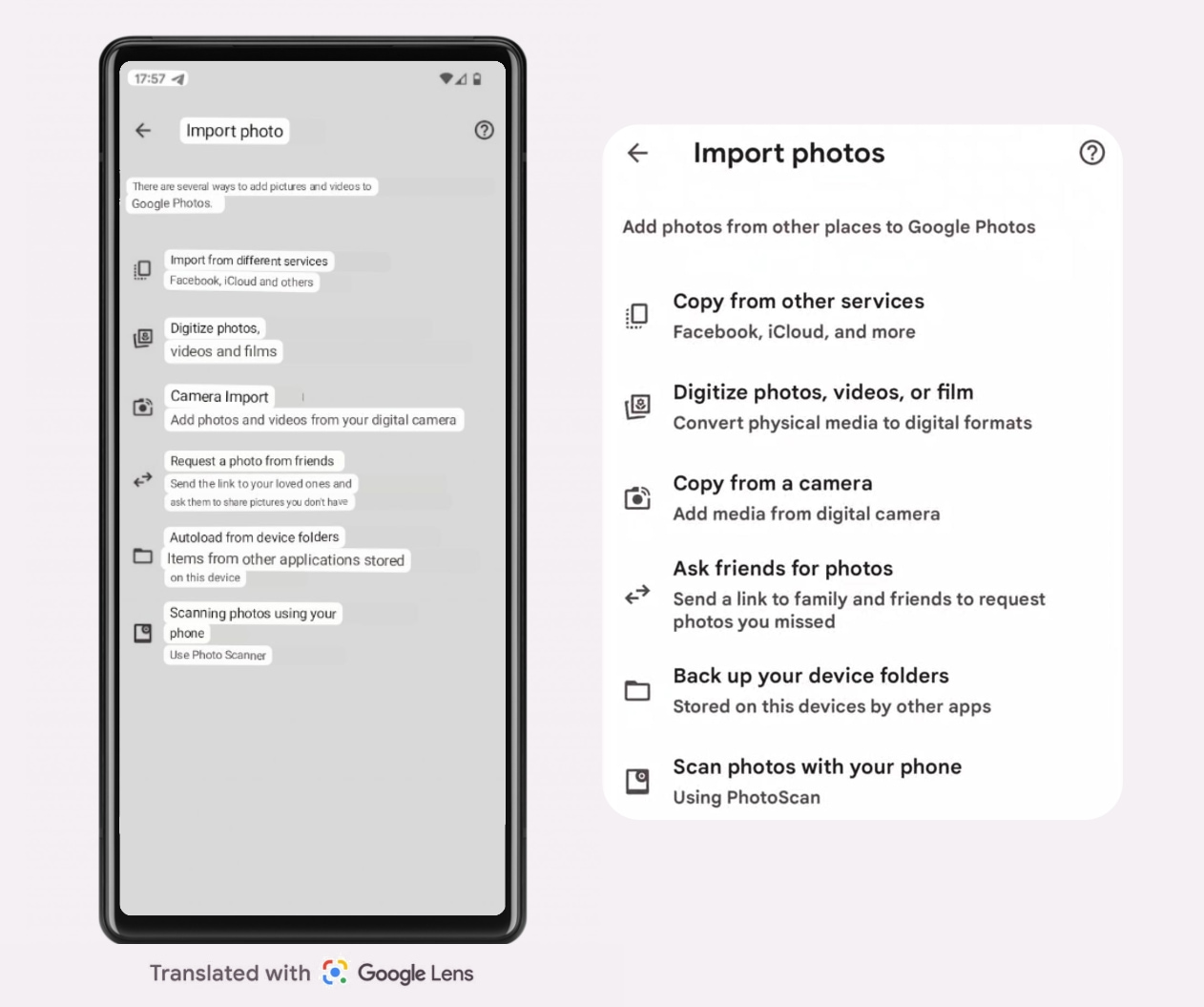
Options in the “Import photo” menu of the Google Photos test build
Via googlenws.ru / English translated version via Forbes

Unfortunately, according to 9to5, the APK teardown doesn’t clarify whether this is the same functionality already included by going to g.co/transferfromicloud or if this would be a direct data transfer from cloud service to cloud service without the long wait. Another interesting tidbit is the mention that this could be done with a USB-C cable, which is puzzling considering that iPhones do not use USB-C cables, and this would most likely require a USB-C to Lightning cable or an adapter to be purchased.

Featured Videos

Xremove ads

Whatever comes out of this, I’m glad to see Google including ways users can seamlessly transfer into the Google ecosystem. Apple is very good at doing this, even providing a “Move to iOS” app on the Play Store. I do hope that the iCloud Photos transfer using the “Move to Android” app offers a faster turnaround than what we currently have. Stay tuned for more on this as we get more info.

SUBSCRIBE TO UPSTREAM

Get Chrome Unboxed delivered straight to your inbox

Upstream is our flagship, curated newsletter with the top stories, most click-worthy deals, giveaways, and trending articles from Chrome Unboxed sent directly to your inbox a few times a week. Join 31,000+ subscribers.

SUBSCRIBE HERE!

Filed Under: Android, Apps, New & Upcoming Features, News Tagged With: google photos, icloud, icloud photos, ios, switch to android, switch to ios

Primary Sidebar

Xremove ads

Deals

You can score $40 off Google’s battery-powered Nest Doorbell right now

By Joseph Humphrey
March 20, 2026

The touchscreen Lenovo Chromebook Slim 3 is a steal at under $200

By Robby Payne
March 16, 2026

Google TV Streamer and Remote held in front of a wall-mounted TV

The premium Google TV Streamer 4K is back down to $80

By Joseph Humphrey
March 16, 2026

The best Chromebook deals today

By Robby Payne
March 16, 2026

Pixel Buds Pro 2 running

I still love the Pixel Buds Pro 2 and they are $60 off right now

By Joseph Humphrey
March 13, 2026

More Deals

Xremove ads

Reviews

Acer Chromebook Plus Spin 514 Review: Kompanio Ultra power in a convertible

By Robby Payne
December 24, 2025

My review after 6 weeks with the Lenovo Chromebook Plus 14 [VIDEO]

By Robby Payne
August 11, 2025

One week with the best small Android tablet you can buy, and I’m sold

By Robby Payne
May 9, 2025

Best Chromebooks of 2024 [VIDEO]

By Robby Payne
November 28, 2024

Samsung Galaxy Chromebook Plus Review: Samsung is back! [VIDEO]

By Robby Payne
October 28, 2024

More Reviews

Xremove ads

Guides

This Chromebook trackpad shortcut is definitely not new, but is blowing my mind

By Robby Payne
March 11, 2024

How to reduce broadcast delay on YouTube TV to stop live spoilers

By Robby Payne
December 8, 2023

Windows PC keyboard and Chromebook

How to use a Windows keyboard with a Chromebook

By Joseph Humphrey
December 8, 2023

How reset and revert your Chromebook to the previous version of Chrome OS

By Robby Payne
November 29, 2023

My Chromebook Plus features disappeared: here’s how I fixed it

By Robby Payne
November 24, 2023

More Guides

TWITTER · FACEBOOK · INSTAGRAM · YOUTUBE · EMAIL · ABOUT

Copyright © 2026 · Chrome Unboxed · Chrome is a registered trademark of Google Inc.
We are participants in various affiliate advertising programs designed to provide a means for us to earn fees by linking to affiliated sites.

PRIVACY POLICY