

Just this week, I put a new USB Type-C screen in my bag and I’ve absolutely loved it. You can read more about it in the other post I wrote, but it is a unique accessory that allows me to have an on-the-go second screen that can sit above my Chromebook’s screen, takes up very little space, and works right out of the box.
An unseen issue
Though this thing has been nearly perfect for my setup, I did have one tiny issue during setup that was a problem. Luckily, ChromeOS has a fix built into the display settings that allowed me to breeze right through the issue and in just a matter of seconds, my ideal portable monitor became a perfect fit again.
What was the issue? There was a slight offset to the screen edge due to improper overscan on the hardware. Long story short, the top bar on my full-screen windows didn’t have the right amount of padding. So my close/minimize/window buttons in the top right were way too close to the edge on top.
For a second, I thought I’d just have to live with it. After all, it wasn’t technically breaking anything, so it wasn’t a huge issue. It simply looked odd. But then I remembered ChromeOS has screen fit tools built right in and as soon as I loaded them up, the correction I needed was right at my fingertips.
Display Boundaries
If you head to Settings > Device > Display you’ll see a setting for “Display Boundaries” when you have a second screen attached. Click into this setting, and you get some arrows on each side of the screen that help you align your display.
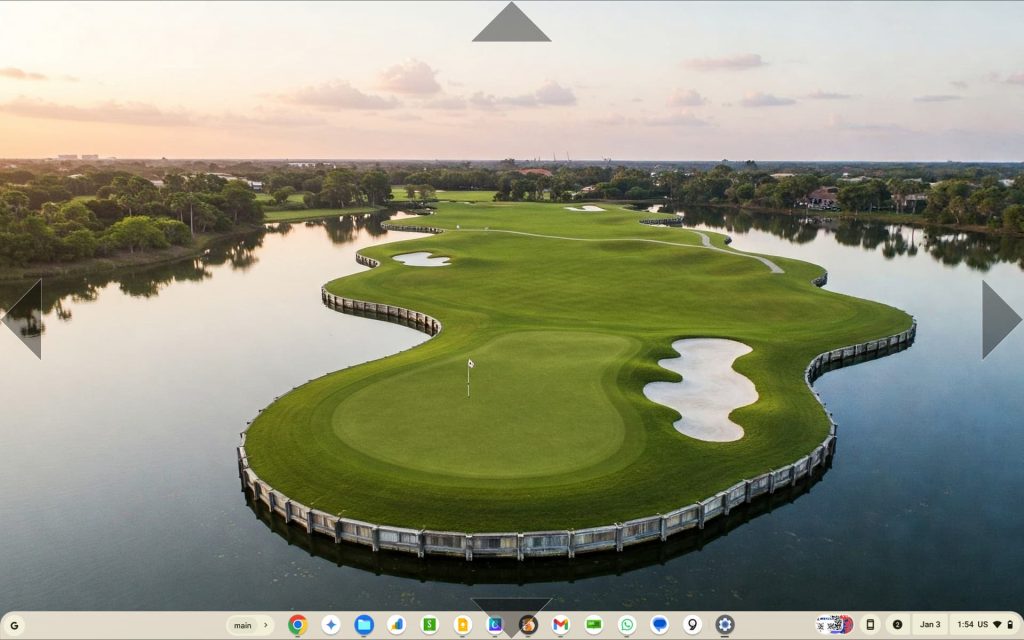
Using the arrow keys, you can move your displayed area around, and expand it in either direction by holding shift and using the same arrow keys. So, you simply need to adjust things to fit properly, close the tool, and you are all set.
It’s an incredibly helpful addition to have at your disposal when needed and it’s super simple to use. It once again reminds me why I love this OS so much. It’s fast, easy to use, and has all the stuff you need to get productive and stay productive. We’re not sure what will happen this year with the Android kernel merge, but I sure hope none of the awesome, helpful features of our favorite OS go anywhere in the transition.
Join Chrome Unboxed Plus
Introducing Chrome Unboxed Plus – our revamped membership community. Join today at just $2 / month to get access to our private Discord, exclusive giveaways, AMAs, an ad-free website, ad-free podcast experience and more.
Plus Monthly
$2/mo. after 7-day free trial
Pay monthly to support our independent coverage and get access to exclusive benefits.
Plus Annual
$20/yr. after 7-day free trial
Pay yearly to support our independent coverage and get access to exclusive benefits.
Our newsletters are also a great way to get connected. Subscribe here!
Click here to learn more and for membership FAQ

