


Support our independent tech coverage. Chrome Unboxed is written by real people, for real people—not search algorithms. Join Chrome Unboxed Plus for just $2 a month to get an ad-free experience, access to our private Discord, and more. Learn more about membership here.
START FREE TRIAL (MONTHLY)START FREE TRIAL (ANNUAL)
Shared Drives (formerly Team Drives) in Google Drive are an important and efficient way to keep files that belong to a specific department or group of associates separate from the rest of the files in an organization. Unfortunately, as it stands right now, all company shared drives are subject to the same policies and reside at the root level of the admin console, which means that there isn’t a way for administrators to automate the process of who gets access to which drives.
That is about to change as Google has now made available a new open beta for Google Admins to place shared drives into sub-organizational units, also known as OUs. Doing this will allow them to apply sharing policies and more easily automate access, especially when restricting access to confidential files that only a specific department or title should have access to. There is no need to opt-in to use the feature as an open beta.
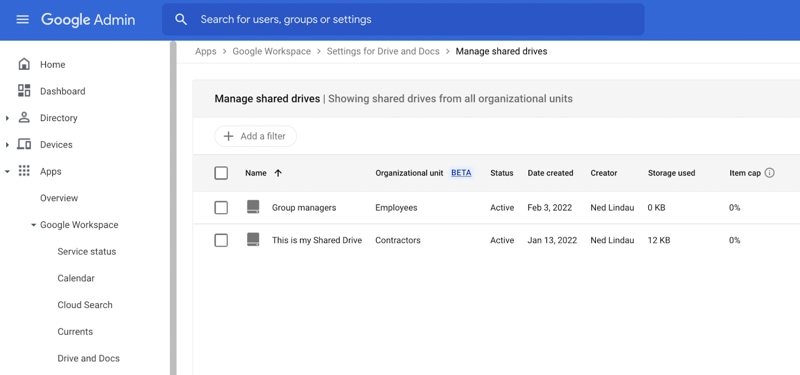
Admins will be able to assign shared drives to OUs using the new “Organizational Unit” column in Apps > Google Workspace > Drives and Docs > Manage Shared Drives, as well as through the orgUnits.memberships API endpoint. There is no end-user setting for this feature and the availability to Google Workspace tiers will be as follows:
•Available to Google Workspace Essentials, Business Standard, Business Plus, Enterprise Standard, Enterprise Plus, Education Fundamentals, Education Standard, Education Plus, the Teaching and Learning Upgrade, and Nonprofits customers
• Not available to Google Workspace Business Starter, Enterprise Essentials, Frontline, as well as legacy G Suite Basic and Business customers Not available to users with personal Google Accounts
