


Support our independent tech coverage. Chrome Unboxed is written by real people, for real people—not search algorithms. Join Chrome Unboxed Plus for just $2 a month to get an ad-free experience, access to our private Discord, and more. Learn more about membership here.
START FREE TRIAL (MONTHLY)START FREE TRIAL (ANNUAL)
Since its birth, Google’s Chrome operating system has been met with a lot of resistance from the “traditional” PC world. Yet, Chromebooks have continued to evolve over the past 8+ years and now offer a true alternative OS for the majority of mass consumers.
Despite rumors of vaporware like Andromeda that sought to bring an end to Chrome OS and Android alike or mobile/desktop solutions found in the form of Samsung’s DeX, Chromebooks march forward and expectations are high that the market will continue to expand.
Even now, Google’s own Fuchsia OS has some believing that the folks in Mountain View are actively seeking to replace Chrome OS entirely. We’ve even caught glimpse of an Android Desktop experience that is reportedly living in the latest Beta version of Android Q.
To all of those things that may be a pending threat to the Chrome OS ecosystem, I say “meh.” Three years into covering the world of Chrome and all signs point to a continued commitment from Google to make Chrome OS that all-in-one, go-to operating system for consumers, schools and (as you will see in a few weeks at Cloud Next,) Enterprise.
Enough of my ramblings. The point is, Google has finally gone and launched something that should have been created long ago.
The Chromebook Simulator
I have long held that Google’s volunteer-centric Chromebook Help Forum is probably the richest source for Chrome OS knowledge and support for general users. If you can’t find an answer to your question there, there’s always someone willing to do their best to find it for you.
Still, despite the awesome efforts from the forum folks and Google’s library of support pages one thing has been sorely missing for way too long. That thing is a proper Chromebook “how-to” guide from Google. Granted, Google has launched a variety of videos over the years on how to make the move to Chrome OS and that’s great but there has always been a void for a centralized guide to Chromebooks.
We do our best to offer up the information we hope will acclimate new users to Chrome OS and there are more and more sites adding Chromebook help articles every day and that’s awesome. On the flip side, when I am looking for information about a specific product, I generally look to the source for said data.
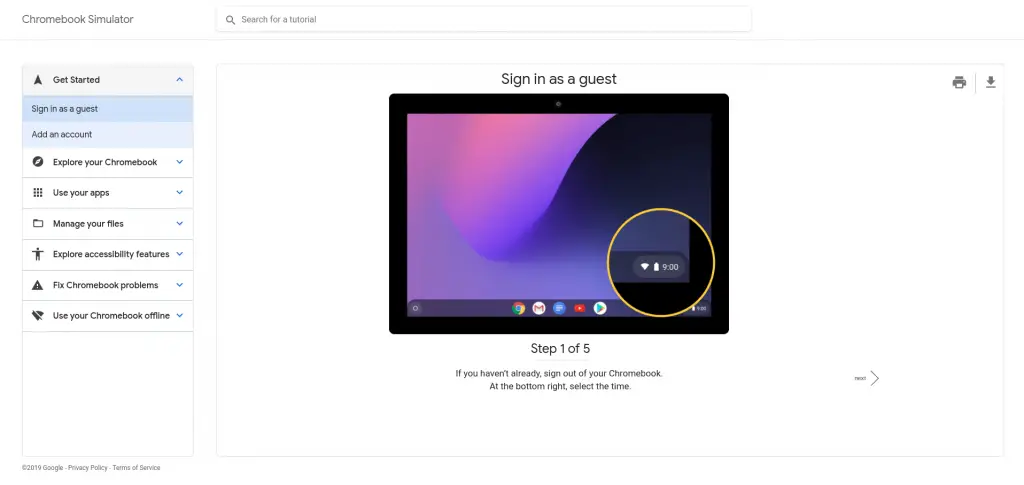
That’s where Google’s Chromebook Simulator comes in. The “simulator” is actually more of an interactive walkthrough that shows users how to use features on their devices as well as troubleshoot problems and even the most basic of tasks such as signing in or resetting a Chromebook.
I know that, for many who are regulars here, these may seem like remedial guides but let’s now forget that we were all new to Chrome OS at one point. I can assure you, based on the numerous emails and comments we receive, general consumers are looking for these exact type of tutorials.
When it comes to actually liking the operating system you’re working with, ease of navigation (or lack thereof) plays a big part in whether the user will remain loyal to the OS. Frustrations brought about by the inability to do simple tasks such as print or adjust screen brightness are simple things that can drive a user over the edge and eventually result in abandoning a platform entirely.
With that being said, I applaud Google for launching the simulator but I have some first impressions to share later today and they aren’t good ones. If Google really wants Chrome OS to be the platform for the masses, they are going to have to raise the bar in areas like support and the Chromebook Simulator would have been a very simple and great place to start.
Check back later this evening for my first impressions of the Chromebook Simulator. In the meantime, you can check out the new support feature at the link below.
Chromebook Simulator Shop Chromebooks On Amazon
