


Support our independent tech coverage. Chrome Unboxed is written by real people, for real people—not search algorithms. Join Chrome Unboxed Plus for just $2 a month to get an ad-free experience, access to our private Discord, and more. Learn more about membership here.
START FREE TRIAL (MONTHLY)START FREE TRIAL (ANNUAL)
While for a great many people out there, news of a new Galaxy Chromebook from Samsung was new information, around here at Chrome Unboxed it was just confirmation of something we’ve known about for quite some time. You see, shortly after CES 2020 (yes, a full year ago), Gabriel found evidence of another 10th-gen Intel-powered Chromebook in the same family as the original Galaxy Chromebook, made by Samsung, and curiously only entering development after the original Galaxy Chromebook was made official.
‘Nightfury’ was/is the codename of that device and just last week, we all got to know it a little bit better by it’s real name: the Galaxy Chromebook 2. All the things we thought we knew about this device were revealed as spot-on, like the 10th-gen processors, QLED screen, Galaxy Chromebook branding, and as it turns out, the inclusion of a fan this time around. Yeah, the Samsung Galaxy Chromebook 2 is fanned and we should all be glad for it. While we never reported this as part of the new Galaxy Chromebook’s hardware, we’ve known it was there all along. Look at these commits from April 2020:

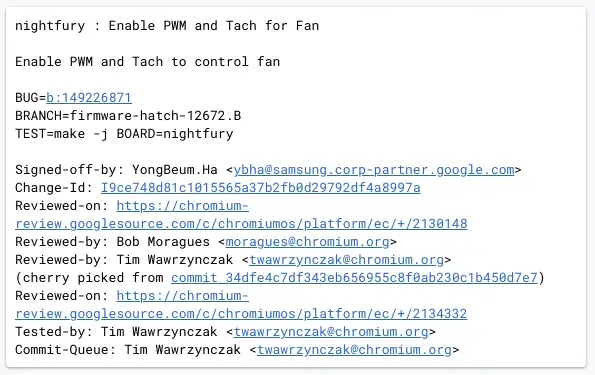
Sometimes we really have to dig around, piece together clues and make our case when it comes to digging in the repositories, but this one was quite clear and anyone reading the commits I dropped in above can clearly see it was the plan to have fans in the Galaxy Chromebook 2 all along. With the original Galaxy Chromebook being thinner and fanless, overheating was an issue constantly. Paired up with terrible battery life, it made the otherwise-outstanding original Galaxy Chromebook a very tough recommendation at $999.
As you can clearly see in the early hands-on videos and some of the stock photos provided by Samsung, this new device clearly comes equipped with fans and for some reason, no one is mentioning this. I’d offer that this is generally a good indication that Samsung has done a great job in hiding the fan ports away so they aren’t in your face, but it is also likely a product of only a handful of reviewers getting to actually handle this Chromebook in relatively-noisy environments where they’d never even hear the fan spin up if it needed to.
It has been quite some time since we had a fanned Samsung Chromebook, so I honestly don’t have a clue how quiet their fans tend to be. If recent Chromebooks are anything to go by, the fan won’t likely kick on very often and when it does, there’s a high chance you won’t notice it. That doesn’t take away from the fact that it is there, however, and those eyeing the Samsung Galaxy Chromebook 2 as their next possible thin/light Chromebook should be aware that this time around, there’s a fan along for the ride, and that will likely be another check in the win column for the second iteration of the Galaxy Chromebook if it keeps heat down and processor speed at full capacity throughout the work day.
SUBSCRIBE TO UPSTREAM
Get Chrome Unboxed delivered straight to your inbox
Upstream is our flagship, curated newsletter with the top stories, most click-worthy deals, giveaways, and trending articles from Chrome Unboxed sent directly to your inbox a few times a week. Join 31,000+ subscribers.

