

• Skip to main content
  • Skip to primary sidebar
  • Deals
  • Features
  • Guides
  • Chromebooks
  • Videos
  • Podcast
  • More +
    • Reviews
    • Unboxing
    • Upcoming Devices
    • Chromebook Plus
    • Chrome
    • ChromeOS
    • Chrome OS Flex
  • Search
  • Sign Up
  • Log In
Chrome Unboxed – The Latest Chrome OS News

Chrome Unboxed - The Latest Chrome OS News

A Space for All Things Chrome, Google, and More!

  • Deals
  • Features
  • Guides
  • Chromebooks
  • Videos
  • Podcast
  • More +
    • Reviews
    • Unboxing
    • Upcoming Devices
    • Chromebook Plus
    • Chrome
    • ChromeOS
    • Chrome OS Flex
  • Search
  • Sign Up
  • Log In

Pixel users can now easily turn their flashlight off with one tap

June 13, 2022 By Michael Perrigo View Comments

Support our independent tech coverage. Chrome Unboxed is written by real people, for real people—not search algorithms. Join Chrome Unboxed Plus for just $2 a month to get an ad-free experience, access to our private Discord, and more. Learn more about membership here.
START FREE TRIAL (MONTHLY)START FREE TRIAL (ANNUAL)

Normally, enabling your phone’s flashlight consists of swiping down from the top notification shade to reveal the quick settings and then tapping the “Flashlight” icon. To turn it off, you have to go and do the same thing. In recent memory, Google has added more efficient ways of doing this like shaking the phone or telling Assistant “Hey Google, turn on the flashlight”.

However, that doesn’t mean that it’s readily available in a way that reduces friction. You may find yourself in situations where you can’t use your voice – particularly if you’re in the dark where you need a flashlight! Think of a life-threatening situation or when everyone is asleep at home…yes, yes I do watch too many movies. Another example is having to swipe down twice from the notification shade and tap the flashlight icon that everyone quite frankly has in a different tile position. This just doesn’t provide a consistent user experience!

Xremove ads

June’s Pixel Feature Drop update that we covered last week included a small nod to a shortcut you can enable on the At a Glance widget of the device home screen. It allows you to quickly turn your active flashlight off with one tap. While it doesn’t stay on the widget and allow you to turn the flashlight back on (it disappears after you tap it!), it’s still an easier way to shut things down after you’re finished using it to look under the couch for the TV remote.
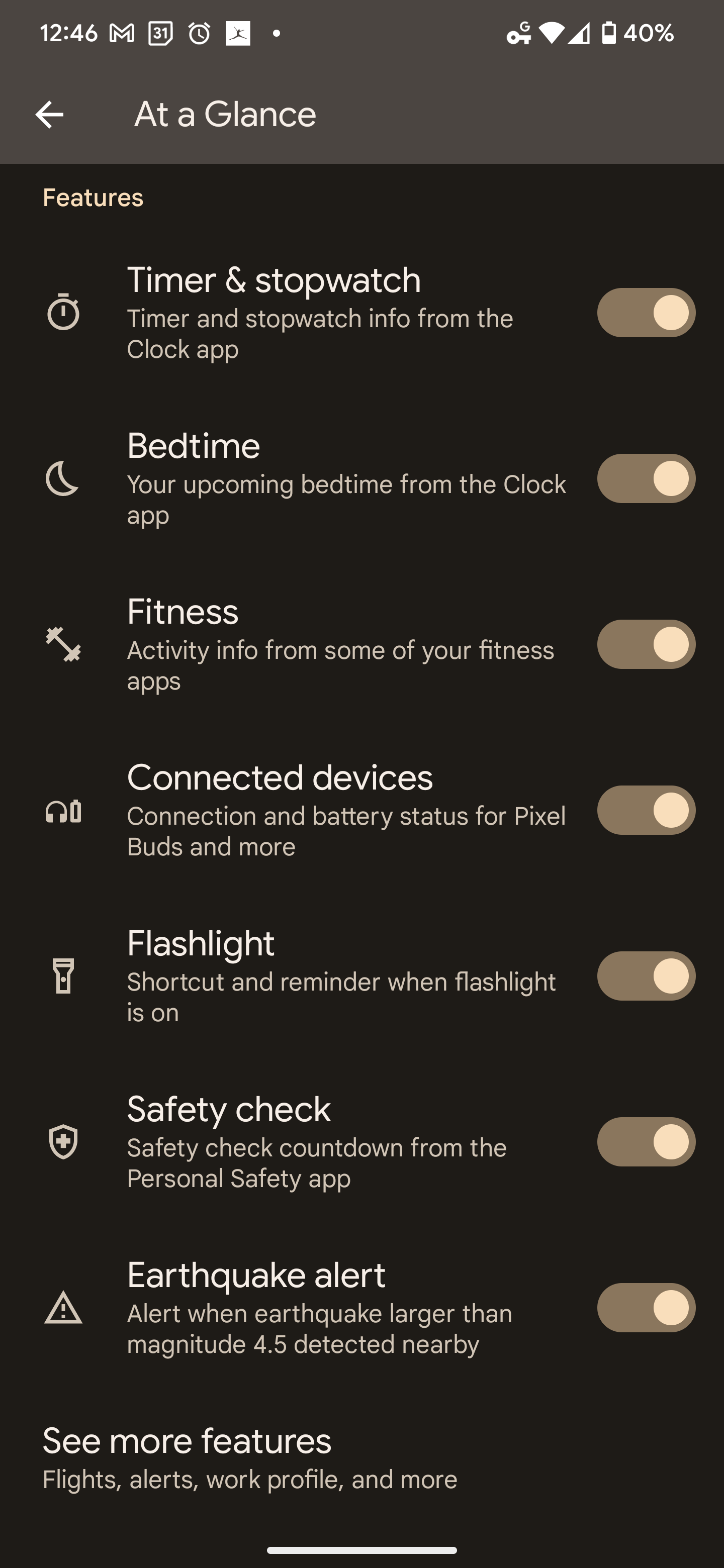
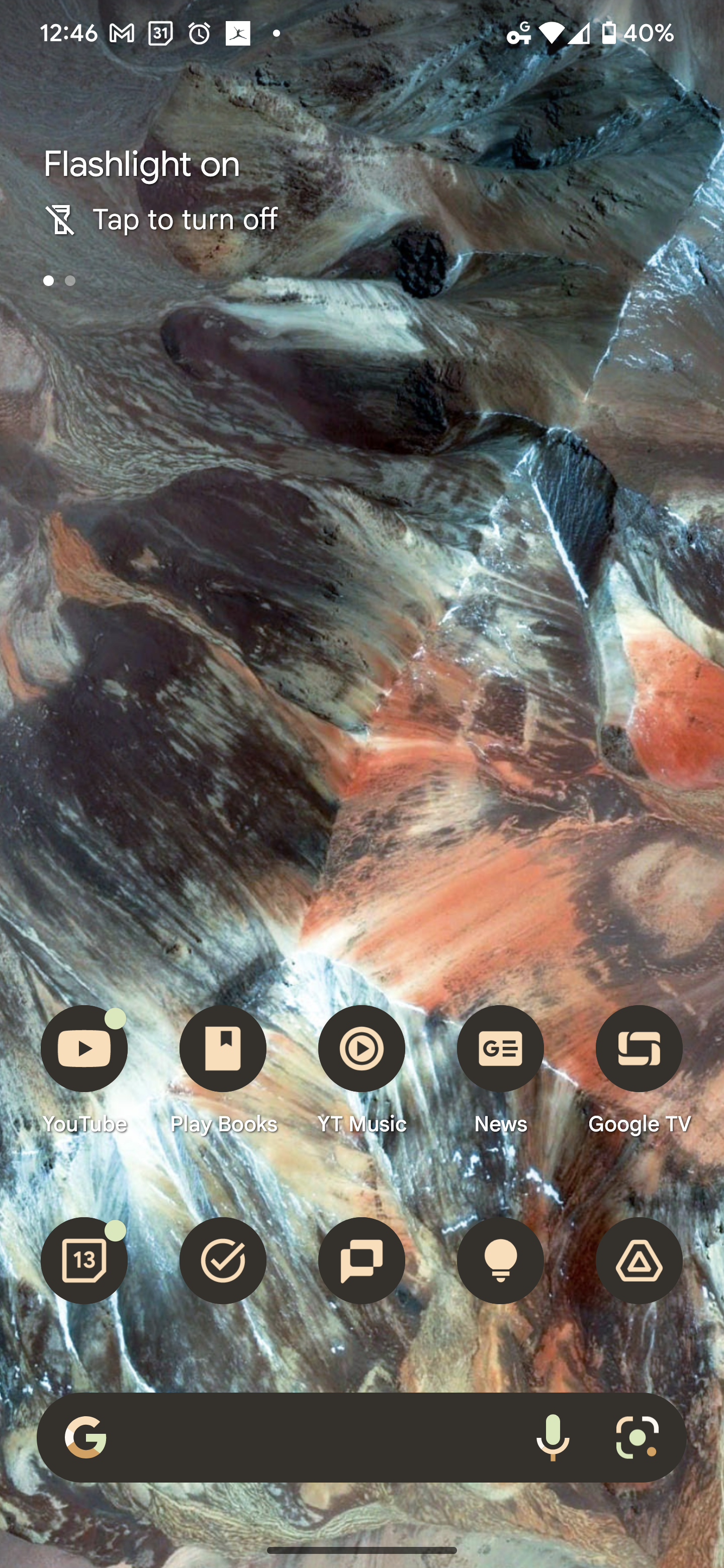
To access it, just press and hold the At a Glance widget at the top of your Pixel phone’s home screen and then tap “Customize”. From there, scroll down and toggle “Flashlight – Shortcut and reminder when flashlight is on”. I imagine that beyond just the efficiency of it, it will also help those who have enabled their flashlight and don’t realize it until the device is overheating or low on battery. We all have that one relative, right?

Featured Videos

Xremove ads

Let me know in the comments if you think this should be persistent when toggled in the customization section so that you can also turn the flashlight on without having to swipe down from the top of your phone. I’m interested in knowing what else you think ought to occupy At a Glance in the future as well, so be sure to discuss below!

SUBSCRIBE TO UPSTREAM

Get Chrome Unboxed delivered straight to your inbox

Upstream is our flagship, curated newsletter with the top stories, most click-worthy deals, giveaways, and trending articles from Chrome Unboxed sent directly to your inbox a few times a week. Join 31,000+ subscribers.

SUBSCRIBE HERE!

Filed Under: New & Upcoming Features, News, Pixel, Updates

About Michael Perrigo

Known as "Google Mike" to his customers, Michael worked at Best Buy as a Chromebook Expert who dedicated his time to understanding the user experience from a regular Chromebook owner's perspective. Having spent nearly 20 years meeting you face-to-face, he strives to help you understand your technology through carefully crafted guides and coverage, relentlessly seeking out the spark in what's new and exciting about ChromeOS.

Primary Sidebar

Googlebook

Chrome 156 for Googlebook delivers 14 desktop upgrades and a look at what’s coming next

By Robby Payne
October 26, 2026

Googlebook OS is finally getting one of my favorite ChromeOS features

By Robby Payne
October 26, 2026

Google is bringing Chromebook’s best unlock feature to Googlebooks

By Robby Payne
October 26, 2026

Googlebook is getting AAC Bluetooth audio and key fixes for Cast My Apps

By Robby Payne
October 25, 2026

We just got our Lenovo AI Mouse for Googlebook, and it’s impressive

By Robby Payne
October 23, 2026

More Googlebook

Xremove ads

Deals

My favorite convertible Chromebook is $150 off right now and primed for Googlebook OS

By Robby Payne
September 29, 2026

Google Pixel Buds 2a in Hazel bundled with a new Googlebook laptop at Best Buy

Score a free $129 pair of Pixel Buds 2a with any Googlebook pre-order at Best Buy

By Robby Payne
September 28, 2026

The best Chromebook deals today

By Robby Payne
September 2, 2026

The best Chromebook ever made is $350 off at Best Buy right now

By Robby Payne
August 21, 2026

The excellent, powerful Acer Chromebook Plus Spin 514 is $150 off right now

By Robby Payne
August 12, 2026

More Deals

Xremove ads

Reviews

Acer Chromebook Plus Spin 514 Review: the best convertible you can buy [VIDEO]

By Robby Payne
July 1, 2026

Lenovo Chromebook Plus 2-in-1 Review: pretty great in a vacuum

By Robby Payne
April 23, 2026

My review after 6 weeks with the Lenovo Chromebook Plus 14 [VIDEO]

By Robby Payne
August 11, 2025

One week with the best small Android tablet you can buy, and I’m sold

By Robby Payne
May 9, 2025

Best Chromebooks of 2024 [VIDEO]

By Robby Payne
November 28, 2024

More Reviews

Xremove ads

TWITTER · FACEBOOK · INSTAGRAM · YOUTUBE · EMAIL · ABOUT

Copyright © 2026 · Chrome Unboxed · Chrome is a registered trademark of Google Inc.
We are participants in various affiliate advertising programs designed to provide a means for us to earn fees by linking to affiliated sites.

PRIVACY POLICY