


Support our independent tech coverage. Chrome Unboxed is written by real people, for real people—not search algorithms. Join Chrome Unboxed Plus for just $2 a month to get an ad-free experience, access to our private Discord, and more. Learn more about membership here.
START FREE TRIAL (MONTHLY)START FREE TRIAL (ANNUAL)
 For nearly 30 years, OWC has been a mainstay when it comes to storage and docking solutions across a number of platforms. With an initial focus on Mac-compatible products, Other World Computing has expanded their reach to include Windows certified products for personal as well as enterprise users.
We had a chance to catch up with the guys from OWC and they gave us a hands-on with a number of docks and drives available from their company. We even had the chance to test a few out on Robby’s Pixelbook.
The world of peripherals for Chrome OS is pretty much the Wild West in terms of compatibility but OWC is hoping to change that. When you’re shopping online, there’s really no way to determine if a drive or a dock is Chrome OS friendly other than just buying it and testing it out. We do our best to try out products so you don’t have to and hopefully, we can make finding the right add-ons for your Chromebook a little easier.
OWC is working hard to bring full compatibility for Chrome OS to as many of their devices as possible and this video highlights a few of those. We use a few of their docking accessories around the office and they work great. That’s why we’re proud to give many OWC products the Chrome Unboxed seal of approval. Check out what they have to offer.
USB-C Travel Dock
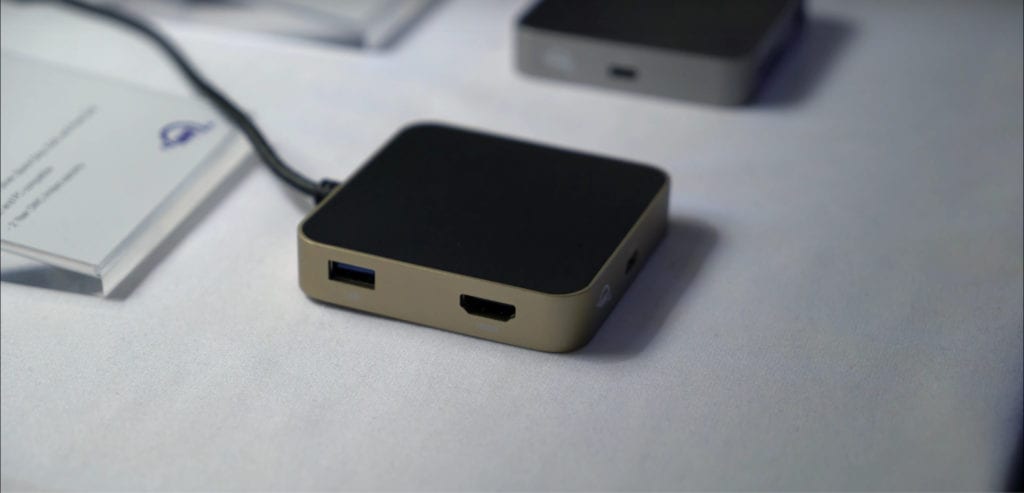
We test all kinds of mini docks for use around the office and when we travel. A lot of people have asked about the travel dock from OWC and after we had some hands-on, I can say it’s just about the perfect travel companion. With a full-size HDMI, 2 USB A 3.1, a full-size SD card reader and power passthrough USB-C, there isn’t much this little guy won’t do. For under $50, the OWC travel dock is a must-have for your gear bag.
Oh yeah, it comes in four colors as well. Gold, Rose Gold, Silver and my favorite, Space Gray.
USB-C 10 Port Dock
We’ve had this guy around the office for the better part of a year and just about everyone here has used it at some point. The updated USB-C version features ports for just about everthing including Ethernet and Mini Display Port. It may be labeled as “For MacBook” but it is 100% compatible with the latest generation of Chromebooks.
The 10 Port Dock looks great and the low profile design fits well on any desk or workspace. Like the Mini dock, the full-size USB-C dock comes in four colors and will run you around $150.
Mercury Elite Pro Dual mini
We don’t talk a lot about external storage here at Chrome Unboxed because most of us live in the cloud for everything. We know that for many of you, that just isn’t the case an you need storage solutions for data and projects. We tested the OWC Elite Pro Dual Mini 1TB drive on the Pixelbook and it worked like a charm. The Pixelbook powered the drive and was able to read the devices full volume. With transfer speeds sustainable at 861MB/s, you can literally edit media directly from the drive.
The drives range from 240GB up to 4TB and come in SSD and HD depending on your needs.
OWC is going to be sending some more products our way and we’re excited to test them out an share them with you. They have a wide range of Thunderbolt products and we hope to see support for that standard coming to Chrome OS in the very near future.
Special thanks to CEO Larry O’Connor and the OWC team for the hospitality and the opportunity to see what Other World Computing has to offer for Chromebook users.

