


Support our independent tech coverage. Chrome Unboxed is written by real people, for real people—not search algorithms. Join Chrome Unboxed Plus for just $2 a month to get an ad-free experience, access to our private Discord, and more. Learn more about membership here.
START FREE TRIAL (MONTHLY)START FREE TRIAL (ANNUAL)
Chrome Incognito mode is a popular feature that allows users to browse the internet without leaving any traces of their activity on the device. Essentially, this mode creates a temporary browsing session that deletes all browsing history, cookies, and other information upon closing Chrome. This means that any websites visited or information entered into forms during the browsing session will not be stored on the device, providing a level of privacy for users – well, sort of.
Incognito mode doesn’t make you completely anonymous like some people seem to think. Although Google doesn’t capture any data while you’re incognito, others, like your internet service provider (ISP), can still peruse everything you’ve searched without getting your consent!
In fact, there’s this little-known thing called the DNS cache which can help a tech-savvy person with a command terminal and a little extra time on their hands spy on your browsing activity if they have physical and unadulterated access to your device hardware. The DNS cache is a record of all the websites you’ve visited, even those visited while in incognito mode! It’s stored locally on your device and managed by your operating system. Using a terminal on Windows or Mac, someone can use the ipconfig/displaydns command to view this list of domains and either clutch their pearls or use that information to invade your privacy in other ways.
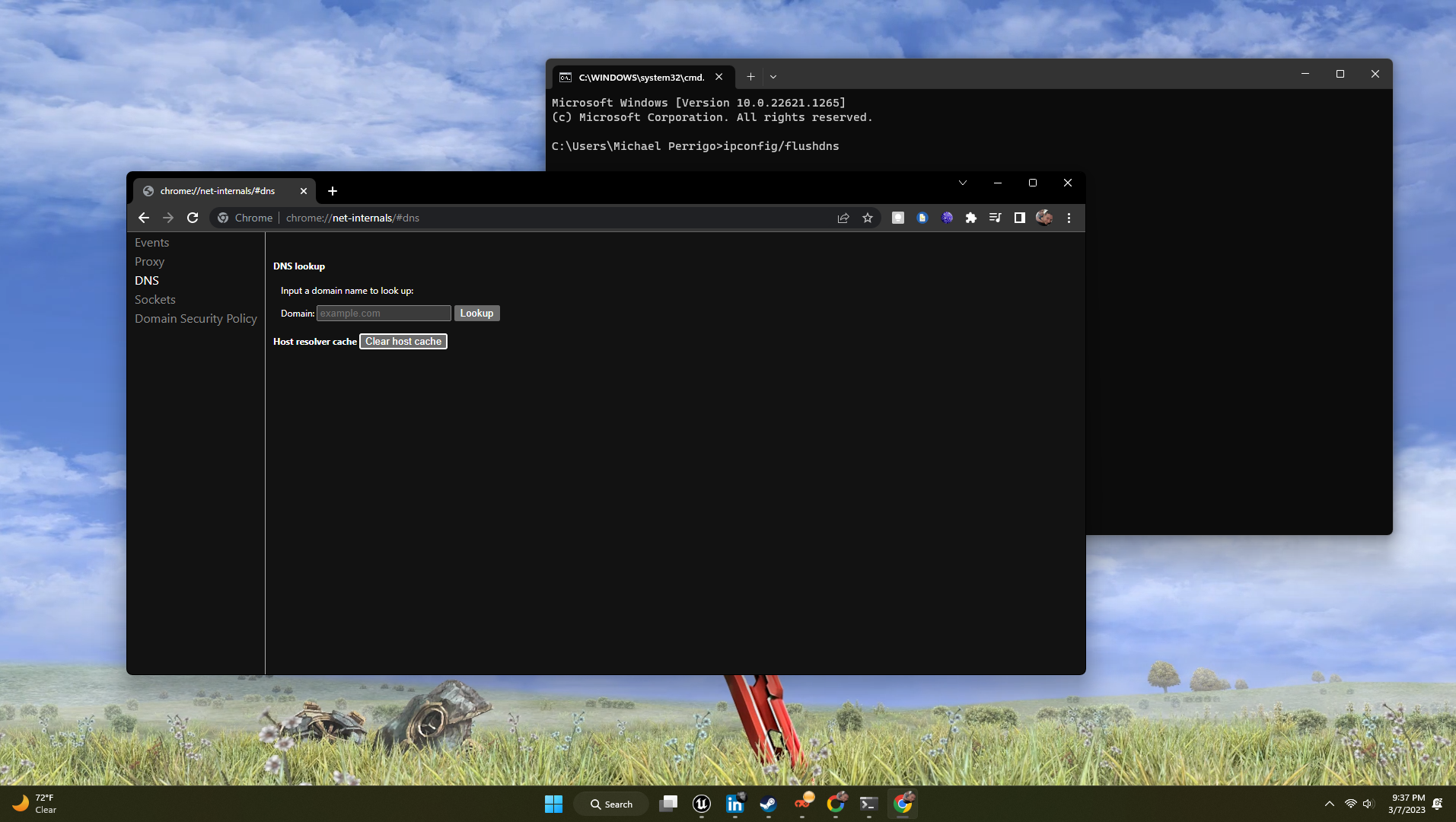
Don’t worry, you can prevent this from happening. Obviously, I’m going to come right out and say first that no one, not one person on this planet should leave their device unlocked, unprotected, and unsupervised because that’s just crazy in my opinion.
Next, I’m going to recommend that you use this neat trick to find and completely clear that aforementioned DNS cache manually. To do this, just type chrome://net-internals/#dns into your browser’s address bar and hit enter. Then, click DNS on the left-hand side, and select “Clear host cache.” This will completely wipe out the locally stored copy of websites you’ve visited which, yes, includes those incognito URLS. Alternatively if you’re using a Windows or Mac PC, you can just open the cmd prompt yourself and type ipconfig/flushdns, hit enter, and rest assured that your DNS cache history is gone.
At the end of the day, yes, Chrome Incognito mode can provide a level of privacy when browsing the internet, but no, it’s not as foolproof as Google would have you believe with its marketing. It has limitations, but I agree that the layperson looking at the company’s banners, commercials, and help articles may never care or need to know such a thing, despite it being important to user privacy. Let me know in the comments if you knew about this, and if you flush this out often!
Kudos: saniy_aaa on Instagram
SUBSCRIBE TO UPSTREAM
Get Chrome Unboxed delivered straight to your inbox
Upstream is our flagship, curated newsletter with the top stories, most click-worthy deals, giveaways, and trending articles from Chrome Unboxed sent directly to your inbox a few times a week. Join 31,000+ subscribers.

