


A few days ago, Robby shared some interesting details about a couple of experimental sharing features in the Canary and Developer builds of Chrome for Android. There was one other feature hiding in one of his photos that he didn’t mention but if you were keen enough to catch it, you may be wondering how it got there.
Currently, to share a webpage from Chrome on mobile you simply have to click the overflow menu. This is the three-dot icon at the top right of the browser. From there, you can hit share and select the application you want to share it to or you can copy the link to your clipboard. As Robby detailed, the new share menu will bring up options such as QR code, screenshot and send to your other devices but there is also a new way to access the sharing options.
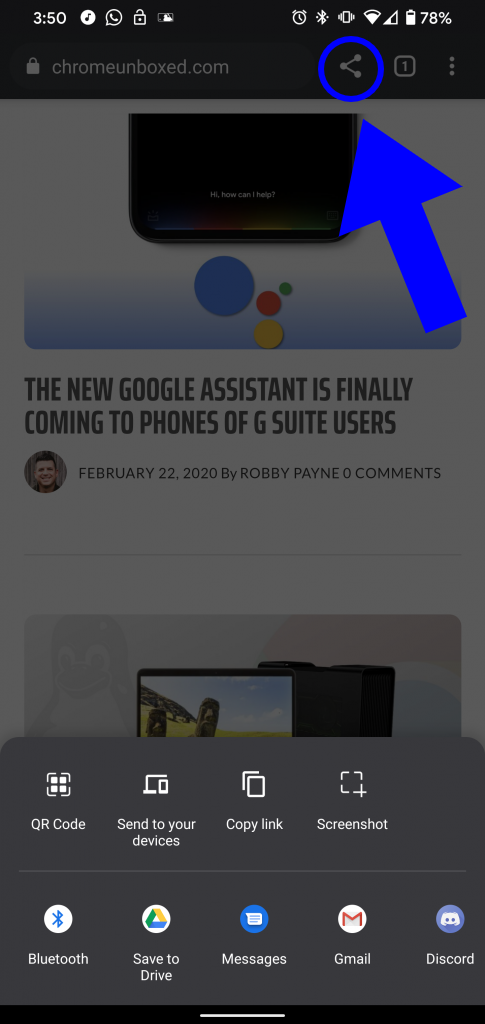
Currently behind a flag in the Developer build of Chrome, “Share Button in Top Toolbar” does exactly that. The share option is still in the overflow but the flag adds the familiar share icon to the right of the Omnibox. Clicking the icon brings up the usual share sheet unless you have the flags enabled for the experimental share feature Robby mentioned in his article. If you’d like to try out the new feature, you can do so by downloading Chrome Dev from the Google Play Store and heading to chrome://flags. From there, search “share” and find the flag #share-button-in-top-toolbar. Select enable and relaunch the browser and you’re all set. This may seem like an insignificant change but people love convenience and this makes sharing about as easy as it can get.
Join Chrome Unboxed Plus
Introducing Chrome Unboxed Plus – our revamped membership community. Join today at just $2 / month to get access to our private Discord, exclusive giveaways, AMAs, an ad-free website, ad-free podcast experience and more.
Plus Monthly
$2/mo. after 7-day free trial
Pay monthly to support our independent coverage and get access to exclusive benefits.
Plus Annual
$20/yr. after 7-day free trial
Pay yearly to support our independent coverage and get access to exclusive benefits.
Our newsletters are also a great way to get connected. Subscribe here!
Click here to learn more and for membership FAQ

