
• Skip to main content
  • Skip to primary sidebar
  • Deals
  • Features
  • Guides
  • Chromebooks
  • Videos
  • Podcast
  • More +
    • Reviews
    • Unboxing
    • Upcoming Devices
    • Chromebook Plus
    • Chrome
    • ChromeOS
    • Chrome OS Flex
  • Search
  • Sign Up
  • Log In
Chrome Unboxed – The Latest Chrome OS News

Chrome Unboxed - The Latest Chrome OS News

A Space for All Things Chrome, Google, and More!

  • Deals
  • Features
  • Guides
  • Chromebooks
  • Videos
  • Podcast
  • More +
    • Reviews
    • Unboxing
    • Upcoming Devices
    • Chromebook Plus
    • Chrome
    • ChromeOS
    • Chrome OS Flex
  • Search
  • Sign Up
  • Log In

Google Maps integrates Trips, adds live crowdedness indicators for transit, more

July 21, 2021 By Michael Perrigo View Comments

Support our independent tech coverage. Chrome Unboxed is written by real people, for real people—not search algorithms. Join Chrome Unboxed Plus for just $2 a month to get an ad-free experience, access to our private Discord, and more. Learn more about membership here.
START FREE TRIAL (MONTHLY)START FREE TRIAL (ANNUAL)

Now that millions of people are trying to get back to normal life as best they can, Google has stepped in once again as they have through the entire pandemic to assist. Google Maps is gaining several new features that will help you reminisce and plan for the future as you figure out what traveling will look like for you and your family going forward.

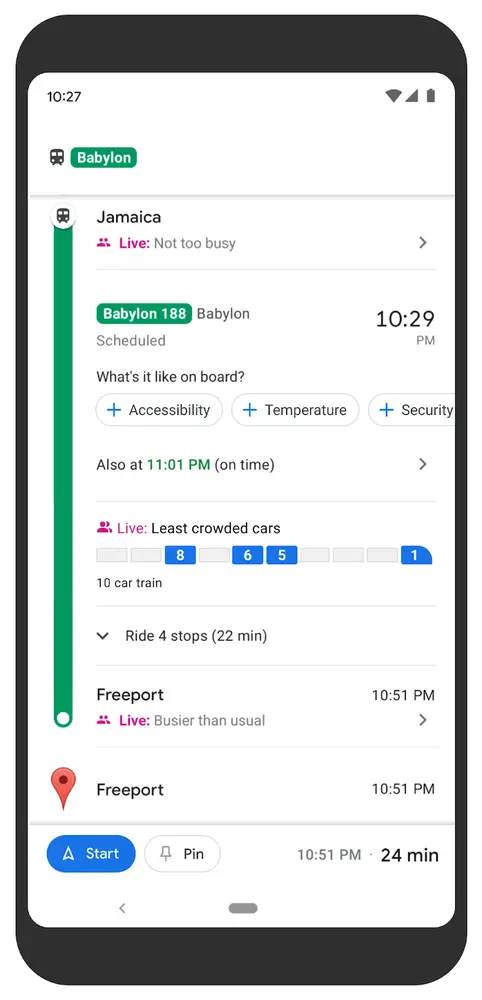
First, new transit crowdedness predictions for over 10,000 transit agencies in 100 countries will be rolling out to users so that you can understand capacity or open seats, for example, and to feel as safe as you can while you plan ahead. You can also tell Maps how crowded it is with a few taps as you utilize mass transit so it can update this information for other riders.
Xremove ads

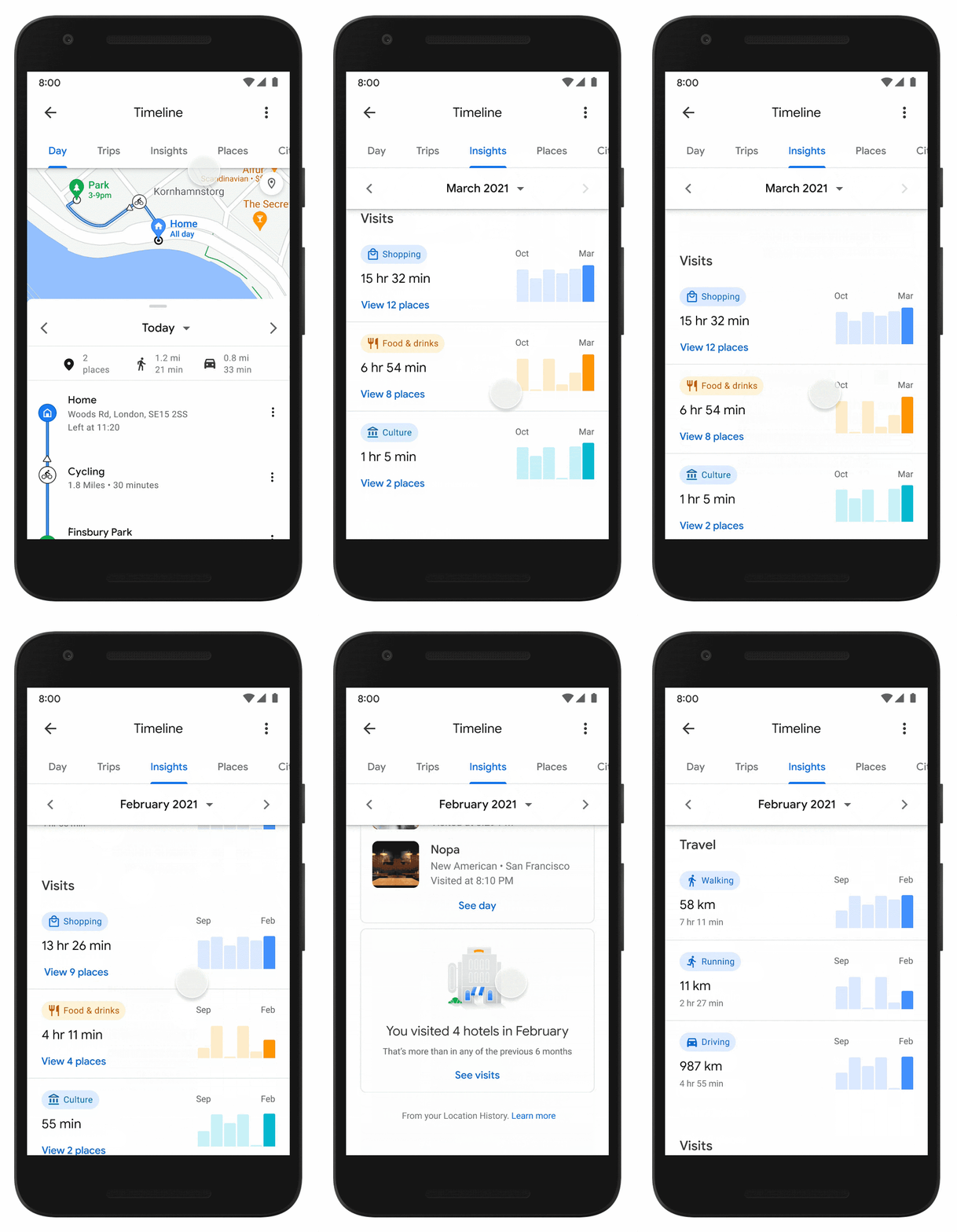
Additionally, a new Timeline Insights tab will show you and only you monthly trends about how you navigate the world (Android only). So long as you’ve kept your Location History active in Maps, you’ll begin seeing how far you’ve traveled by car, foot, plane, or bike and how long you’ve spent at different locale types such as shops, airports, restaurants, etc. It’s either going to be very awesome or very creepy (or maybe a bit of both) depending on who you are.

Google made sure today to remind you that you can modify what information is collected or manage it in bulk, in-line, or with auto-delete controls right from within said timeline. Don’t forget that you can turn the timeline off entirely, or simply manage everything through your Google My Account section or My Activity respectively.

Featured Videos

Xremove ads

Perhaps one of the best features announced today was the complete integration of Google Trips into Maps. I’ve been a big-time fan of everything that Trips has offered for years now, and when the company shut down its individual app in favor of a web experience, I wasn’t too happy. Luckily, the web interface included almost every feature that predated it in the app, but having it baked directly into Maps both makes complete sense, and works really well as you can see below!
Lastly, more detailed review tools are being enabled for all users on Android and iOS and will appear while leaving feedback on any Restaurant in the United States (more countries and categories in the future, of course). Extra, highly specific questions will appear below your ‘Share more about your experience’ text field and photo upload tool.

Some of the examples given include choosing whether you got dine-in, take-out, or delivery, if you got breakfast, brunch, lunch, dinner, or something else, and how much money you spent per person during your visit. I can’t wait to see more specific questions for other categories outside of the food industry!

Xremove ads

SUBSCRIBE TO UPSTREAM

Get Chrome Unboxed delivered straight to your inbox

Upstream is our flagship, curated newsletter with the top stories, most click-worthy deals, giveaways, and trending articles from Chrome Unboxed sent directly to your inbox a few times a week. Join 31,000+ subscribers.

SUBSCRIBE HERE!

Filed Under: Apps, New & Upcoming Features, News

About Michael Perrigo

Known as "Google Mike" to his customers, Michael worked at Best Buy as a Chromebook Expert who dedicated his time to understanding the user experience from a regular Chromebook owner's perspective. Having spent nearly 20 years meeting you face-to-face, he strives to help you understand your technology through carefully crafted guides and coverage, relentlessly seeking out the spark in what's new and exciting about ChromeOS.

Primary Sidebar

Xremove ads

Deals

Lenovo’s powerful 8.8-inch Legion Tab Gen 5 Android gaming tablet is now $150 off

By Joseph Humphrey
June 10, 2026

The Google TV Streamer hits $80 again, bringing Gemini and smart home control to your living room

By Joseph Humphrey
June 5, 2026

The best Chromebook deals today

By Robby Payne
May 25, 2026

Save $300 as Acer’s Chromebook Plus Spin 714 returns to its all-time low price

By Robby Payne
May 21, 2026

Save $40 on the Google Pixel Watch 4 before the Spring Sale ends

By Joseph Humphrey
April 24, 2026

More Deals

Xremove ads

Reviews

Lenovo Chromebook Plus 2-in-1 Review: pretty great in a vacuum

By Robby Payne
April 23, 2026

Acer Chromebook Plus Spin 514 Review: Kompanio Ultra power in a convertible

By Robby Payne
December 24, 2025

My review after 6 weeks with the Lenovo Chromebook Plus 14 [VIDEO]

By Robby Payne
August 11, 2025

One week with the best small Android tablet you can buy, and I’m sold

By Robby Payne
May 9, 2025

Best Chromebooks of 2024 [VIDEO]

By Robby Payne
November 28, 2024

More Reviews

Xremove ads

Guides

This Chromebook trackpad shortcut is definitely not new, but is blowing my mind

By Robby Payne
March 11, 2024

How to reduce broadcast delay on YouTube TV to stop live spoilers

By Robby Payne
December 8, 2023

Windows PC keyboard and Chromebook

How to use a Windows keyboard with a Chromebook

By Joseph Humphrey
December 8, 2023

How reset and revert your Chromebook to the previous version of Chrome OS

By Robby Payne
November 29, 2023

My Chromebook Plus features disappeared: here’s how I fixed it

By Robby Payne
November 24, 2023

More Guides

TWITTER · FACEBOOK · INSTAGRAM · YOUTUBE · EMAIL · ABOUT

Copyright © 2026 · Chrome Unboxed · Chrome is a registered trademark of Google Inc.
We are participants in various affiliate advertising programs designed to provide a means for us to earn fees by linking to affiliated sites.

PRIVACY POLICY