

• Skip to main content
  • Skip to primary sidebar
  • Deals
  • Features
  • Guides
  • Chromebooks
  • Videos
  • Podcast
  • More +
    • Reviews
    • Unboxing
    • Upcoming Devices
    • Chromebook Plus
    • Chrome
    • ChromeOS
    • Chrome OS Flex
  • Search
  • Sign Up
  • Log In
Chrome Unboxed – The Latest Chrome OS News

Chrome Unboxed - The Latest Chrome OS News

A Space for All Things Chrome, Google, and More!

  • Deals
  • Features
  • Guides
  • Chromebooks
  • Videos
  • Podcast
  • More +
    • Reviews
    • Unboxing
    • Upcoming Devices
    • Chromebook Plus
    • Chrome
    • ChromeOS
    • Chrome OS Flex
  • Search
  • Sign Up
  • Log In

New Chromebook feature will allow mouse movement with keyboard keys

February 27, 2024 By Robby Payne View Comments

Support our independent tech coverage. Chrome Unboxed is written by real people, for real people—not search algorithms. Join Chrome Unboxed Plus for just $2 a month to get an ad-free experience, access to our private Discord, and more. Learn more about membership here.
START FREE TRIAL (MONTHLY)START FREE TRIAL (ANNUAL)

Accessibility features on Chromebooks have continued to grow and evolve for years at this point, and it seems that growth is only set to continue. With great features like the powerful magnifier, speech-to-text dictation, ChromeVox screen reader, and system wide auto captions, Chromebooks are a great tool for a wide range of users with physical impairments that make standard computing a bit of a chore.

Another great ChromeOS feature

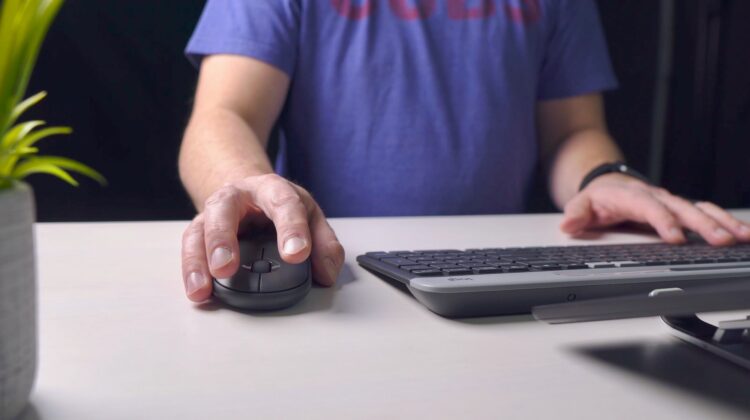
Adding to the list of established accessibility features, it seems s For those who have trouble operating a mouse or trackpad, this could come in very, very handy.
Xremove ads
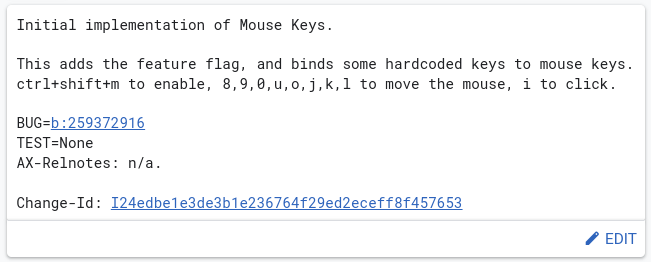
via the Chromium Gerrit

This new commit that was only added on February 22nd looks to give Chromebooks the option to use a handful of keyboard keys to move the mouse on-screen. Like a directional pad on a game controller, this new feature will allow users to move the mouse cursor without having to engage the trackpad or an external mouse.

Check out Today’s Best Chomebook Deals

From the looks of it, the keys that make a quasi-square (8,9,0,u,o,j,k,l) will be the 8 directions of movement with the “i” key at the center that will act as the mouse click. The entire experience will be called up with a quick shortcut (CTRL + SHIFT + M) for use when needed. Ideally, the moment the user no longer needs this, the same shortcut will return the keys mentioned above to their standard operation.

Featured Videos

Xremove ads

It’s a solid addition to the long list of ChromeOS accessibility features and one I’d love to weigh in on a bit if anyone from the ChromeOS team is reading this. For Chromebooks that have a numeric keypad included, that area should become the default “mouse keys” area since those keys are aligned perfectly for the 8-way directional task of moving a mouse on the screen: just my two cents. Either way, this is going to be a really cool, really useful addition once it lands.

SUBSCRIBE TO UPSTREAM

Get Chrome Unboxed delivered straight to your inbox

Upstream is our flagship, curated newsletter with the top stories, most click-worthy deals, giveaways, and trending articles from Chrome Unboxed sent directly to your inbox a few times a week. Join 31,000+ subscribers.

SUBSCRIBE HERE!

Filed Under: Chromebooks, ChromeOS, New & Upcoming Features

About Robby Payne

As the founder of Chrome Unboxed, Robby has been reviewing Chromebooks for over a decade. His passion for ChromeOS and the devices it runs on drives his relentless pursuit to find the best Chromebooks, best services, and best tips for those looking to adopt ChromeOS and those who've already made the switch.

Primary Sidebar

Googlebook

Luminar and Fantastical bring premium, desktop-class apps to Googlebook

By Robby Payne
October 6, 2026

Android gaming on Googlebook is already hitting a frustratingly familiar roadblock

By Robby Payne
October 6, 2026

Real desktop widgets and shortcuts on the Googlebook desktop are refreshing

By Robby Payne
October 6, 2026

Googlebook ‘Better Together’ doesn’t work with Samsung phones, but will soon

By Robby Payne
October 6, 2026

The Googlebook era is here: some first impressions of the hardware and a whole new OS

By Robby Payne
October 5, 2026

More Googlebook

Xremove ads

Deals

My favorite convertible Chromebook is $150 off right now and primed for Googlebook OS

By Robby Payne
September 29, 2026

Google Pixel Buds 2a in Hazel bundled with a new Googlebook laptop at Best Buy

Score a free $129 pair of Pixel Buds 2a with any Googlebook pre-order at Best Buy

By Robby Payne
September 28, 2026

The best Chromebook deals today

By Robby Payne
September 2, 2026

The best Chromebook ever made is $350 off at Best Buy right now

By Robby Payne
August 21, 2026

The excellent, powerful Acer Chromebook Plus Spin 514 is $150 off right now

By Robby Payne
August 12, 2026

More Deals

Xremove ads

Reviews

Acer Chromebook Plus Spin 514 Review: the best convertible you can buy [VIDEO]

By Robby Payne
July 1, 2026

Lenovo Chromebook Plus 2-in-1 Review: pretty great in a vacuum

By Robby Payne
April 23, 2026

My review after 6 weeks with the Lenovo Chromebook Plus 14 [VIDEO]

By Robby Payne
August 11, 2025

One week with the best small Android tablet you can buy, and I’m sold

By Robby Payne
May 9, 2025

Best Chromebooks of 2024 [VIDEO]

By Robby Payne
November 28, 2024

More Reviews

Xremove ads

TWITTER · FACEBOOK · INSTAGRAM · YOUTUBE · EMAIL · ABOUT

Copyright © 2026 · Chrome Unboxed · Chrome is a registered trademark of Google Inc.
We are participants in various affiliate advertising programs designed to provide a means for us to earn fees by linking to affiliated sites.

PRIVACY POLICY