

Support our independent tech coverage. Chrome Unboxed is written by real people, for real people—not search algorithms. Join Chrome Unboxed Plus for just $2 a month to get an ad-free experience, access to our private Discord, and more. Learn more about membership here.
START FREE TRIAL (MONTHLY)START FREE TRIAL (ANNUAL)
When Google announced that Googlebook OS was built directly on modern Android foundations, one of the first thoughts running through my head (and likely millions of other mobile gamers’ heads) was, not surprisingly: finally, Android games on a Google laptop are just going to work.
No more weird container translation layers, no more sluggish ARCVM limitations, and no more half-baked performance. With high-end Intel Core Ultra and Qualcomm Snapdragon X Elite chips under the hood, paired with native Android app execution, the stage was set for Googlebook to become an absolute mobile gaming powerhouse.
Now that our launch units are in-house and I’ve spent time setting them up, I of course decided to immediately put that theory to the test. And the result? A massive day-one letdown. The state of popular Android gaming on Googlebook right now is frustratingly limited, and in the worst way possible, it feels a bit like the early days of ChromeOS all over again.
Big titles won’t install or block you outright
I didn’t start with obscure indie titles. I went straight for the heavy hitters that people actually play every single day – like competitive shooters that feature native controller support and would look incredible on a 120Hz OLED laptop canvas. Across both our Intel-powered ASUS Googlebook 14 and our Snapdragon-powered machines, here is what happened:
- Call of Duty: Mobile, PUBG Mobile and Fortnite: Searching any of these titles in the Google Play Store on Googlebook either yields no results or greets you with the dreaded “Your device isn’t compatible with this version” message. You can’t even download them.
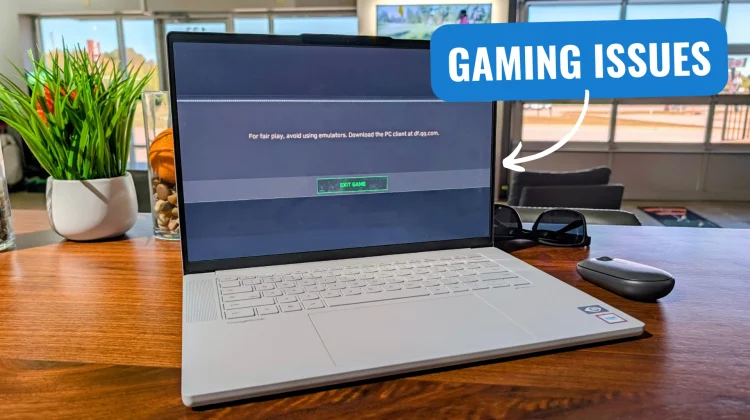
- Farlight 84 & Delta Force: Both games actually managed to download and install. But the second you fire them up, the game client flags the system, throws up a warning stating that you are using an unauthorized emulator, and blocks you from matchmaking or playing entirely.
Seeing anti-cheat systems trip an “emulator” flag on a device running native Android on top-tier silicon is wildly frustrating. With Googlebook, we aren’t running an emulator, so this second issue was possibly more irritating than the first.
The hardware isn’t the problem
To make sure this wasn’t an inherent GPU driver crash or a fundamental flaw with the hardware, I kept testing. I downloaded Bloodstrike, and sure enough, it installed without hesitation and ran buttery smooth at max graphics settings without dropping a single frame. The silicon inside these machines is more than capable of handling high-end 3D mobile rendering without breaking a sweat.
The issue isn’t horsepower. The issue is that the Play Store, developer manifests, and server-side anti-cheat tools are looking at Googlebook OS and treating it as an untrusted desktop environment.
Mobile developers frequently blacklist non-standard Android form factors or flag multi-window desktop environments to prevent keyboard-and-mouse users from gaining an unfair competitive advantage in touch-screen matchmaking lobbies. But rather than segregating input pools – something games like Call of Duty: Mobile already do when you connect an Xbox or PlayStation controller -the door is simply slammed shut.
A bad day-one look for Googlebook gaming
Titles like COD: Mobile and Fortnite are complete home runs for a form factor like this. You have gorgeous 14-inch and 15-inch high-refresh screens, fantastic speakers, massive batteries, and a full Bluetooth stack for controller pairing out of the box. Being able to kick back with an Xbox controller and play your favorite mobile shooter while traveling should be a flagship selling point for Googlebook.
Instead, users unboxing their brand-new, $1,000+ laptops this week to play their favorite games are going to run face-first into issues, blocked installs, and emulator warnings.
Hopefully, this is just a day-one problem that Google and game studios can resolve with quick updates and a few small tweaks. But right out of the gate, having to play the exact same “will it or won’t it run” guessing game we dealt with on ChromeOS for years is an undeniably frustrating pill to swallow.
SUBSCRIBE TO UPSTREAM
Get Chrome Unboxed delivered straight to your inbox
Upstream is our flagship, curated newsletter with the top stories, most click-worthy deals, giveaways, and trending articles from Chrome Unboxed sent directly to your inbox a few times a week. Join 31,000+ subscribers.

