

Support our independent tech coverage. Chrome Unboxed is written by real people, for real people—not search algorithms. Join Chrome Unboxed Plus for just $2 a month to get an ad-free experience, access to our private Discord, and more. Learn more about membership here.
START FREE TRIAL (MONTHLY)START FREE TRIAL (ANNUAL)
For the past 24 hours, I’ve been putting our initial launch fleet of Googlebooks through the ringer. There’s so much to learn and discover with a completely new OS, so I’m constantly falling off task to test, tinker, and investigate every nook and cranny I can find in Googlebook OS.
This is a new platform, so there are small issues I’m finding here and there for sure. And we’ll be writing about those, but there are also some incredibly thoughtful touches that immediately make Googlebook OS really fun and useful as well. It’s easy to get bogged down with critical thoughts, but I don’t’ want to let any of that get in the way of what these devices are already doing very, very well.
A breath of fresh air for long-time Chromebook users
If you have spent any significant amount of time living in ChromeOS over the last decade, you already know the pain of the basically-useless desktop.
Outside of pinning app icons to your bottom shelf, the desktop itself has always been a barren wasteland reserved strictly for wallpapers. It looks nice, but it is not functional at all.
You can’t pin loose files, create quick-launch folders, or drop interactive widgets onto the desktop. If you wanted glanceable information, you were forced to dig through shelf flyouts, open the browser, or fire up an app in a window.
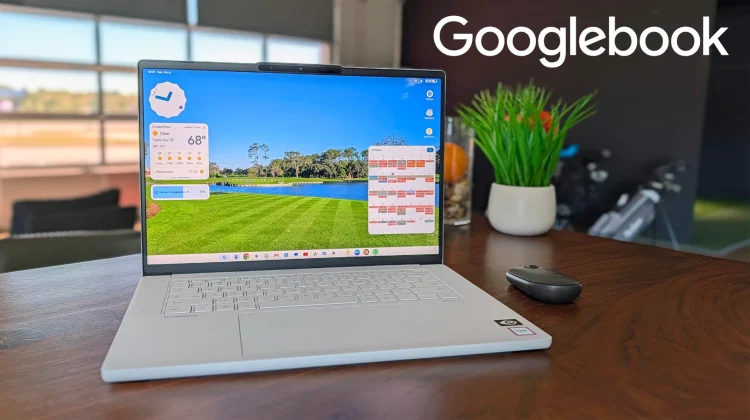
Googlebook OS flips that script entirely, borrowing the best parts of Android’s flexible home screen architecture and adapting it cleanly for a large desktop canvas.
Having the choice matters
Now, I know the immediate rebuttal from Chromebook purists: doesn’t an icon-heavy desktop turn into a chaotic, cluttered disaster?
It certainly can if you let it. But the nice part of Googlebook OS is that it gives you the choice. If you prefer a pristine, minimalist desktop with nothing but your favorite wallpaper, you can leave it completely bare.
For those of us who value instant, glanceable utility, however, the ability to tailor your primary workspace is fantastic. Within no time on the Lenovo Googlebook 15, I customized my main home screen with:
- An expansive Google Calendar agenda: Seeing my next meeting and daily schedule at a glance without opening a web tab or hunting down an app is an instant productivity win.
- A clean Clock widget: Giving me quick time-zone tracking and fast access to timers right from the desktop.
- The Gemini prompt widget: Dropping a persistent AI prompt box right onto my home screen lets me offload thoughts, summarize notes, or trigger tasks in seconds.
- A live Weather widget: Providing immediate local forecasts alongside our travel itineraries.
- Categorized App & File Folders: Grouping my most-used daily web apps, local tools, and frequent directories into neat desktop folders that keep things organized without cluttering the bottom dock.
A small change that makes daily use feel effortless
When you transition between laptops all day, it’s the little friction points that stand out the most. Having to launch a browser window just to see what time your next conference call starts or digging through an app drawer to open a specific workflow is a subtle waste of time.
By allowing native Android widgets and custom app clusters to live natively on the desktop, Googlebook OS immediately bridges the gap between the glanceability of a smartphone and the heavy-lifting abilities of a laptop.
It’s customizable, it’s responsive, and best of all, it makes this brand-new operating system feel like your personal workspace from day one. I still have plenty of critiques to share as our testing continues, but when it comes to home screen freedom, Google hit a home run here.
SUBSCRIBE TO UPSTREAM
Get Chrome Unboxed delivered straight to your inbox
Upstream is our flagship, curated newsletter with the top stories, most click-worthy deals, giveaways, and trending articles from Chrome Unboxed sent directly to your inbox a few times a week. Join 31,000+ subscribers.

