

Support our independent tech coverage. Chrome Unboxed is written by real people, for real people—not search algorithms. Join Chrome Unboxed Plus for just $2 a month to get an ad-free experience, access to our private Discord, and more. Learn more about membership here.
START FREE TRIAL (MONTHLY)START FREE TRIAL (ANNUAL)
Today is the day. After months of tracking code commits, dissecting leaks, and getting that unforgettable first taste at Google’s media showcase in New York City, Googlebooks are officially landing on doorsteps and retail shelves.
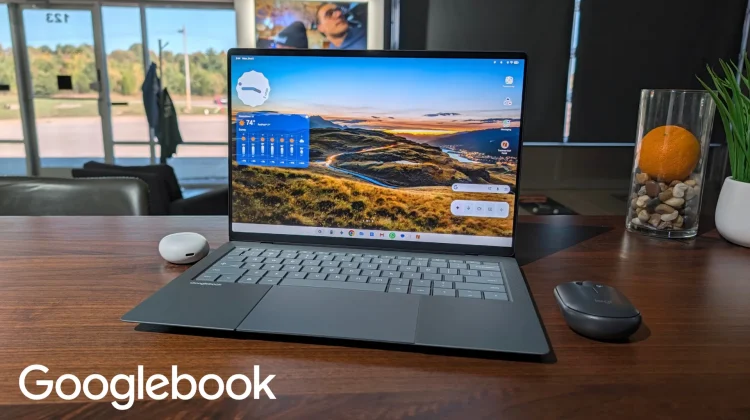
Our review units were quite literally all dropped off minutes ago, and sitting right in front of me right now is one of the five new Googlebooks I’ve been itching to spend real time with: the ASUS Googlebook 14. The rest of the launch fleet will get unboxed shortly, and those initial videos and first-look overviews will be hitting the Chrome Unboxed YouTube channel as fast as we can get them in front of the cameras.
But it’s worth noting that full, comprehensive reviews will naturally take some time. We don’t believe in rushing out reviews after 48 hours with a completely new platform. However, after spending my morning setting up the ASUS, typing on it, and navigating its software, I do have some immediate takeaways and a bit clearer of a roadmap for how we’ll be covering all this newness over the coming weeks.
The hardware is insanely good across the board
Just like we walked away feeling in NYC, the physical hardware Google and its partners have assembled here is exceptional. Lifting the ASUS Googlebook 14 out of the box reinforces how remarkable its engineering is. It is featherweight in the hand yet remarkably rigid with zero chassis flex. The 14-inch OLED display is bright, punchy, and vivid, and the anti-glare treatment works wonders against office lighting without washing out contrast.
The typing experience is clicky and responsive, the haptic trackpad is top-tier, and the speakers are wildly good; pushing out audio far richer than what you’d expect from a notebook this thin. Under the hood, performance feels fantastic in the small amount of time I’ve been tinkering around, and I haven’t seen a single stutter, frame drop, or hint of hesitation yet.
My only hardware complaint so far? The 1080p webcam. It is totally passable for an everyday video call, but on a $1,299 machine that feels this premium and luxury-focused in every other metric, a higher-end camera sensor really should have made the cut.
A brand-new OS is exciting and overwhelming
While the hardware makes a phenomenal first impression, the overarching reality of living with a Googlebook hits you the moment you log in: this is a brand-new operating system.
Yes, there are familiar touches and muscle-memory consistencies carried over from ChromeOS. But make no mistake, Googlebook OS is fundamentally different. There is an absolute ton to learn, muscle memory to unlearn, and fresh workflows to navigate.
From window management and multi-tasking behaviors to file handling, local AI integration, and the way Android apps run natively on the desktop, the learning curve is real. In these early hours, it feels equal parts exhilarating and slightly overwhelming.
There’s a lot I like so far, and there are already quite a few things I think Google still needs to work on. As a full-time Chromebook user for over 10 years now, there are some clear expectations I have coming in that simply aren’t being met on day one. But again, this is day one, and that means I need to get my thoughts together a bit before we start diving into all of this.
So, accordingly, over the next few weeks, that is exactly where our coverage is going to live. We are going to dive deep into:
- The Good, the Bad, and the Quirky: Where Googlebook OS genuinely improves daily productivity, and where it currently stumbles or creates friction.
- ChromeOS vs. Googlebook OS: Breaking down the exact feature differences, parity gaps, and what long-time Chromebook users should actually expect before jumping ship.
- The AI Reality Check: How deeply integrated tools like Gemini Intelligence, Magic Pointer, and Rambler fit into actual everyday work.
Setting the stage for rapid evolution
As we begin tearing into this software and putting every hardware model through its paces, one critical truth has to frame the conversation: we are on day one.
This is a ground-up platform launch. Just like ChromeOS looked wildly different in year two than it did at its humble beginnings, Googlebook OS is going to iterate fast. Features will shift, bugs will get squashed, and early rough edges will be smoothed out through regular software updates.
We’re going to cover all of it with radical honesty: calling out what’s brilliant today, what needs fixing tomorrow, and whether this new chapter of computing lives up to its immense promise.
Keep your eyes locked on the site and our YouTube channel over the next few days as the unboxings go live and our deep-dive software series officially kicks off. The Googlebook era is here, and we have a lot of work to do.
SUBSCRIBE TO UPSTREAM
Get Chrome Unboxed delivered straight to your inbox
Upstream is our flagship, curated newsletter with the top stories, most click-worthy deals, giveaways, and trending articles from Chrome Unboxed sent directly to your inbox a few times a week. Join 31,000+ subscribers.

