
• Skip to main content
  • Skip to primary sidebar
  • Deals
  • Features
  • Guides
  • Chromebooks
  • Videos
  • Podcast
  • More +
    • Reviews
    • Unboxing
    • Upcoming Devices
    • Chromebook Plus
    • Chrome
    • ChromeOS
    • Chrome OS Flex
  • Search
  • Sign Up
  • Log In
Chrome Unboxed – The Latest Chrome OS News

Chrome Unboxed - The Latest Chrome OS News

A Space for All Things Chrome, Google, and More!

  • Deals
  • Features
  • Guides
  • Chromebooks
  • Videos
  • Podcast
  • More +
    • Reviews
    • Unboxing
    • Upcoming Devices
    • Chromebook Plus
    • Chrome
    • ChromeOS
    • Chrome OS Flex
  • Search
  • Sign Up
  • Log In

Nest Hub Max can now read web pages out loud using text-to-speech technology

August 24, 2021 By Michael Perrigo View Comments

Support our independent tech coverage. Chrome Unboxed is written by real people, for real people—not search algorithms. Join Chrome Unboxed Plus for just $2 a month to get an ad-free experience, access to our private Discord, and more. Learn more about membership here.
START FREE TRIAL (MONTHLY)START FREE TRIAL (ANNUAL)

In June, it was found that the Nest Hub and the Nest Hub Max would have a built-in keyboard for browsing the web by hand as opposed to doing so by voice. These devices also gained several new browser tools to make quickly navigating around the web much more accessible. Paired with the recently discovered full-fledged application launcher, these smart displays are beginning to come into their own as more useful tools in the home.

Now, 9to5Google has encountered an interesting feature that may or may not have been meant to release yet. In fact, it may just be a side effect of Google Assistant tying into the built-in browser. On Android, the ‘read this page’ option appeared last year and allowed you to do exactly that, so I think this feature is naturally extending to smart displays as a result.

Xremove ads

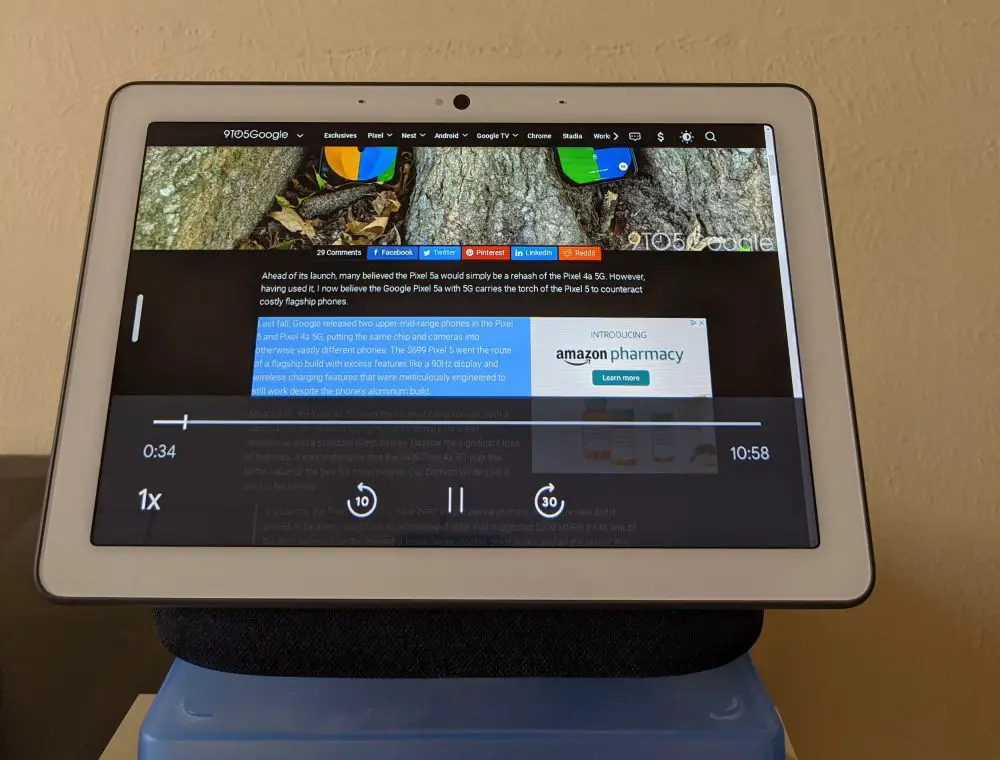
A new text-to-speech icon (a person with audio waves coming from their mouth) is now featured on the top bar of Nest Hub Max devices – just next to the button that allows you to adjust the text size for the web page that you’re viewing. When selected, the player you see below becomes visible, complete with a scrubber, play, and pause buttons, a playback speed selector, and even the ability to skip forward 30 seconds, and backward 10 seconds. It’s actually reminiscent of that which is found on Google Podcasts, except here, the skip forward and backward buttons can’t be modified to display different time options.

The text-to-speech feature will highlight some text on the page and begin reading it out loud in Google Assistant’s voice. It works well overall, but it’s clearly still in development, as evidenced by the crashes that 9to5Google experienced after extensive testing. Not only that, but apparently, it continued to read an article even when the web browser was closed – weird.
Featured Videos

Xremove ads
Source: 9to5Google

In addition to this great feature, the browser on Nest Hub Max can now also open web pages by voice – just like you’ve been able to do on phones and Chromebooks. By saying ‘Hey Google, visit Chromeunboxed.com’, for example, your display will navigate you to us hands-free! It should be noted that these updates are only currently appearing on Hub Max devices, and not on standard Nest Hubs – not even first-gen Hubs running Fuchsia. Check your display settings for version 1.54 or 1.56 to see if you can start tapping into these extra tools!

SUBSCRIBE TO UPSTREAM

Get Chrome Unboxed delivered straight to your inbox

Upstream is our flagship, curated newsletter with the top stories, most click-worthy deals, giveaways, and trending articles from Chrome Unboxed sent directly to your inbox a few times a week. Join 31,000+ subscribers.

SUBSCRIBE HERE!

Filed Under: Google Assistant, Nest, New & Upcoming Features, News, Smart Home

About Michael Perrigo

Known as "Google Mike" to his customers, Michael worked at Best Buy as a Chromebook Expert who dedicated his time to understanding the user experience from a regular Chromebook owner's perspective. Having spent nearly 20 years meeting you face-to-face, he strives to help you understand your technology through carefully crafted guides and coverage, relentlessly seeking out the spark in what's new and exciting about ChromeOS.

Primary Sidebar

Xremove ads

Deals

Lenovo’s powerful 8.8-inch Legion Tab Gen 5 Android gaming tablet is now $150 off

By Joseph Humphrey
June 10, 2026

The Google TV Streamer hits $80 again, bringing Gemini and smart home control to your living room

By Joseph Humphrey
June 5, 2026

The best Chromebook deals today

By Robby Payne
May 25, 2026

Save $300 as Acer’s Chromebook Plus Spin 714 returns to its all-time low price

By Robby Payne
May 21, 2026

Save $40 on the Google Pixel Watch 4 before the Spring Sale ends

By Joseph Humphrey
April 24, 2026

More Deals

Xremove ads

Reviews

Lenovo Chromebook Plus 2-in-1 Review: pretty great in a vacuum

By Robby Payne
April 23, 2026

Acer Chromebook Plus Spin 514 Review: Kompanio Ultra power in a convertible

By Robby Payne
December 24, 2025

My review after 6 weeks with the Lenovo Chromebook Plus 14 [VIDEO]

By Robby Payne
August 11, 2025

One week with the best small Android tablet you can buy, and I’m sold

By Robby Payne
May 9, 2025

Best Chromebooks of 2024 [VIDEO]

By Robby Payne
November 28, 2024

More Reviews

Xremove ads

Guides

This Chromebook trackpad shortcut is definitely not new, but is blowing my mind

By Robby Payne
March 11, 2024

How to reduce broadcast delay on YouTube TV to stop live spoilers

By Robby Payne
December 8, 2023

Windows PC keyboard and Chromebook

How to use a Windows keyboard with a Chromebook

By Joseph Humphrey
December 8, 2023

How reset and revert your Chromebook to the previous version of Chrome OS

By Robby Payne
November 29, 2023

My Chromebook Plus features disappeared: here’s how I fixed it

By Robby Payne
November 24, 2023

More Guides

TWITTER · FACEBOOK · INSTAGRAM · YOUTUBE · EMAIL · ABOUT

Copyright © 2026 · Chrome Unboxed · Chrome is a registered trademark of Google Inc.
We are participants in various affiliate advertising programs designed to provide a means for us to earn fees by linking to affiliated sites.

PRIVACY POLICY