

Support our independent tech coverage. Chrome Unboxed is written by real people, for real people—not search algorithms. Join Chrome Unboxed Plus for just $2 a month to get an ad-free experience, access to our private Discord, and more. Learn more about membership here.
START FREE TRIAL (MONTHLY)START FREE TRIAL (ANNUAL)
Though it has perhaps been tempting to think of the upcoming Pixel Glow as just a nostalgic return to the quirky lightbar days of the original Chromebook Pixel, it seems more is going on with this new feature than many initially thought.
New teardowns of the Pixel Diagnostics and Google apps have revealed that Google is building a much more robust lighting system designed for both phones and laptops. According to both Android Authority and 9to5Google, the hardware isn’t just a single light source; the system code specifically references an array of eight individual color LEDs and some additional specifics on how this could all show up on laptops as well.
The 8-LED array
The discovery of an eight-LED setup suggests that Pixel Glow is intended to be a visual “display” in its own right. Rather than a simple on/off state, an 8-LED array allows for:
- Progress Bars: Visualizing things like battery charging or a timer countdown.
- Gemini Flow: A multi-color, pulsing animation that matches the Gemini “star” branding when the assistant is listening or thinking.
- Directional Alerts: Subtle light movements that could indicate which side of the device a notification is coming from.
The Android Authority teardown of the Diagnostics app also confirmed that these lights can be independently tested for red, green, and blue abnormalities, ensuring the full color spectrum is available for these “glow” effects.
A first look at ‘Project Aluminium’ lightbar feedback
The most intriguing part of this leak to us here at Chrome Unboxed is an animation found within the Google app that specifically targets a laptop form factor. The animation shows a horizontal light strip located at the base of the display or maybe even integrated into the hinge that pulses with the signature Gemini colors.
While the buzz is still about a secret Google-made laptop, I still lean toward this being the standardized UI for Project Aluminium devices moving forward. While this being included in the “Pixel Glow” code does have me wondering a bit, we’ve simply seen zero evidence of Google making a new laptop at this point. Down the road, I 100% think this could (and absolutely should) happen; I just don’t see it being the first device we see the Pixel Glow feature show up in the laptop space.
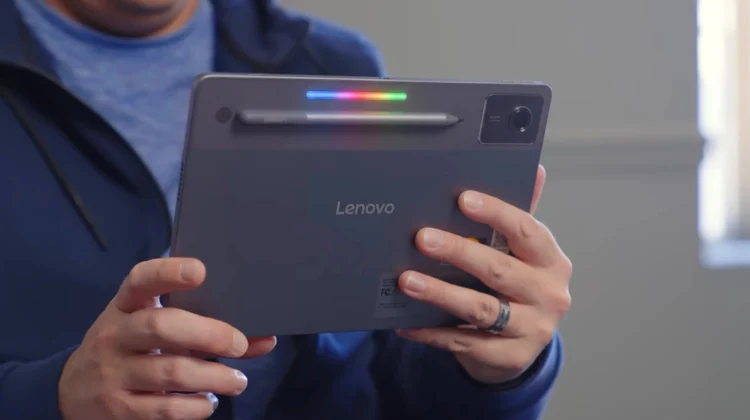
As we’ve already discussed, we are seeing this exact 4-color lightbar hardware being tested on OEM boards from Lenovo (Sapphire) and Acer (Moonstone). I think this leaked animation isn’t necessarily showing us a Google laptop; it’s likely showing us the mandatory visual feedback system for any flagship laptop running the upcoming Android-based ‘Aluminium OS’.
Pixel Lights, Gemini Glow, and Aurora
The code also mentions several potential marketing names, including “Pixel Lights,” “Gemini Glow,” and “Aurora.” Where those names end up in the grand scheme of things – software or hardware – remains to be seen, but one thing is clear: Google wants your next device to communicate basic things to you through some sort of lightbar. And with The Android Show just a couple of weeks away, we might finally get to see those LEDs in action.
SUBSCRIBE TO UPSTREAM
Get Chrome Unboxed delivered straight to your inbox
Upstream is our flagship, curated newsletter with the top stories, most click-worthy deals, giveaways, and trending articles from Chrome Unboxed sent directly to your inbox a few times a week. Join 31,000+ subscribers.

