


Support our independent tech coverage. Chrome Unboxed is written by real people, for real people—not search algorithms. Join Chrome Unboxed Plus for just $2 a month to get an ad-free experience, access to our private Discord, and more. Learn more about membership here.
START FREE TRIAL (MONTHLY)START FREE TRIAL (ANNUAL)
Recently, Microsoft added a banner to the Chrome download page within the Edge browser that promotes Edge as a trustworthy alternative to Google Chrome. The advertisement’s language is creepy and invasive in my opinion. The full-width banner was clearly a targeted injection meant to persuade Google’s user base over to Edge by highlighting its similarities while attempting to boost its brand. The banner read “Microsoft Edge runs on the same technology as Chrome, with the added trust of Microsoft.”
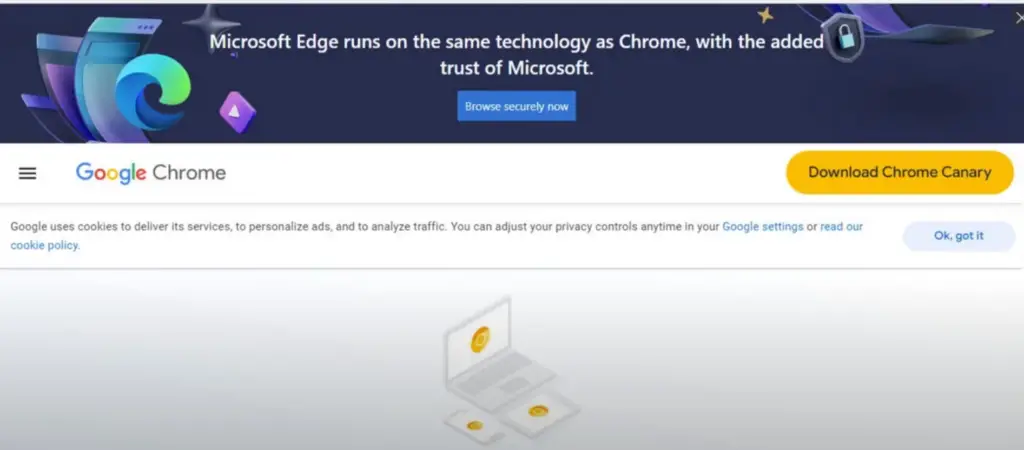
Microsoft’s claim to “added trust” ignores all the telemetry it adds to the browsing experience. Chrome users already have all of the benefits it’s describing thanks to both browsers being built on the same code base – Chromium. Moreover, the push for Edge (or over the edge, you could say) is clearly a strategy the company is employing to try to increase its browser market share and drive more users to its ecosystem full of apps.
These types of campaigns are not uncommon, and Google even nudges Edge users to switch to Chrome as a faster alternative when they visit Google.com. The difference, I feel, is that while both companies are using automated detection to understand what browser users are visiting websites with, Google is injecting targeted language into its own website where as Microsoft is injecting targeted language into a space where its competitor resides. Obviously, Google collects user data for various reasons just as the big M does, and both are for-profit businesses, so it’s less about telemetry and more about deceptive or biased marketing meant to kneecap the competition’s reputation.
Following media coverage and criticism from various sources, Microsoft did change the banner to a less intrusive pop-up dialogue. It’s not known whether or not the YouTubers and news outlets that initially reported on this were the reason the company made the change, but the message remains the same: it claims that Edge is a viable alternative to Chrome, and users should trust them even though they’re providing a near-identical experience. Ultimately, it’s up to the individual to decide which browser they prefer, but in my experience, Edge has notoriously been worse for many things like web apps, tab groups, and performance on Windows 11.

All it seems the tech giant achieved with this stunt was to spark controversy and raise concerns about its motives. This reminds me of Microsoft’s “Scroogled” ad campaigns of years past that mercilessly went for Google’s throat comparing Bing search to Google Search with hilariously failed results. In nearly all of the tests, the latter proved superior, which was the opposite effect Microsoft hoped to have with its efforts.
As someone who has spent the past month using Edge and Bing search to give both a fair shake, I went back to using Chrome with the Chrometana extension to redirect Microsoft’s forced Bing searches to Google.com. This allows me to use the search feature on my Windows 11 desktop to perform Google searches without Bing getting in the way. Let me know in the comments if you agree that a huge colorful banner begging users to switch to Edge planted smack dab at the top of the Chrome download page smells of desperation or not.

