


Support our independent tech coverage. Chrome Unboxed is written by real people, for real people—not search algorithms. Join Chrome Unboxed Plus for just $2 a month to get an ad-free experience, access to our private Discord, and more. Learn more about membership here.
START FREE TRIAL (MONTHLY)START FREE TRIAL (ANNUAL)
Earlier this year, after roughly three years, Google finally lifted the “Beta” label from the Crostini project that brought a Linux development environment to Chromebooks. While many may feel that the Linux side of Chrome OS is only for technical users, developers, and tinkerers such as myself, the ability to install in run Linux packages can bring a lot of value to Chrome OS for even the average consumer. Applications such as GIMP can give users access to more powerful image editing tools that are relatively scant in the web-based ecosystem of Chromebooks. Still, others may be interested in Linux on Chromebooks for the possibility of native gaming via the upcoming Borealis project that will use the same container tech to bring Steam to Chrome OS.
If you are a technical user and have found yourself using the Linux environment regularly, managing your container or containers could soon be a lot easier. I said containers, plural because that’s exactly what this new update to the Canary channel aims to manage. Just in case you weren’t aware, you can actually fire up multiple containers inside the Linux environment on Chrome OS. Why? Well, there are plenty of use cases but one example would be a developer that needs multiple Linux distros running for testing purposes.
Anyway, navigating multiple containers on Chrome OS (or any OS) requires a fair degree of technical understanding of how to navigate the Linux terminal and the Crosh shell. Once you’ve created new containers in your VM, you can start/stop, delete, and manage them from Crosh. However, an upcoming update to Chrome OS may allow users to view and manage active containers directly from the settings menu. Discovered by ZDNet and dismantled by our friend Kevin Tofel, the new Chrome OS flag could eventually bring us a settings UI for container management.
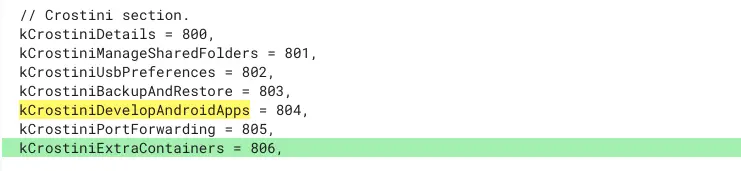
As you can see in the image above, the new feature is being added to the already existing Linux options in the Chrome OS settings menu. This should make it more user-friendly to manage multiple containers without the need to run commands in a Crosh shell. Presumably, you will be able to start/stop or delete containers from this menu. That will be very handy if one or more of your containers are giving you fits or you’re simply done with it. According to Mr. Tofel, each container could receive its own color-coding for easier identification. I also presume that the individual name of each container, whether auto-assigned or manually added, will appear in the settings menu.
Again, this may seem like a feature for a narrow segment of users but make no mistake, Google is gunning for the developer community. Between Android app developers and Enterprise types, the maker of Chrome OS is serious about making Chromebooks a viable option for all walks of life and that includes Linux developers. Toss in gamers that want Steam on Chrome OS and Chromebooks could soon see another major surge in segment growth. This flag popped up in the latest update to the Canary channel and I’ve fired up some containers to see if it’s working but nothing yet. I’ll keep testing to see what it looks like when it goes live and we can see it in action.
SUBSCRIBE TO UPSTREAM
Get Chrome Unboxed delivered straight to your inbox
Upstream is our flagship, curated newsletter with the top stories, most click-worthy deals, giveaways, and trending articles from Chrome Unboxed sent directly to your inbox a few times a week. Join 31,000+ subscribers.

