
• Skip to main content
  • Skip to primary sidebar
  • Deals
  • Features
  • Guides
  • Chromebooks
  • Videos
  • Podcast
  • More +
    • Reviews
    • Unboxing
    • Upcoming Devices
    • Chromebook Plus
    • Chrome
    • ChromeOS
    • Chrome OS Flex
  • Search
  • Sign Up
  • Log In
Chrome Unboxed – The Latest Chrome OS News

Chrome Unboxed - The Latest Chrome OS News

A Space for All Things Chrome, Google, and More!

  • Deals
  • Features
  • Guides
  • Chromebooks
  • Videos
  • Podcast
  • More +
    • Reviews
    • Unboxing
    • Upcoming Devices
    • Chromebook Plus
    • Chrome
    • ChromeOS
    • Chrome OS Flex
  • Search
  • Sign Up
  • Log In

More major changes coming to your Chrome browser’s global media controls

May 5, 2021 By Michael Perrigo View Comments

Support our independent tech coverage. Chrome Unboxed is written by real people, for real people—not search algorithms. Join Chrome Unboxed Plus for just $2 a month to get an ad-free experience, access to our private Discord, and more. Learn more about membership here.
START FREE TRIAL (MONTHLY)START FREE TRIAL (ANNUAL)

A user on Reddit by the name of Leopeva64 (Thanks for the heads up!) made us aware of some pretty significant changes that are coming to your Chrome browser’s global media controls and even provided Chromium Repository commits to reflect these changes. We previously detailed how Google was turning your music controls on their head, and these new changes lean further into that design. At this time, there is no timeline that we’re aware of for when these changes will come to Chromebooks, but as with previous alterations, the browser and Chrome OS implemented them pretty much immediately in step with one another.

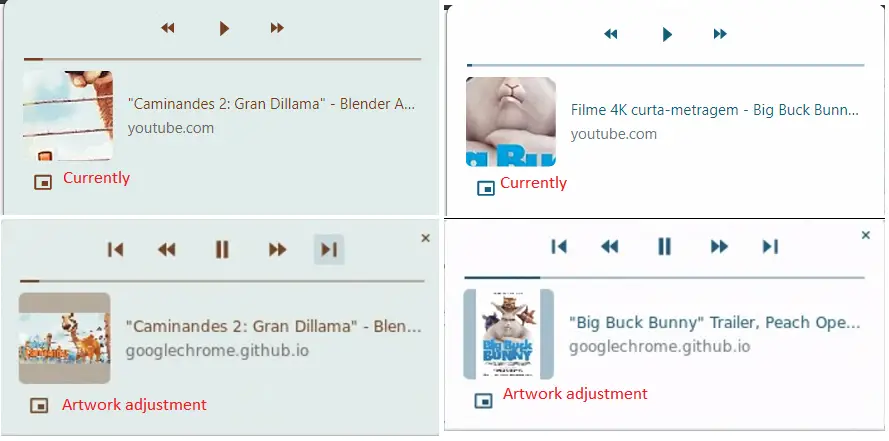
First – and this is a weird one – the global media controls section is modifying how your album art will display. It’s being changed to show the entire album art instead of a zoomed-in version, and that means that the area dedicated to album art will pretty much never be completely filled out. I’m personally partial to the zoomed-in, cropped version of the album art because it looks cleaner and more intentional. I’m definitely not a fan of this one!
Xremove ads
Credit: Leopeva64

Next up, a device selector is being added to the bottom of the global media control card for your active item. The first two available devices that you can cast to will be shown, followed by a drop-down arrow that will allow you to select from any other available cast devices. I did notice this one recently on Desktop Chrome, and I welcome this change with open arms! Previously, devices were listed in a separate cast section of the three dots ‘more’ menu.

Credit: Leopeva64

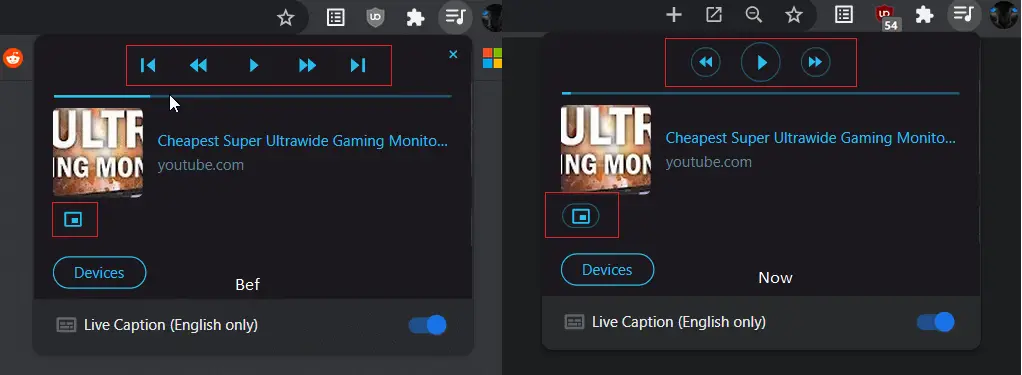
Additionally, the play and pause buttons as well as the buttons used to skip forward and backward are receiving a bit of a makeover. Now, they will feature a clean-looking, attention-drawing circle around them. This looks pretty nice! I’m a bit surprised this wasn’t implemented upon the launch of the global media controls section, but I understand that polish is definitely not a priority while features are being tested and developed.
Featured Videos

Xremove ads
Credit: Leopeva64

Lastly, while no image exists for a volume slider being built directly into the media card, there is a Chromium Repository commit that details this as a future implementation. I’m not really sure I can imagine where this would be placed in order to prevent confusion with the scrubbing bar, but I do believe it would be useful. I personally approve of almost all of these changes and look forward to what Google is going to make of global media controls over time, but I am still having trouble adjusting to the primary controls for each card appearing above the artwork at the top of the card as opposed to its traditional placement on the bottom.

SUBSCRIBE TO UPSTREAM

Get Chrome Unboxed delivered straight to your inbox

Upstream is our flagship, curated newsletter with the top stories, most click-worthy deals, giveaways, and trending articles from Chrome Unboxed sent directly to your inbox a few times a week. Join 31,000+ subscribers.

SUBSCRIBE HERE!

Filed Under: Chrome OS Tablet, ChromeOS, New & Upcoming Features, News, Updates

About Michael Perrigo

Known as "Google Mike" to his customers, Michael worked at Best Buy as a Chromebook Expert who dedicated his time to understanding the user experience from a regular Chromebook owner's perspective. Having spent nearly 20 years meeting you face-to-face, he strives to help you understand your technology through carefully crafted guides and coverage, relentlessly seeking out the spark in what's new and exciting about ChromeOS.

Primary Sidebar

Xremove ads

Deals

The Google TV Streamer hits $80 again, bringing Gemini and smart home control to your living room

By Joseph Humphrey
June 5, 2026

The best Chromebook deals today

By Robby Payne
May 25, 2026

Save $300 as Acer’s Chromebook Plus Spin 714 returns to its all-time low price

By Robby Payne
May 21, 2026

Save $40 on the Google Pixel Watch 4 before the Spring Sale ends

By Joseph Humphrey
April 24, 2026

Deal Alert: the excellent Lenovo Chromebook Plus 2-in-1 returns to $429

By Robby Payne
April 20, 2026

More Deals

Xremove ads

Reviews

Lenovo Chromebook Plus 2-in-1 Review: pretty great in a vacuum

By Robby Payne
April 23, 2026

Acer Chromebook Plus Spin 514 Review: Kompanio Ultra power in a convertible

By Robby Payne
December 24, 2025

My review after 6 weeks with the Lenovo Chromebook Plus 14 [VIDEO]

By Robby Payne
August 11, 2025

One week with the best small Android tablet you can buy, and I’m sold

By Robby Payne
May 9, 2025

Best Chromebooks of 2024 [VIDEO]

By Robby Payne
November 28, 2024

More Reviews

Xremove ads

Guides

This Chromebook trackpad shortcut is definitely not new, but is blowing my mind

By Robby Payne
March 11, 2024

How to reduce broadcast delay on YouTube TV to stop live spoilers

By Robby Payne
December 8, 2023

Windows PC keyboard and Chromebook

How to use a Windows keyboard with a Chromebook

By Joseph Humphrey
December 8, 2023

How reset and revert your Chromebook to the previous version of Chrome OS

By Robby Payne
November 29, 2023

My Chromebook Plus features disappeared: here’s how I fixed it

By Robby Payne
November 24, 2023

More Guides

TWITTER · FACEBOOK · INSTAGRAM · YOUTUBE · EMAIL · ABOUT

Copyright © 2026 · Chrome Unboxed · Chrome is a registered trademark of Google Inc.
We are participants in various affiliate advertising programs designed to provide a means for us to earn fees by linking to affiliated sites.

PRIVACY POLICY