


Support our independent tech coverage. Chrome Unboxed is written by real people, for real people—not search algorithms. Join Chrome Unboxed Plus for just $2 a month to get an ad-free experience, access to our private Discord, and more. Learn more about membership here.
START FREE TRIAL (MONTHLY)START FREE TRIAL (ANNUAL)
Gaming on Chromebooks has become quite common nowadays. Back in the day though, it was inconceivable to say “Chromebook” and “Games” in the same sentence, even though Android apps had graced the OS years prior. With the advent of cloud gaming, however, AAA titles like Destiny, Star Wars Jedi: Fallen Order, and more are now just a website URL away.
If you’re an old-school gamer like me though, you’ll always have a fondness in your heart for simple games from your youth like Tetris, Space Invaders, and more. Heck, when I was growing up and in middle and high school, I even played a ton of Sudoku once the craze began in the early 2000s in the United States. The only difference is that this was only done in the newspaper or in books.
Now, you can play these sorts of games on your Chromebook through apps and perhaps even cloud services, but did you know that you can also play them natively on your device through the Linux terminal? I didn’t either! That’s why when our community member Pfredd pointed this out to me, I was excited.
Today, I’m going to show you how to play these titles with just a few lines of code on your Chromebook, and even though they aren’t the licensed titles of yore, they are free and open-source clones of them – as Linux is great for. Happy gaming!
Before you start playing the games though, you’ll need to install Linux on a compatible Chromebook. You can use our handy guide, but essentially, you just go to the Settings app, type “Linux” into the search bar, and click “Set up Linux development environment”. Once there, just go through the steps!
Bastet

According to HowToGeek, who’s now fueled my late-night terminal gaming craze, Bastet gets its name from “Bastard” and “Tetris”. The name is fitting because this version of the classic game purposely calculates which blocks you aren’t interested in for solving lines and forces you to use them in more clever ways. I’m thinking that this is only one of many curse words you may inadvertently shout at the coffee shop while playing.
To set it up, open the Linux Terminal app from your Chromebook’s ‘Everything button’ and type in the following:
sudo apt install bastet
2048

One game that’s become incredibly popular since the advent of touchscreen phones is 2048. Type the command below into the terminal and hit enter to launch this game of combining tiles by sliding them up, down, left, or right. While deceptively simple, this could provide you with hours of fun, and frustration as you try to stack tiles up to the number 2048!
sudo apt install 2048
Nudoku
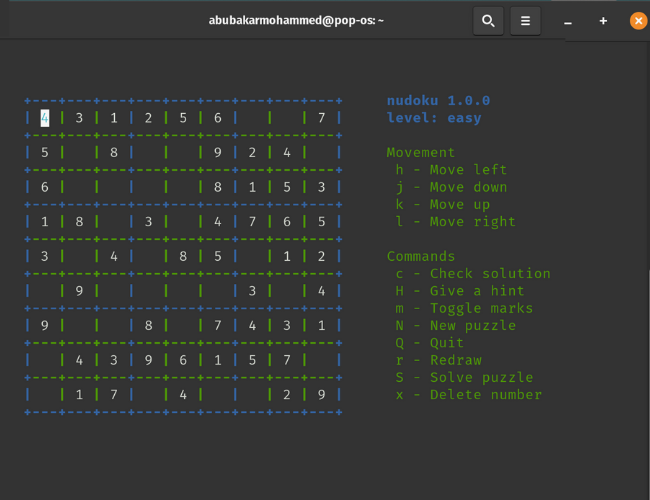
Remember how I mentioned Sudoku and its rise in dominance for previous crossword loyalists? Well, have you ever played it in terminal green? No? Me either – at least, not until yesterday. You probably don’t need an introduction to Sudoku, but just in case, I’ll give you one anyway. The screen is made up of 1 big box, full of 9 smaller boxes, and in those 9 boxes, 9 other boxes reside. I know, confusing.
However, if you keep this in mind, along with the fact that every box, row, and column can only have the numbers 1-9 appear once, then segmenting it this way can help you solve what at first seems like a complex puzzle. Instead, it’s simply a matter of eliminating choices! I absolutely love Sudoku, and I’m so happy to see a clone of it called “Nudoku” appear on ChromeOS without the need for an installation. This version forces you to utilize the keyboard buttons to input numbers, mark boxes with placeholders, and more.
sudo apt install nudoku
Other Interesting Terminal Games
- Moon Buggy – Move your moon buggy across the surface of the moon from left to right as you avoid craters in the ground by jumping.
sudo apt install moon-buggy
- Pacman4Console – Even Google’s doodle has become a version of the iconic classic Pac-man, so why not also play it on a terminal? Move your Pac-man through the level collecting pellets and avoid the “ghosts”. In this case, they’re ampersands!
sudo apt install pacman4console
- Ninvaders – Everyone has likely heard of Space Invaders, the very first arcade game in 1980 that was licensed for the Atari 2600 (yes, my first console, and I’m proud of it!) “Ninvaders” is like that, but without the copyright infringement lawsuits. Destroy aliens with your ship as they attempt to invade the planet.
sudo apt install ninvaders
- nSnake – My first ever phone was a Tracfone that I received when I was 17 years old. I know, my son is much younger and already has a cell phone…times are changing! Anyways, this was a T9 device, so I had to press lots of buttons just to say “lol”. If you’re at least in your 30s, you’ll know what I’m talking about. When I wasn’t busy making my thumbs sore all night texting my first girlfriend, I was playing Snake on the crappy black and white screen. “nSnake” is a Snake clone, and it closely resembles the original, but using Ascii characters like the rest of the titles we’re covering today. Move the snake left, right, up or down to collect the money since, you know, snakes need to pay their rent too.
sudo apt install nsnake
- Greed – This one is strange at first. You’re an “@” sign surrounded by randomly colored numbers, and you have to eat the number to your left or right, or above/below you. When you do, your score goes up, but you can’t go back the way you came, and must keep powering ahead, eating more calories than you have in your daily budget because, well, you’re greedy, aren’t you? The game is over when you can’t move anymore.
sudo apt install greed
- BSD Games – This game is actually more than one game – it’s a handful packed into one install command! Air Traffic, Battlestar, Hunt, and more can be played by using the terminal command found below, but I’ll leave it to you to discover all that it entails. Have fun!
sudo apt install bsdgames
- Ascii Patrol – “Ascii” is short for the “American Standard Code for Information Interchange” which, I know, sounds super boring when it comes to gaming, but it just means that the entire game is created from text characters. This title closely resembles the above “Moon Buggy”, but instead of just dodging lunar potholes, you must shoot UFOs out of the sky as well! First, you’ll need to install Snap to your Linux terminal, and then install the game from there. See instructions below.
sudo apt install snapd
sudo apt install ascii-patrol
SUBSCRIBE TO UPSTREAM
Get Chrome Unboxed delivered straight to your inbox
Upstream is our flagship, curated newsletter with the top stories, most click-worthy deals, giveaways, and trending articles from Chrome Unboxed sent directly to your inbox a few times a week. Join 31,000+ subscribers.

