
• Skip to main content
  • Skip to primary sidebar
  • Deals
  • Features
  • Guides
  • Chromebooks
  • Videos
  • Podcast
  • More +
    • Reviews
    • Unboxing
    • Upcoming Devices
    • Chromebook Plus
    • Chrome
    • ChromeOS
    • Chrome OS Flex
  • Search
  • Sign Up
  • Log In
Chrome Unboxed – The Latest Chrome OS News

Chrome Unboxed - The Latest Chrome OS News

A Space for All Things Chrome, Google, and More!

  • Deals
  • Features
  • Guides
  • Chromebooks
  • Videos
  • Podcast
  • More +
    • Reviews
    • Unboxing
    • Upcoming Devices
    • Chromebook Plus
    • Chrome
    • ChromeOS
    • Chrome OS Flex
  • Search
  • Sign Up
  • Log In

How to sort data by date in Google Sheets

April 22, 2022 By Johanna Romero View Comments

Support our independent tech coverage. Chrome Unboxed is written by real people, for real people—not search algorithms. Join Chrome Unboxed Plus for just $2 a month to get an ad-free experience, access to our private Discord, and more. Learn more about membership here.
START FREE TRIAL (MONTHLY)START FREE TRIAL (ANNUAL)

Google Sheets may be one of the most undervalued tools in the Google Workspace arsenal of productivity apps. Accounting fiends swear by more powerful applications such as Microsoft Excel, but there is a lot that Google Sheets can do that will suffice for those simply looking for an application that can crunch some numbers. One of the things Sheets can do very well is to sort your data in an easier way for you to analyze. In this guide, I will show how you can do just that and sort by date.

How to validate your dates

The first thing we have to do is make sure we have valid dates entered in a column that you can use to sort. Just typing your date as “April 22, 2022” doesn’t mean that Sheets will recognize it as a valid date. In fact, if your date is not right-aligned, that’s a good sign that it is not a valid date format.

Xremove ads

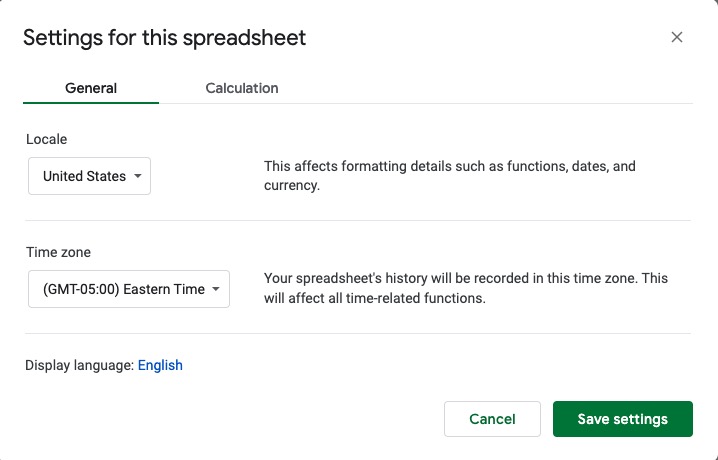
To ensure you are entering a valid date, pay attention to the locale you have set in Google Sheets. This plays a very important role because different countries have their own pattern for displaying dates and times. For example, in the U.S., the date format is mm/dd/yyyy, which is not the case in Europe and other countries. If you enter the dates in the incorrect format, they will be treated as text and show as left-aligned.
How to sort your values

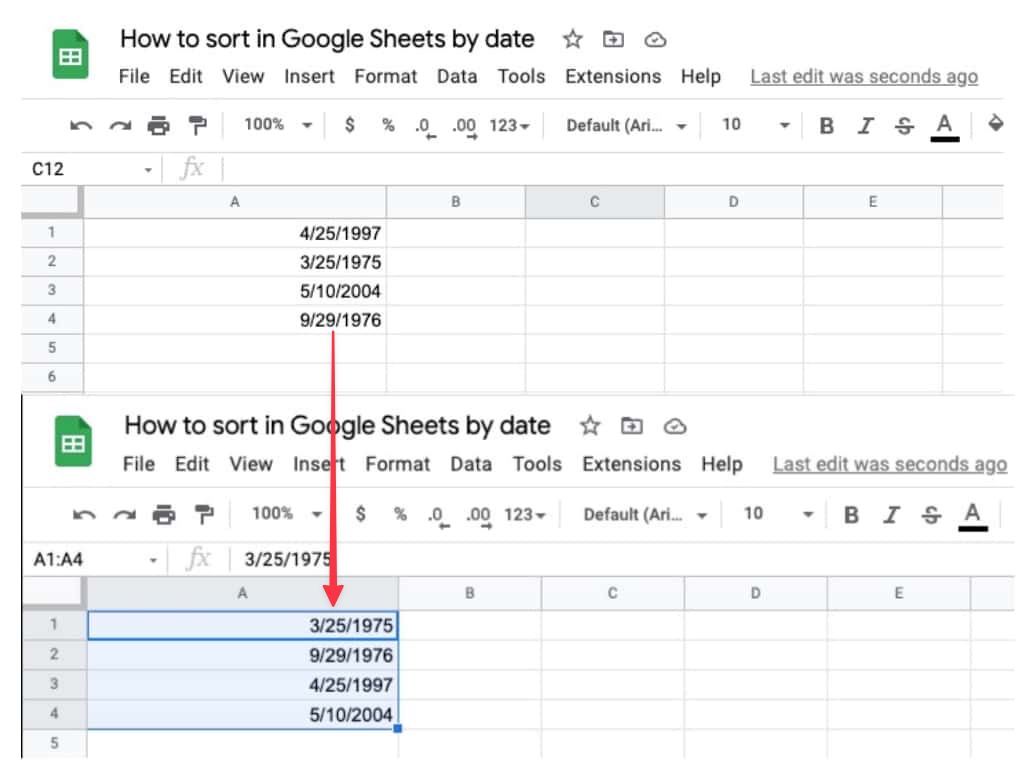
Once you have made sure that all your dates are properly formatted, it’s time to sort them so that they appear in order. For example, I entered a few birth dates out of order in the example below and later sorted them using the method below.
Featured Videos

Xremove ads

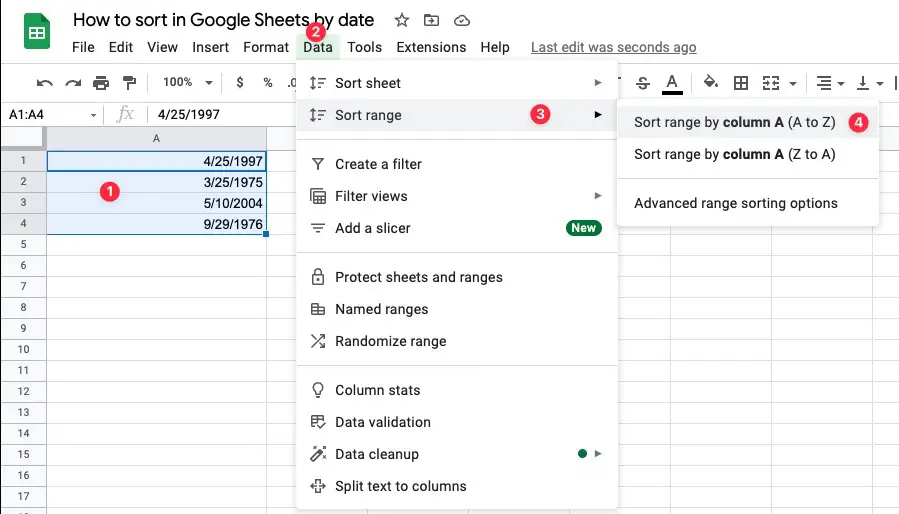
To begin, select the cell range you want to sort, then click on “Data” from the Google Sheets menu. Next, click on “Sort range,” then select how you want to sort it. If you want the dates sorted in chronological order, select “Sort range by Column (A to Z).”
I just want the steps!
    ​
  1. Verify that your dates are formatted correctly.
  2. Select the cell range you want to sort.
  3. Click on Data > Sort range > Sort range by column (A to Z)

Once you’ve followed these steps, your dates will be properly sorted. Advanced sorting options are also available to specify a header row that is not to be touched and to add more conditions, such as sorting another set of values. These features are available in Google Sheets to anyone with a Google account, personal or corporate, and can be used when needed without much fuss.

Filed Under: Apps, Guides and How-To's, Workspace Tagged With: google apps, google sheets, google workspace, sort by date

Primary Sidebar

Xremove ads

Deals

The touchscreen Lenovo Chromebook Slim 3 is a steal at under $200

By Robby Payne
March 16, 2026

Google TV Streamer and Remote held in front of a wall-mounted TV

The premium Google TV Streamer 4K is back down to $80

By Joseph Humphrey
March 16, 2026

The best Chromebook deals today

By Robby Payne
March 16, 2026

Pixel Buds Pro 2 running

I still love the Pixel Buds Pro 2 and they are $60 off right now

By Joseph Humphrey
March 13, 2026

The Lenovo Chromebook Slim 3 is the one to get, starting at just $139 right now

By Robby Payne
March 6, 2026

More Deals

Xremove ads

Reviews

Acer Chromebook Plus Spin 514 Review: Kompanio Ultra power in a convertible

By Robby Payne
December 24, 2025

My review after 6 weeks with the Lenovo Chromebook Plus 14 [VIDEO]

By Robby Payne
August 11, 2025

One week with the best small Android tablet you can buy, and I’m sold

By Robby Payne
May 9, 2025

Best Chromebooks of 2024 [VIDEO]

By Robby Payne
November 28, 2024

Samsung Galaxy Chromebook Plus Review: Samsung is back! [VIDEO]

By Robby Payne
October 28, 2024

More Reviews

Xremove ads

Guides

This Chromebook trackpad shortcut is definitely not new, but is blowing my mind

By Robby Payne
March 11, 2024

How to reduce broadcast delay on YouTube TV to stop live spoilers

By Robby Payne
December 8, 2023

Windows PC keyboard and Chromebook

How to use a Windows keyboard with a Chromebook

By Joseph Humphrey
December 8, 2023

How reset and revert your Chromebook to the previous version of Chrome OS

By Robby Payne
November 29, 2023

My Chromebook Plus features disappeared: here’s how I fixed it

By Robby Payne
November 24, 2023

More Guides

TWITTER · FACEBOOK · INSTAGRAM · YOUTUBE · EMAIL · ABOUT

Copyright © 2026 · Chrome Unboxed · Chrome is a registered trademark of Google Inc.
We are participants in various affiliate advertising programs designed to provide a means for us to earn fees by linking to affiliated sites.

PRIVACY POLICY