


Support our independent tech coverage. Chrome Unboxed is written by real people, for real people—not search algorithms. Join Chrome Unboxed Plus for just $2 a month to get an ad-free experience, access to our private Discord, and more. Learn more about membership here.
START FREE TRIAL (MONTHLY)START FREE TRIAL (ANNUAL)
Google is always looking for ways to help its users work smarter and more efficiently. In recent years, the company has made great strides in using AI and machine learning to give users features like Smart Compose, Smart Reply, Docs Summaries, and more. Now, it’s taking things to the next level with the addition of generative AI features to its suite of tools.
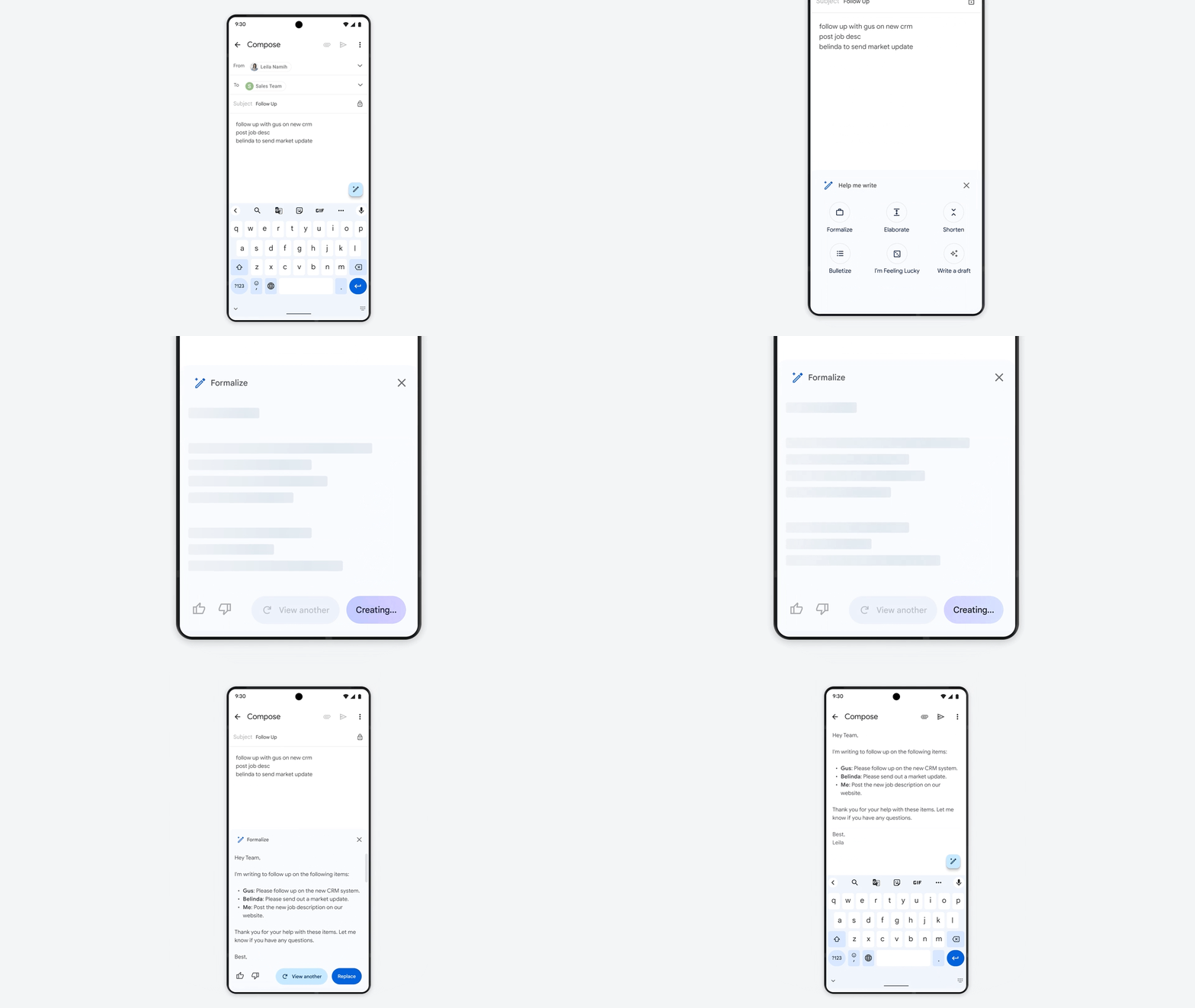
In a Workspace blog post released today, Google announced that it would soon be rolling out a new writing assistant tool for Google Docs and Gmail called “Help me write.” The tool will use ChatGPT or Canva Magic Write-style generative AI to help users draft job summaries, reply to emails in a more professional manner, brainstorm ideas, proofread, write, and rewrite text, and even inject media into their content from around the web among other things.
As we’ve experimented with generative AI ourselves, one thing is clear: AI is no replacement for the ingenuity, creativity, and smarts of real people. Sometimes the AI gets things wrong, sometimes it delights you with something offbeat, and oftentimes it requires guidance. With all this in mind, we’re designing our products in accordance with Google’s AI Principles that keep the user in control, letting AI make suggestions that you’re able to accept, edit, and change. We’ll also deliver the corresponding administrative controls so that IT is able to set the right policies for their organization.
Google Workspace Blog
The idea behind these tools is not at all to replace the writer’s creative vision or personal touch, but instead to help them get started with their writing and find the right style or voice. Simply by jotting down a few bullet points and clicking the “Help me write” or “I’m feeling lucky” buttons, users can quickly and automagically flesh out a summary with full sentences.
Google has been careful to set itself apart from tools like ChatGPT and Bing AI by emphasizing responsible scaling of its AI efforts over time. Instead of hap-hazardously releasing all of its tools at once, the company is taking a cautious approach and partnering with others to improve its AI models, ensuring they are safe and helpful for everyone. I suppose we’ll see how set apart they are in due time. For now, it looks like they’re releasing after everyone else in the industry but implementing AI more thoughtfully toward the user’s experience, which is a great sign.
The introduction of generative AI into Google Docs and Gmail is just the beginning of what is already a rapidly evolving landscape of AI-powered tools in big tech. These tools have the potential to save users a great deal of time and effort, allowing them to focus on the creative aspects of their work. As Google continues to consider this wild, new future, we can expect to see even more exciting and innovative tools designed to help users create, connect, and collaborate like never before.
SUBSCRIBE TO UPSTREAM
Get Chrome Unboxed delivered straight to your inbox
Upstream is our flagship, curated newsletter with the top stories, most click-worthy deals, giveaways, and trending articles from Chrome Unboxed sent directly to your inbox a few times a week. Join 31,000+ subscribers.

