

• Skip to main content
  • Skip to primary sidebar
  • Deals
  • Features
  • Guides
  • Chromebooks
  • Videos
  • Podcast
  • More +
    • Reviews
    • Unboxing
    • Upcoming Devices
    • Chromebook Plus
    • Chrome
    • ChromeOS
    • Chrome OS Flex
  • Search
  • Sign Up
  • Log In
Chrome Unboxed – The Latest Chrome OS News

Chrome Unboxed - The Latest Chrome OS News

A Space for All Things Chrome, Google, and More!

  • Deals
  • Features
  • Guides
  • Chromebooks
  • Videos
  • Podcast
  • More +
    • Reviews
    • Unboxing
    • Upcoming Devices
    • Chromebook Plus
    • Chrome
    • ChromeOS
    • Chrome OS Flex
  • Search
  • Sign Up
  • Log In

Google Vids just unlocked its best AI features for everyone: even personal accounts

November 19, 2025 By Robby Payne View Comments

Support our independent tech coverage. Chrome Unboxed is written by real people, for real people—not search algorithms. Join Chrome Unboxed Plus for just $2 a month to get an ad-free experience, access to our private Discord, and more. Learn more about membership here.
START FREE TRIAL (MONTHLY)START FREE TRIAL (ANNUAL)

When Google Vids first launched, it promised to be the “Docs, Sheets, and Slides” of video creation—a collaborative, easy-to-use tool that lived right in your browser. But for a while, the coolest magic tricks—specifically the powerful Gemini AI features—were locked behind paid Workspace subscriptions. That is all changing now.

Google announced that it is officially expanding access to Gemini in Google Vids to anyone with a personal Gmail account. This means the powerful AI tools that help you build, polish, and edit videos are no longer exclusive to enterprise users.
Xremove ads

According to the announcement, free users now get access to a suite of features that honestly make video editing feel like cheating:

  • “Help me create”: You can use Gemini to turn a simple prompt or idea into a full video outline or storyboard.
  • AI Voiceovers: If you hate recording your own voice, you can choose from preset professional AI voices to narrate your video.
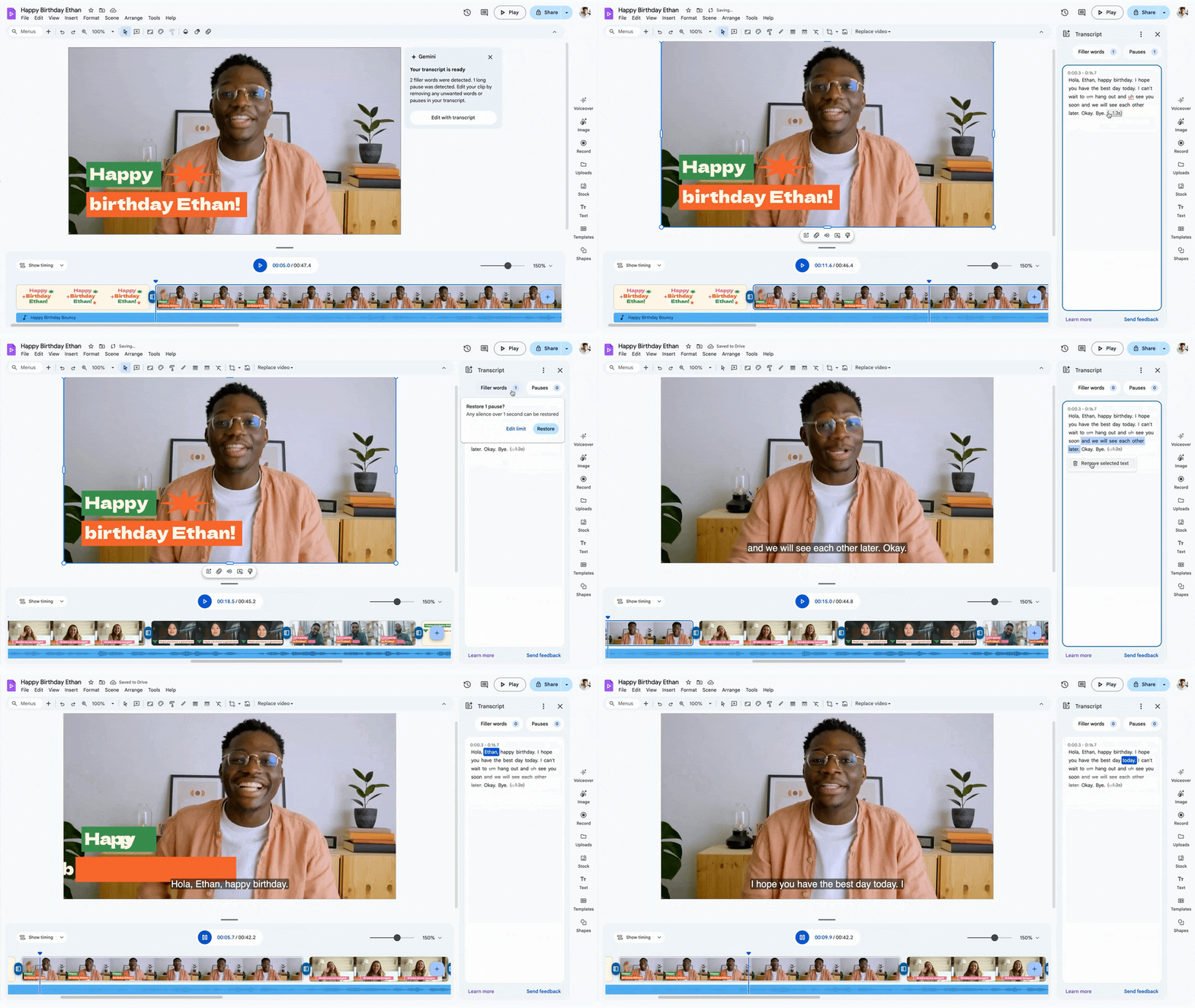
  • Transcript Trimming: Instead of scrubbing through a timeline to cut out silence or “ums” and “ahs,” you just edit the text transcript, and Vids edits the video for you.
  • AI Image Generation: Need a specific visual to make a slide pop? You can generate images directly within the editor.

Who it’s for

Google frames this as a tool for everything from “vacation highlight reels” to “promotional shorts for your side hustle.” And that’s the beauty of it. Video editing has traditionally had a massive learning curve. By bringing these features to personal accounts, Google is trying to make video creation as ubiquitous and simple as making a slide deck.

Featured Videos

Xremove ads

Is there a catch?

While the features are free, it’s worth noting that Google typically uses a “credit” system for these generative AI tools on personal accounts. While the blog post didn’t explicitly detail the cap, personal accounts usually get a set monthly allowance of 100 credits for these high-demand AI tasks. So, while it’s free, you’ll still want to use your credits wisely.

To help new users hit the ground running, Google has also launched a “Vids on Vids” instructional series on YouTube. If you’ve been waiting to try this out, head over to Google Vids and sign in with your personal account. The playground is wide open.

SUBSCRIBE TO UPSTREAM

Get Chrome Unboxed delivered straight to your inbox

Upstream is our flagship, curated newsletter with the top stories, most click-worthy deals, giveaways, and trending articles from Chrome Unboxed sent directly to your inbox a few times a week. Join 31,000+ subscribers.

Xremove ads
SUBSCRIBE HERE!

Filed Under: AI, Gemini, New & Upcoming Features, News

About Robby Payne

As the founder of Chrome Unboxed, Robby has been reviewing Chromebooks for over a decade. His passion for ChromeOS and the devices it runs on drives his relentless pursuit to find the best Chromebooks, best services, and best tips for those looking to adopt ChromeOS and those who've already made the switch.

Primary Sidebar

Googlebook

Your Android phone might soon double as a wireless mouse for Googlebook

By Robby Payne
September 5, 2026

Google’s John Solomon explains why Googlebook is Google’s next Chromebook moment

By Robby Payne
September 4, 2026

Googlebook is designed for AI, but that’s not why I’m excited for it

By Robby Payne
September 3, 2026

Leaked Googlebook ‘Look up’ app appears on the Play Store ahead of launch

By Robby Payne
September 2, 2026

Acer teases its first Googlebook at IFA ahead of Google’s press event

By Robby Payne
September 2, 2026

More Googlebook

Xremove ads

Deals

The best Chromebook deals today

By Robby Payne
September 2, 2026

The best Chromebook ever made is $350 off at Best Buy right now

By Robby Payne
August 21, 2026

The excellent, powerful Acer Chromebook Plus Spin 514 is $150 off right now

By Robby Payne
August 12, 2026

Acer’s new Chromebook 315 is wildly affordable and points to the real future of Chromebooks

By Robby Payne
August 11, 2026

You can score the massively upgraded ASUS CX54 Chromebook Plus for just $599 right now

By Joseph Humphrey
July 28, 2026

More Deals

Xremove ads

Reviews

Acer Chromebook Plus Spin 514 Review: the best convertible you can buy [VIDEO]

By Robby Payne
July 1, 2026

Lenovo Chromebook Plus 2-in-1 Review: pretty great in a vacuum

By Robby Payne
April 23, 2026

My review after 6 weeks with the Lenovo Chromebook Plus 14 [VIDEO]

By Robby Payne
August 11, 2025

One week with the best small Android tablet you can buy, and I’m sold

By Robby Payne
May 9, 2025

Best Chromebooks of 2024 [VIDEO]

By Robby Payne
November 28, 2024

More Reviews

Xremove ads

TWITTER · FACEBOOK · INSTAGRAM · YOUTUBE · EMAIL · ABOUT

Copyright © 2026 · Chrome Unboxed · Chrome is a registered trademark of Google Inc.
We are participants in various affiliate advertising programs designed to provide a means for us to earn fees by linking to affiliated sites.

PRIVACY POLICY