

Support our independent tech coverage. Chrome Unboxed is written by real people, for real people—not search algorithms. Join Chrome Unboxed Plus for just $2 a month to get an ad-free experience, access to our private Discord, and more. Learn more about membership here.
START FREE TRIAL (MONTHLY)START FREE TRIAL (ANNUAL)
The steady drumbeat of useful AI features rolling out to Google Workspace continues, and the latest additions are bringing some seriously powerful creative tools directly into Google Slides and Google Vids.
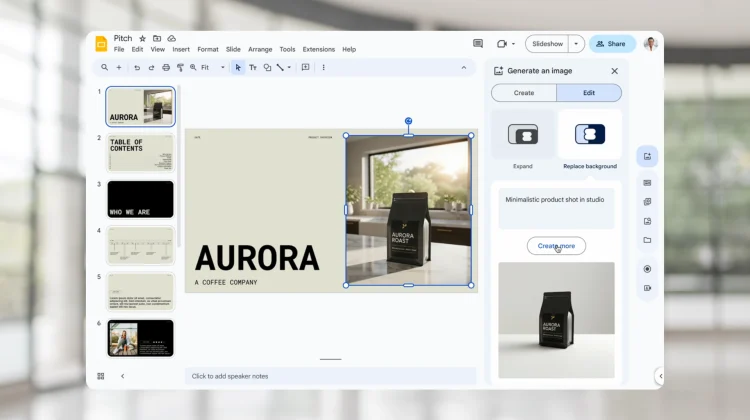
Building on the existing generative image capabilities, Google is now introducing two new AI image editing features: Replace background and Expand image background. These tools are designed to help those without professional design skills create more polished, flexible, and professional-looking presentations and videos.
Replace any background with a simple text prompt
This first feature is a massive upgrade to the existing “remove background” tool. Now, instead of just isolating an object on a plain white background, you can replace the original background with a brand-new, AI-generated scene using a simple text prompt.

For example, you can take a standard product photo of a chair and instantly place it in a variety of realistic settings like a “modern living room” or a “cozy café” to help customers visualize it. It’s also perfect for creating professional “Meet the Team” slides by taking individual headshots and replacing all the distracting backgrounds with a clean, unified one.
Intelligently expand and reframe your images
The second new feature is an intelligent background expansion tool. Think of it as a generative “un-crop.” If you have a great image that’s the wrong aspect ratio for your slide—say, a vertical photo when you need a horizontal one—this tool can seamlessly expand the background to fit the new frame without distorting or compromising the quality of the main subject.

You simply select your image, choose your desired aspect ratio, and Gemini will generate different options for you to preview and insert into your presentation. It’s an incredibly useful tool for making your existing images more flexible and impactful.
How to get it
To access these new features, you can either right-click on an image and select “Edit image” or use the “Generate an image” icon in the Vids or Slides sidebar. The rollout for most users (Scheduled Release domains) began on August 14, 2025. This feature is available to most paid Google Workspace customers, including:
- Business Standard and Plus
- Enterprise Standard and Plus
- Customers with the Gemini Education or Gemini Education Premium add-on
- Google AI Pro and Ultra subscribers
SUBSCRIBE TO UPSTREAM
Get Chrome Unboxed delivered straight to your inbox
Upstream is our flagship, curated newsletter with the top stories, most click-worthy deals, giveaways, and trending articles from Chrome Unboxed sent directly to your inbox a few times a week. Join 31,000+ subscribers.

