
• Skip to main content
  • Skip to primary sidebar
  • Deals
  • Features
  • Guides
  • Chromebooks
  • Videos
  • Podcast
  • More +
    • Reviews
    • Unboxing
    • Upcoming Devices
    • Chromebook Plus
    • Chrome
    • ChromeOS
    • Chrome OS Flex
  • Search
  • Sign Up
  • Log In
Chrome Unboxed – The Latest Chrome OS News

Chrome Unboxed - The Latest Chrome OS News

A Space for All Things Chrome, Google, and More!

  • Deals
  • Features
  • Guides
  • Chromebooks
  • Videos
  • Podcast
  • More +
    • Reviews
    • Unboxing
    • Upcoming Devices
    • Chromebook Plus
    • Chrome
    • ChromeOS
    • Chrome OS Flex
  • Search
  • Sign Up
  • Log In

Google Search dark theme testing black-out look

February 22, 2022 By Johanna Romero View Comments

Support our independent tech coverage. Chrome Unboxed is written by real people, for real people—not search algorithms. Join Chrome Unboxed Plus for just $2 a month to get an ad-free experience, access to our private Discord, and more. Learn more about membership here.
START FREE TRIAL (MONTHLY)START FREE TRIAL (ANNUAL)

Google Search’s dark theme first appeared in the form of an A/B test on some users’ desktop screens towards the end of 2020. After about a year of testing, a wider rollout began prompting users with the option to turn on “Dark theme” at the top of a web result. This dark theme changed your Google Search page into a gray background with the necessary color changes to subsequent links and text elements.

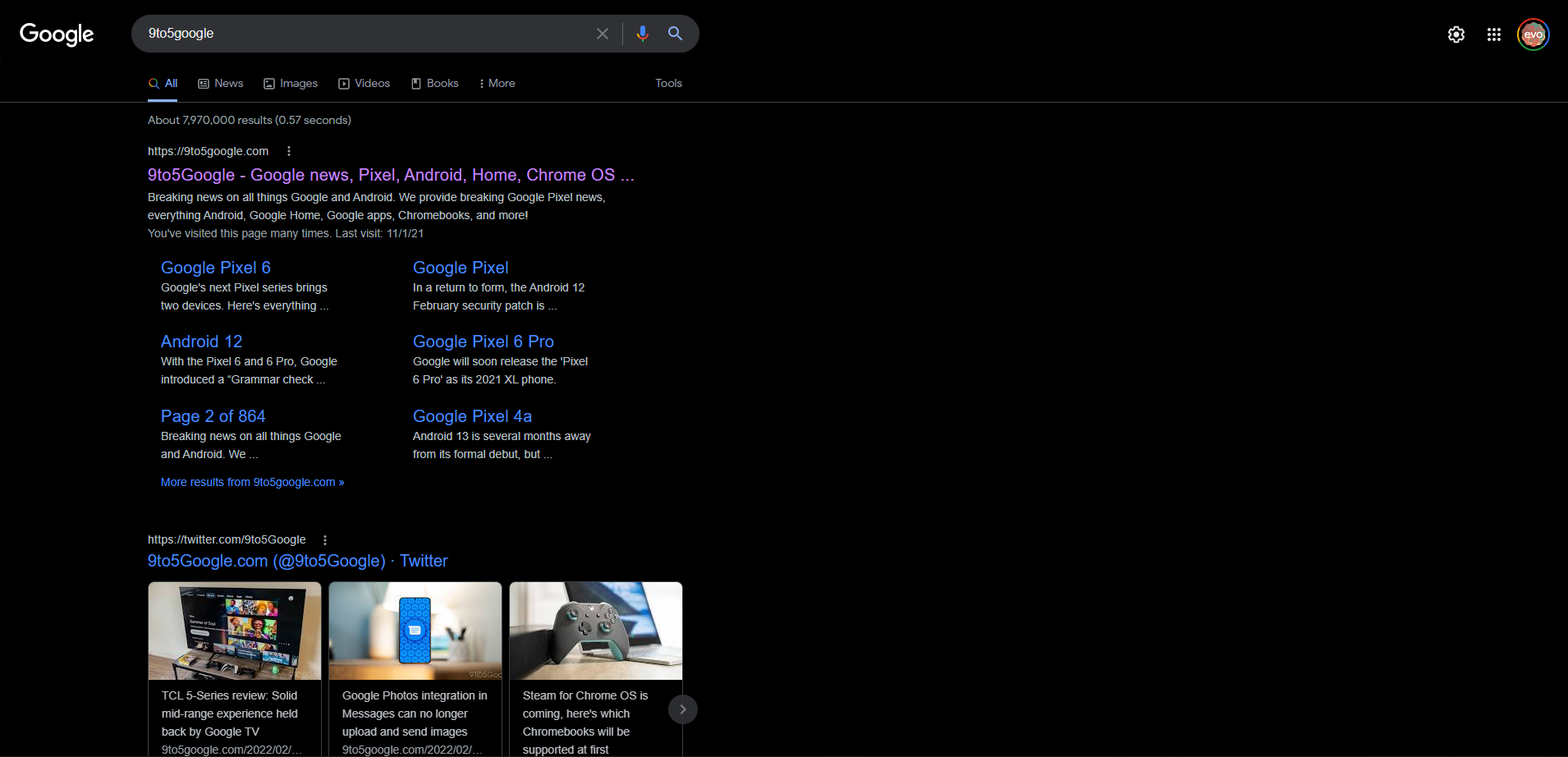
It appears that Google is once again doing another A/B test. This time turning its dark theme into a more “black-out” look, switching the background of Search result pages to a true black #000000. This test seems to only be appearing for a select few and only for the search result page, while the google.com homepage remains unchanged.

Xremove ads

You may check if you are part of this A/B test by turning on “Dark theme” from the Google Search page settings – which you can access from the top right cogwheel – then selecting “Dark theme” under Appearance. If you are one of the chosen few, you should start seeing your search results with a completely muted black background, as opposed to the light to dark gray you’d see on the Google homepage.
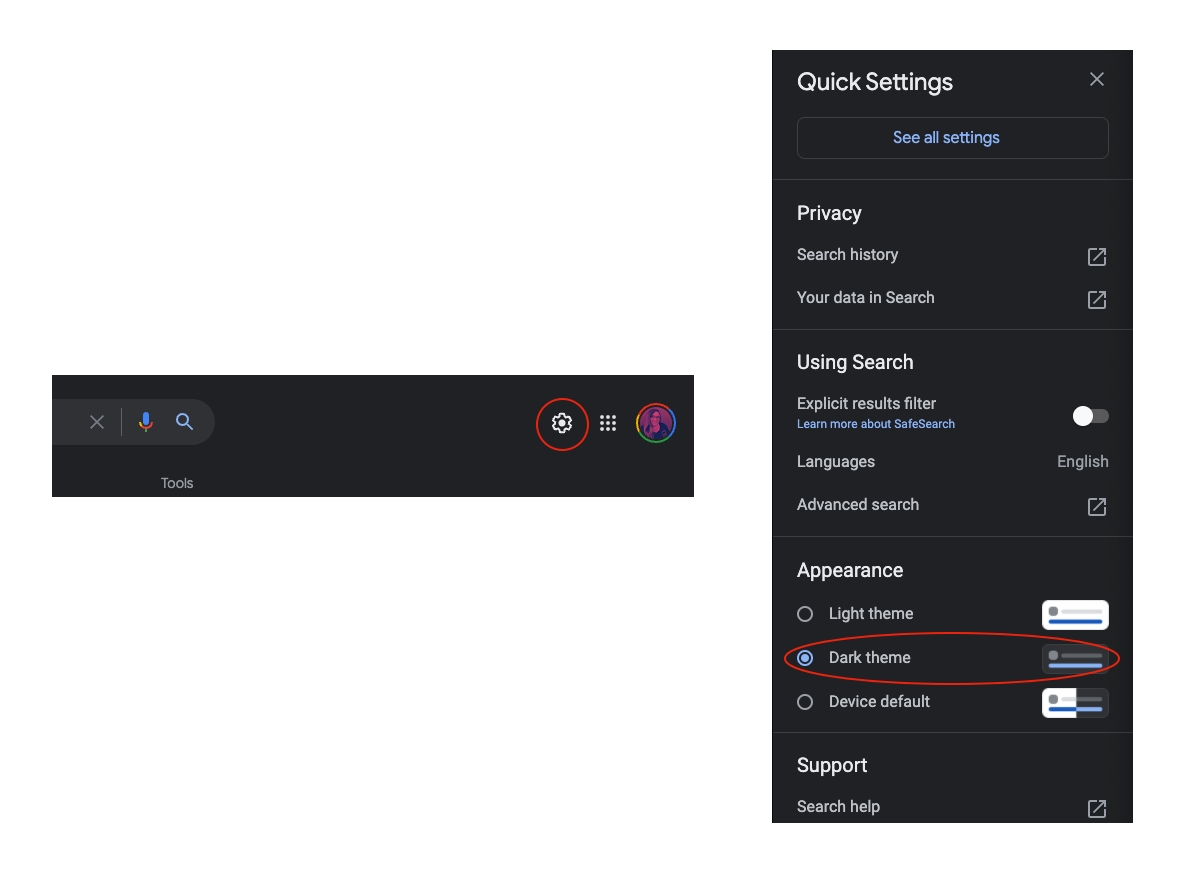
Turning on “Dark theme” from Google Search settings

I have yet to see the fully blacked-out look on my Google Search page unless I resort to a third-party extension such as Dark Reader. However, from what I’ve seen in screenshots posted by those who have it, it will be my preference if given the choice.
Featured Videos

Xremove ads
#000000 Dark Theme as seen by those chosen for the A/B test
Source: 9to5Google

It will be interesting to see what Google does with the results of this test and if it decides to either let us opt between a light, dark, or “darkest” theme, or completely overhaul “Dark theme” to match a more black-out look. Regardless of which direction Google decides to go in, my eyes will thank them for any shade of dark mode that can be implemented throughout the Chrome or Chrome OS interface. Let’s hope we get to find out soon.

Source: 9to5Google

SUBSCRIBE TO UPSTREAM

Get Chrome Unboxed delivered straight to your inbox

Upstream is our flagship, curated newsletter with the top stories, most click-worthy deals, giveaways, and trending articles from Chrome Unboxed sent directly to your inbox a few times a week. Join 31,000+ subscribers.

Xremove ads
SUBSCRIBE HERE!

Filed Under: Chrome, ChromeOS, Google Search, New & Upcoming Features Tagged With: chrome, dark theme, google search

Primary Sidebar

Xremove ads

Deals

The best Chromebook deals today

By Robby Payne
April 20, 2026

Deal Alert: the excellent Lenovo Chromebook Plus 2-in-1 returns to $429

By Robby Payne
April 20, 2026

Lenovo Legion Tab Gen 3 drops to $399, ahead of the much pricier Gen 5 release

By Joseph Humphrey
April 18, 2026

How to get 50% off YouTube Premium for a full year with Google One

By Robby Payne
April 16, 2026

The Pixel 10a just dropped to $449, but here’s why you should buy the Pixel 10 instead

By Joseph Humphrey
April 13, 2026

More Deals

Xremove ads

Reviews

Acer Chromebook Plus Spin 514 Review: Kompanio Ultra power in a convertible

By Robby Payne
December 24, 2025

My review after 6 weeks with the Lenovo Chromebook Plus 14 [VIDEO]

By Robby Payne
August 11, 2025

One week with the best small Android tablet you can buy, and I’m sold

By Robby Payne
May 9, 2025

Best Chromebooks of 2024 [VIDEO]

By Robby Payne
November 28, 2024

Samsung Galaxy Chromebook Plus Review: Samsung is back! [VIDEO]

By Robby Payne
October 28, 2024

More Reviews

Xremove ads

Guides

This Chromebook trackpad shortcut is definitely not new, but is blowing my mind

By Robby Payne
March 11, 2024

How to reduce broadcast delay on YouTube TV to stop live spoilers

By Robby Payne
December 8, 2023

Windows PC keyboard and Chromebook

How to use a Windows keyboard with a Chromebook

By Joseph Humphrey
December 8, 2023

How reset and revert your Chromebook to the previous version of Chrome OS

By Robby Payne
November 29, 2023

My Chromebook Plus features disappeared: here’s how I fixed it

By Robby Payne
November 24, 2023

More Guides

TWITTER · FACEBOOK · INSTAGRAM · YOUTUBE · EMAIL · ABOUT

Copyright © 2026 · Chrome Unboxed · Chrome is a registered trademark of Google Inc.
We are participants in various affiliate advertising programs designed to provide a means for us to earn fees by linking to affiliated sites.

PRIVACY POLICY