


Support our independent tech coverage. Chrome Unboxed is written by real people, for real people—not search algorithms. Join Chrome Unboxed Plus for just $2 a month to get an ad-free experience, access to our private Discord, and more. Learn more about membership here.
START FREE TRIAL (MONTHLY)START FREE TRIAL (ANNUAL)
I’ve been very vocal about the fact that the Google Play Store’s ‘Wishlist’ feature has become a mess of books, movies, games and apps that users will likely never dig through after adding them again. The problem is two fold. First, Google does virtually nothing to remind you of what’s on your list through Store carousels or reminders (aside from the occasional email that tells you when something on that list drops in price)
Second, there have historically been no filters for each type of content saved to the wishlist, making it virtually impossible to sort through and choose something based on your needs. With the 10th anniversary redesign of the Play Store though, the wishlist did receive a smart chip filter system for books, movies, games, and apps! I hadn’t reported on it until now, but with today’s news, it’s all starting to make more sense.
I opened Google Play Books this morning and was met with a blue tutorial overlay for an icon that was added to the bottom navigation of the app. As you can see below, a “Wishlist” option has appeared in Books for Android, making it a one tap operation to see what you’ve saved for later!
Google TV has the ‘Stuff’ tab, and I imagine that Books will go the same route in time, but for now, this is a major improvement over having to look for the wishlist carousel that appears when it wants to and disappears from the app’s homescreen when Google decides it does.
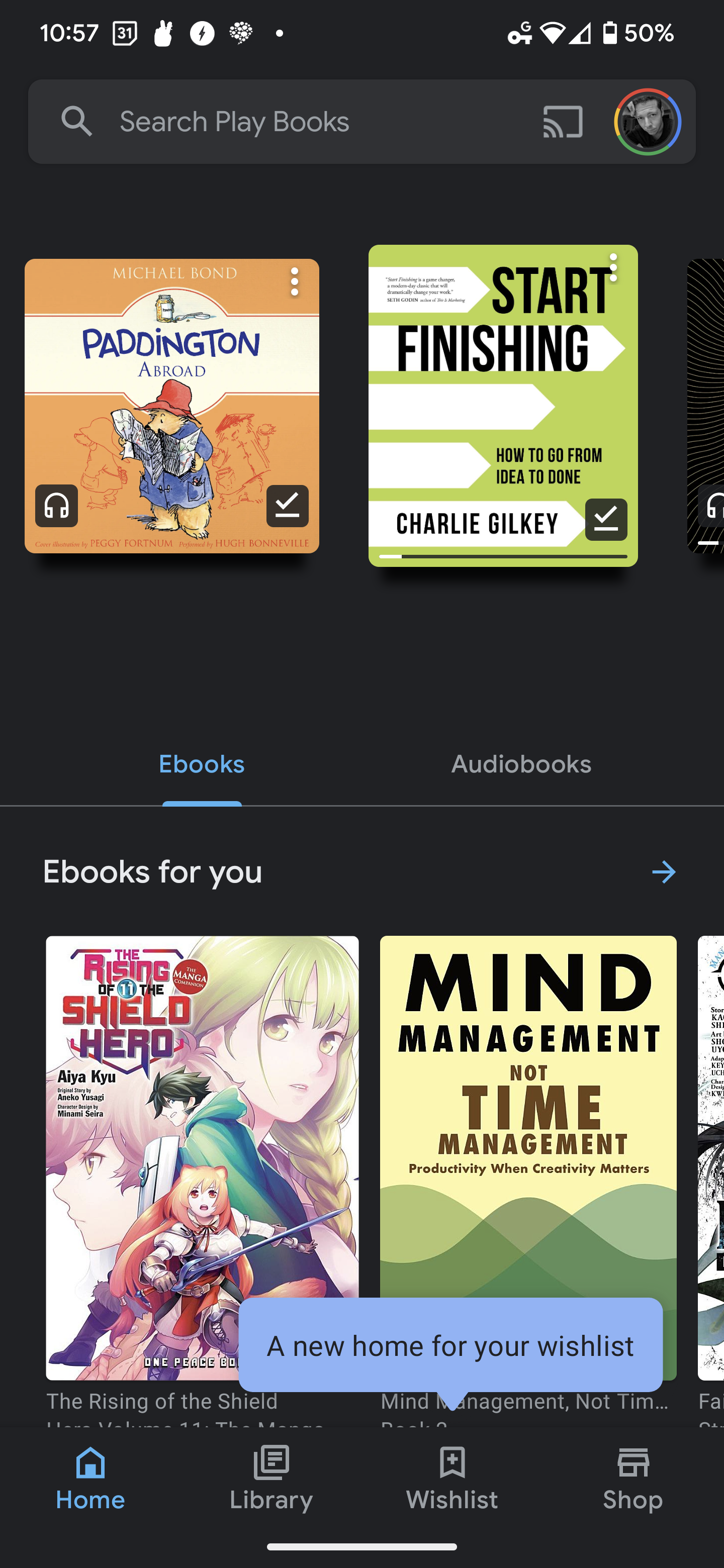
What does this mean for the future? Music already got removed from the Play Store back when Google Play Music converted into YouTube Music, and Google TV’s success has now determined that Movies and TV shows will be nixed from the store front as well. Google’s ideal setup is to place content where it’s most often consumed and that makes a lot of sense to me.
I believe that the new Wishlist option for the Google Play Books app means that we may see the company announce the removal of books, audiobooks and comics from the Play Store in the near future. Mark my words, we will likely see this occur, and in time, the Store will be for nothing but apps and games.
Looking much further ahead, I’m still entirely convinced that Google wants to kill of the ‘Play’ branding entirely, housing games only in the Games app and moving all standard apps to the Google Store. If this does happen, I’ll not only be very happy with my prediction, but we would also see a future where you visit the Google Store for the company’s hardware and software, similar to how Apple has constructed its ecosystem over the years.
In the meantime, you can find all of your wishlisted books, audiobooks and comics in the Google Play Books app via the new bottom navigation item once you receive the update. Let me know in the comments if this appeals to you, or if you’re one of the people reading this who never visit books in the Play Store and are happy for their potential removal.
SUBSCRIBE TO UPSTREAM
Get Chrome Unboxed delivered straight to your inbox
Upstream is our flagship, curated newsletter with the top stories, most click-worthy deals, giveaways, and trending articles from Chrome Unboxed sent directly to your inbox a few times a week. Join 31,000+ subscribers.

