

Support our independent tech coverage. Chrome Unboxed is written by real people, for real people—not search algorithms. Join Chrome Unboxed Plus for just $2 a month to get an ad-free experience, access to our private Discord, and more. Learn more about membership here.
START FREE TRIAL (MONTHLY)START FREE TRIAL (ANNUAL)
It’s only been a few weeks since we discussed that Google Messages had begun to roll out its ‘Conversation Categories’ feature to more users, especially in the United States. Previously, it along with other features were exclusive to India, and a huge air of mystery surrounded the release timetable of these new and exciting tools. Message reactions were also taking their time to show up for most users, along with the ability to automate the deletion of OTP codes.
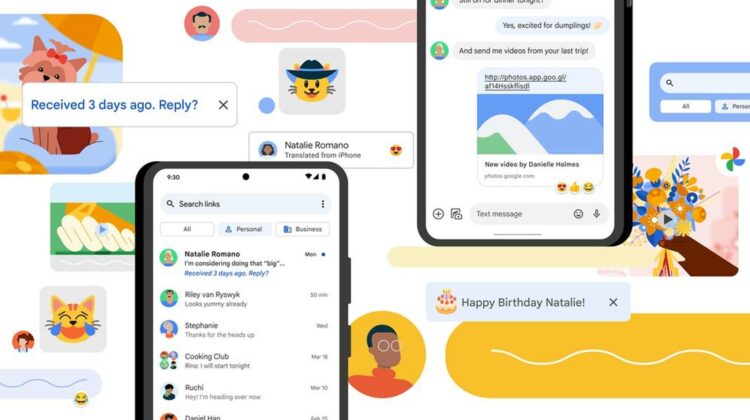
This morning, however, Google shared on its official blog that many of these features would be really and truly rolling out to all users over the “coming weeks”. That’s right, the wait is finally (almost) over! The first feature you can expect to see soon is the ability to press and hold messages sent from your iPhone friends to add reaction emoji that they will see. Anyone with a device set to English (additional languages coming soon) will now be able to erase the barrier between their green bubble and blue bubble friends.
Next, Google Photos will now be in charge of photos and videos sent through Google Messages. This ensures that their quality is preserved across devices and operating systems. Have you ever sent a video from your Pixel or another Android phone to your significant other who undoubtedly has an iPhone (at least in my home)? I have and let me tell you, it’s blurry as all get out. Not only that but there’s a thick, black border around all sides of the video. This will now be resolved through direct connection and sending with Google Photos as an automated process within Messages. Both Android and iOS users value and use Google Photos, so that common ground is now being leveraged to give everyone a better experience regardless of their hardware.
Your Messages inbox will now be much more organized with the long-awaited ‘Conversation Categories’ feature we discussed above (along with nudges). I’ve been covering this quite a bit over the past year, and it’s finally coming (for real this time)! At the top of your inbox, you’ll see an “All” smart chip for all messages, followed by filter chips for “Personal” and “Business”. Your contacts will be in “Personal”, while One Time Password codes (OTPs), as well as other business messages from airlines, Uber, Door Dash, and more will populate that “Business” tab.
I was just about to cover this one when the official announcement dropped – if it’s your contact’s birthday, Messages will display a “Happy Birthday!” banner at the top of your conversation with them. From there, you can use that reminder to send them a sweet message using Gboard’s new Emoji Kitchen catalog of over 2,000 new emoji stickers.
Whether you’re new to Google Messages because Verizon recently began using it as its native SMS and RCS application, or if you’ve been using it for years, I think you’ll agree that these additions are more than welcome and make Google’s app even more modern than it was before. Messages have always been rather utilitarian, and it’s refreshing to see innovative features that already exist in many other messaging apps come to the most popular way to communicate with others.
SUBSCRIBE TO UPSTREAM
Get Chrome Unboxed delivered straight to your inbox
Upstream is our flagship, curated newsletter with the top stories, most click-worthy deals, giveaways, and trending articles from Chrome Unboxed sent directly to your inbox a few times a week. Join 31,000+ subscribers.

