

• Skip to main content
  • Skip to primary sidebar
  • Deals
  • Features
  • Guides
  • Chromebooks
  • Videos
  • Podcast
  • More +
    • Reviews
    • Unboxing
    • Upcoming Devices
    • Chromebook Plus
    • Chrome
    • ChromeOS
    • Chrome OS Flex
  • Search
  • Sign Up
  • Log In
Chrome Unboxed – The Latest Chrome OS News

Chrome Unboxed - The Latest Chrome OS News

A Space for All Things Chrome, Google, and More!

  • Deals
  • Features
  • Guides
  • Chromebooks
  • Videos
  • Podcast
  • More +
    • Reviews
    • Unboxing
    • Upcoming Devices
    • Chromebook Plus
    • Chrome
    • ChromeOS
    • Chrome OS Flex
  • Search
  • Sign Up
  • Log In

Google is officially rolling out native vertical tabs to the stable version of Chrome

April 8, 2026 By Joseph Humphrey View Comments

Support our independent tech coverage. Chrome Unboxed is written by real people, for real people—not search algorithms. Join Chrome Unboxed Plus for just $2 a month to get an ad-free experience, access to our private Discord, and more. Learn more about membership here.
START FREE TRIAL (MONTHLY)START FREE TRIAL (ANNUAL)

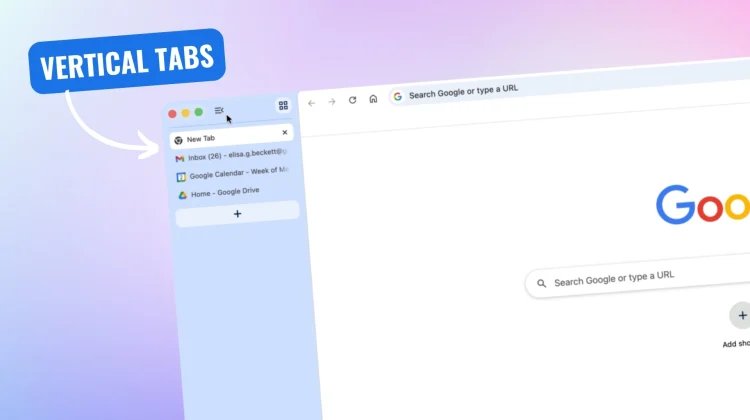
A few months ago, we reported that Google was finally testing one of the most-requested features in the Canary channel: vertical tabs. Well, today is the day we have all been waiting for—Google is officially rolling out native vertical tabs to the stable version of Chrome.

The implementation is incredibly simple. You don’t have to dig through hidden flags or install third-party extensions anymore. To turn it on, all you have to do is right-click on any Chrome window and select “Show Tabs Vertically.” Then your horizontal tab strip disappears, and your tabs instantly stack down the left side of your screen.

Xremove ads

Reclaiming your screen real estate

This is so much more than just a minor UI tweak; it is a big productivity shift. Because virtually all modern monitors and laptop displays are widescreen, horizontal space is abundant, while vertical space is precious. Meanwhile, the websites and web apps we use every day are practically always vertical experiences. By moving your tabs to the side of your browser window, you reclaim that precious vertical height for your actual content.

It also solves the headache of having too many tabs open. If you open 20 tabs across the top of your screen, they shrink down until all you can see are tiny, confusing favicons. But with vertical tabs, you can easily read the full page titles and manage your tab groups, no matter how many windows you have open. You can even shrink the sidebar down to just favicons if you want a truly minimalist setup.

Xremove ads

Reading Mode gets a full-page upgrade

Vertical tabs aren’t the only thing getting an overhaul. Google is also rolling out an update to Chrome’s native Reading Mode. Previously, Reading Mode functioned primarily as a side panel.

Now, it has been upgraded to a completely immersive, full-page interface. When you right-click on a cluttered webpage and select “Open in reading mode,” Chrome will instantly strip away ads, images, and other visual distractions, transforming the site into a clean, text-focused reading experience.

These updates are a huge win for productivity and focus, and they finally bring Chrome into parity with some of the best features offered by competing browsers. Google says these two new features are beginning to roll out to the desktop version of Chrome starting today. If you haven’t seen them pop up just yet, ensure your browser is fully updated by going to Settings > About Chrome.

Xremove ads

Are you going to make the switch to vertical tabs, or are you sticking with the classic horizontal look? Let me know in the comments!

Filed Under: Chrome, News Tagged With: videos

About Joseph Humphrey

Joe has been a part of Chrome Unboxed since 2016 when he started helping Robby produce YouTube videos. Although normally behind the scenes, Joe has spent countless hours editing reviews and unboxings of many, many Chromebooks. Now a Partner in Unboxed Media, Joe is constantly thinking strategically about the Chromebook industry and how Chrome Unboxed can continue to innovate in the space.

Primary Sidebar

Googlebook

ASUS Googlebook CX9406 leak reveals early pricing, Core Ultra 5 and a 16GB RAM model

By Robby Payne
August 20, 2026

Googlebook leak reveals ‘Continue On’, Google’s built-in answer to Apple Handoff

By Robby Payne
August 19, 2026

Google makes it official: Googlebook press event set for September in NYC

By Robby Payne
August 18, 2026

Why I can still love Chromebooks and be thrilled for Googlebook’s future

By Robby Payne
August 18, 2026

Here’s a sneak peek at the new ‘Desktop Camera’ app for Googlebook

By Joseph Humphrey
August 17, 2026

More Googlebook

Xremove ads

Deals

The best Chromebook ever made is $350 off at Best Buy right now

By Robby Payne
August 21, 2026

The best Chromebook deals today

By Robby Payne
August 17, 2026

The excellent, powerful Acer Chromebook Plus Spin 514 is $150 off right now

By Robby Payne
August 12, 2026

Acer’s new Chromebook 315 is wildly affordable and points to the real future of Chromebooks

By Robby Payne
August 11, 2026

You can score the massively upgraded ASUS CX54 Chromebook Plus for just $599 right now

By Joseph Humphrey
July 28, 2026

More Deals

Xremove ads

Reviews

Acer Chromebook Plus Spin 514 Review: the best convertible you can buy [VIDEO]

By Robby Payne
July 1, 2026

Lenovo Chromebook Plus 2-in-1 Review: pretty great in a vacuum

By Robby Payne
April 23, 2026

My review after 6 weeks with the Lenovo Chromebook Plus 14 [VIDEO]

By Robby Payne
August 11, 2025

One week with the best small Android tablet you can buy, and I’m sold

By Robby Payne
May 9, 2025

Best Chromebooks of 2024 [VIDEO]

By Robby Payne
November 28, 2024

More Reviews

Xremove ads

TWITTER · FACEBOOK · INSTAGRAM · YOUTUBE · EMAIL · ABOUT

Copyright © 2026 · Chrome Unboxed · Chrome is a registered trademark of Google Inc.
We are participants in various affiliate advertising programs designed to provide a means for us to earn fees by linking to affiliated sites.

PRIVACY POLICY