

• Skip to main content
  • Skip to primary sidebar
  • Deals
  • Features
  • Guides
  • Chromebooks
  • Videos
  • Podcast
  • More +
    • Reviews
    • Unboxing
    • Upcoming Devices
    • Chromebook Plus
    • Chrome
    • ChromeOS
    • Chrome OS Flex
  • Search
  • Sign Up
  • Log In
Chrome Unboxed – The Latest Chrome OS News

Chrome Unboxed - The Latest Chrome OS News

A Space for All Things Chrome, Google, and More!

  • Deals
  • Features
  • Guides
  • Chromebooks
  • Videos
  • Podcast
  • More +
    • Reviews
    • Unboxing
    • Upcoming Devices
    • Chromebook Plus
    • Chrome
    • ChromeOS
    • Chrome OS Flex
  • Search
  • Sign Up
  • Log In

Google is eliminating a popular button on your Chromebook keyboard

October 2, 2024 By John R. Sowash View Comments

Support our independent tech coverage. Chrome Unboxed is written by real people, for real people—not search algorithms. Join Chrome Unboxed Plus for just $2 a month to get an ad-free experience, access to our private Discord, and more. Learn more about membership here.
START FREE TRIAL (MONTHLY)START FREE TRIAL (ANNUAL)

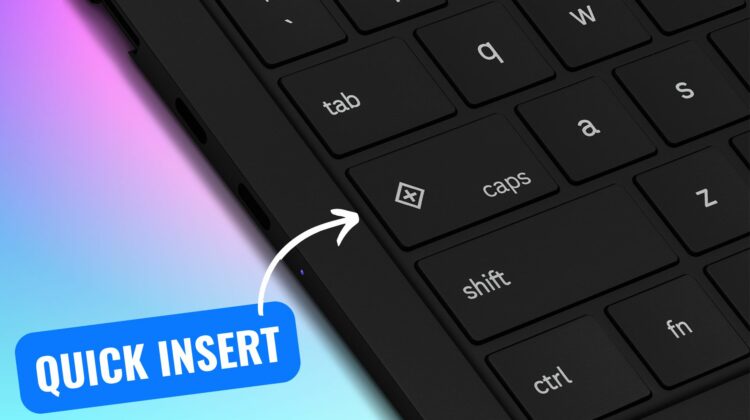
When I provide Chromebook training to teachers, one of my favorite jokes is asking my audience to locate the caps lock key on their Chromebook keyboard. Long-time Chromebook users will immediately realize the joke as Chromebooks feature a “search” key where the caps lock key is normally located.

Officially called the launcher button (or Search or Everything Button), this key has typically opened up the Chromebook app drawer. After more than 10 years, Google has decided to retire this unique key which Robby covered in his round up of Google’s fall ChromeOS updates.

Xremove ads

But don’t worry, we’re not returning to the days of TYPING IN ALL CAPS. Google is upgrading the search key to become the Quick Insert key. The Quick Insert key will expand what you can do on your Chromebook and will dynamically change based on what you are doing.

Here is what the Quick Insert key can do:

Featured Videos

Xremove ads
  • Insert emoji
  • Insert GIFS
  • Trigger “help me write” powered by Gemini*
  • Toggle caps lock
  • Insert a link from your browser history
  • Insert a date
  • Perform simple calculations and unit conversions

*only available on Chromebook Plus devices

The Samsung Galaxy Chromebook Plus is the first device that will feature the new insert key, but Google has shared that more new devices will include this update starting in 2025.

What about existing devices?

You don’t need to go out and buy a new Chromebook to test out the features of the insert key. Google has already added a new configuration that you can use to convert your existing launcher button to function like the insert button. You can either remap your launcher key to the new Quick Insert function or leave it as the Launcher + F shortcut Google has shipped with ChromeOS 129.

Xremove ads
Buy the Samsung Galaxy Chromebook Plus at Samsung

While change can be hard, I view this change as an upgrade, not an elimination. Dedicating an entire key to the app drawer seems a little excessive. Expanding the capabilities of this prime keyboard real estate makes a lot of sense. One Google executive even commented that the insert key has become as essential to him as the ability to copy and paste text. I’m eager to get my hands on the new Samsung Chromebook to give it a try.

SUBSCRIBE TO UPSTREAM

Get Chrome Unboxed delivered straight to your inbox

Upstream is our flagship, curated newsletter with the top stories, most click-worthy deals, giveaways, and trending articles from Chrome Unboxed sent directly to your inbox a few times a week. Join 31,000+ subscribers.

SUBSCRIBE HERE!

Filed Under: New & Upcoming Features, News

About John R. Sowash

John Sowash is an experienced classroom teacher, former school administrator and author of The Chromebook Classroom (2016). For more than a decade John has been supporting the use of Chromebooks and web-based tools in the classroom. You can connect with John via his blog or on X and Instagram.

Primary Sidebar

Xremove ads

Deals

The Pixel 10a just dropped to $449, but here’s why you should buy the Pixel 10 instead

By Joseph Humphrey
April 13, 2026

Save up to $200 on the two best Chromebooks on the market

By Robby Payne
April 13, 2026

The best Chromebook deals today

By Robby Payne
April 13, 2026

You can grab the battery-powered Nest Doorbell for just $129.99 right now

By Joseph Humphrey
April 11, 2026

Deal Alert: the excellent Lenovo Chromebook Plus 2-in-1 drops to $429

By Robby Payne
April 10, 2026

More Deals

Xremove ads

Reviews

Acer Chromebook Plus Spin 514 Review: Kompanio Ultra power in a convertible

By Robby Payne
December 24, 2025

My review after 6 weeks with the Lenovo Chromebook Plus 14 [VIDEO]

By Robby Payne
August 11, 2025

One week with the best small Android tablet you can buy, and I’m sold

By Robby Payne
May 9, 2025

Best Chromebooks of 2024 [VIDEO]

By Robby Payne
November 28, 2024

Samsung Galaxy Chromebook Plus Review: Samsung is back! [VIDEO]

By Robby Payne
October 28, 2024

More Reviews

Xremove ads

Guides

This Chromebook trackpad shortcut is definitely not new, but is blowing my mind

By Robby Payne
March 11, 2024

How to reduce broadcast delay on YouTube TV to stop live spoilers

By Robby Payne
December 8, 2023

Windows PC keyboard and Chromebook

How to use a Windows keyboard with a Chromebook

By Joseph Humphrey
December 8, 2023

How reset and revert your Chromebook to the previous version of Chrome OS

By Robby Payne
November 29, 2023

My Chromebook Plus features disappeared: here’s how I fixed it

By Robby Payne
November 24, 2023

More Guides

TWITTER · FACEBOOK · INSTAGRAM · YOUTUBE · EMAIL · ABOUT

Copyright © 2026 · Chrome Unboxed · Chrome is a registered trademark of Google Inc.
We are participants in various affiliate advertising programs designed to provide a means for us to earn fees by linking to affiliated sites.

PRIVACY POLICY